Just as we told you a while ago, this September 9, Apple is going to hold a keynote event at the Bill Graham Civic Auditorium in San Francisco. Naturally, when one of the leading companies in the business announces its plans to host an event of this caliber, it attracts lots of attention, and in the case of Apple this is truer than ever.
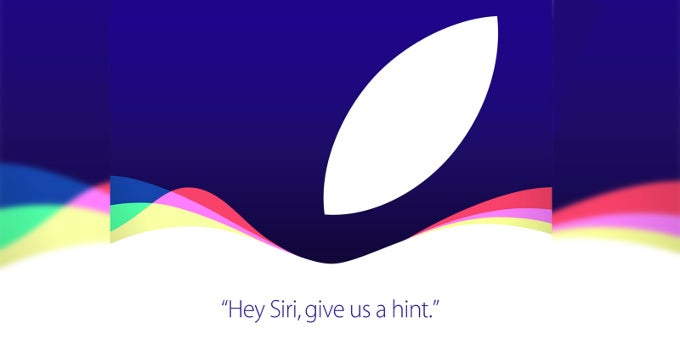
"Hey, Siri, give us a hint," says the tagline of the scheduled event, but we certainly need no hints whatsoever on what to expect, do we? As usual, Apple's September event will be all about iPhones, the final releases of iOS 9 and OS X El Capitan, and... One more thing, hopefully! Last year, this was the initial appearance of the Apple Watch; who knows, Apple might show the second generation of the wearable next week.
Naturally, the stars of the show will be the iPhone 6s and 6s Plus, improved versions of last year's bestselling iOS-powered smartphones. We seem to know what the highlights of the 6s and 6s Plus will be, but this doesn't mean we won't watch them get unveiled by Tim Cook and Craig Federighi on stage.
The keynote will kick off at 10:00 PDT | 11:00 MDT | 12:00 CDT | 13:00 EDT | 19:00 CET/CEST | 20:00 EET/EEST. Here's how to watch it live.
Recommended For You
How to watch the event on an Apple device
1. As usual, you will be able to stream the event on your iPhone, iPad, iPod Touch that run iOS 7.0 or later, a Mac with with Safari 6.0.5 or later on OS X v10.8.5 or later, or a second- or third-generation Apple TV with software 6.2 or later.
2. If you're rocking an iPhone, iPad, or an iPod Touch, you have to head to the App Store and grab the official Apple WWDC app. Thanks to it, you will be able to watch the event once it starts, as well as all previous Apple keynotes, including the announcement of the first iPhone from 2007.
3. If you're on a Mac or an Apple TV, you need to navigate to http://www.apple.com/live/ in your Safari browser, where you'll be able to stream the event. Of course, if you're not keen on getting the WWDC app, you can open the link on your iPhone or iPad's Safari browsers.
How to watch the event on a Windows 10 PC
1. For the first time, Apple is allowing Windows users to also stream the keynote. You will need a PC with Windows 10 and Microsoft Edge in order to watch the live stream. This is possible due to Microsoft's decision to rig the Edge browser with support for HTTP Live Streaming (HLS) technology.
1. If you're still swearing by an older version of Windows, like Win 8, 7, Vista or the archaic XP, you will have a harder time tuning in with Tim Cook & Co.
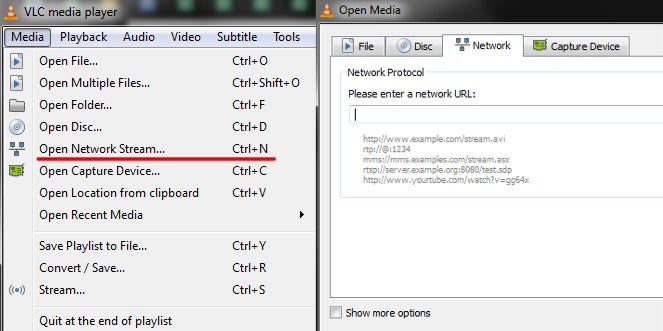
2. Although it's not certain it will work, you might try to use VLC Media Player's Network Streaming feature. Tap the Media menu on top, hit the Network tab, and paste the URL right below. That's the internal URL that Apple TV uses to stream keynotes and events. You can also hit the below link, save it, and open it with VLC.
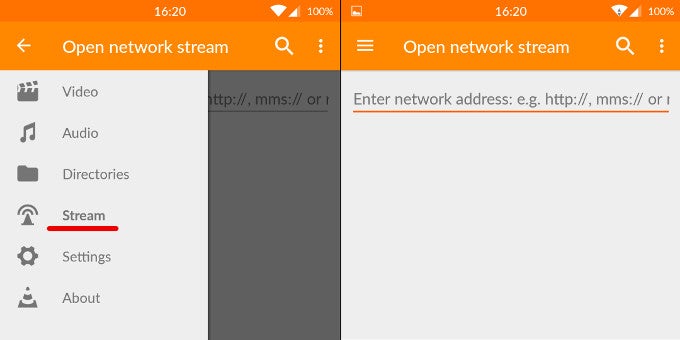
1. You can try getting the VLC app for Android, which also comes with a network streaming feature, and use it to open the URL link we provided above.
2. You can also try getting the Ustream app hoping that someone will be streaming the event in a borderline-legal way, of sorts.
Six-month unlimited plan is now 57% off
$90
$210
$120 off (57%)
Mint Mobile is now allowing you to get whichever plan you like for either three, six, or 12 months for just $15/mo. If you go for the six-month unlimited service, for instance, you'll now have to pay just $90 upfront instead of $210.
Peter is a skilled writer with over 13 years of experience at PhoneArena. He has published nearly 300 phone reviews and comparisons. This vast experience helps him navigate the mobile tech landscape with ease. He enjoys everything Android but relies on a MacBook Pro daily.
A discussion is a place, where people can voice their opinion, no matter if it
is positive, neutral or negative. However, when posting, one must stay true to the topic, and not just share some
random thoughts, which are not directly related to the matter.
Things that are NOT allowed:
Off-topic talk - you must stick to the subject of discussion
Offensive, hate speech - if you want to say something, say it politely
Spam/Advertisements - these posts are deleted
Multiple accounts - one person can have only one account
Impersonations and offensive nicknames - these accounts get banned
To help keep our community safe and free from spam, we apply temporary limits to newly created accounts:
New accounts created within the last 24 hours may experience restrictions on how frequently they can
post or comment.
These limits are in place as a precaution and will automatically lift.
Moderation is done by humans. We try to be as objective as possible and moderate with zero bias. If you think a
post should be moderated - please, report it.
Have a question about the rules or why you have been moderated/limited/banned? Please,
contact us.







Things that are NOT allowed:
To help keep our community safe and free from spam, we apply temporary limits to newly created accounts: