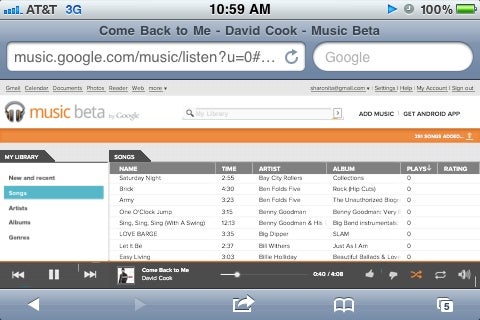
Google finally entered the realms of cloud-based music services after a beta version of Google Music along with a Google Music Android app were brought to life yesterday. Being a child of Google itself, the streaming audio service was announced to be optimized for Honeycomb tablets with smartphone versions of Android (2.2 Froyo and above) to support it as well, but it turns out there is a way to stream your uploaded songs to iOS devices without much difficulty.
Even though the web-based Google Music player is built using Adobe Flash technology, it seems like Mobile Safari is able to run it just fine. The first and most important thing that you need to do is to get yourself an invitation to a beta account, kind of like when Gmail launched back in 2004. After you do that, you should be able to upload your favorite tunes from your computer to Google's cloud. Once that is finished, open Mobile Safari and navigate to Google Music's home page where you will be able to log in using your Google account. That's it! As soon as you log in, the web-based Google Music player will show up and you will be able to use it even when Mobile Safari is minimized. Just remember to use two fingers when scrolling through the playlist, and that the audio controls in the iOS multitasking tray work too.
Recommended For You
Bear in mind that the web-based player lags a bit when navigating, but having it running to some extent is definitely better than not being able to use it at all. Feel free to give it a try and let us know how it works for you by dropping a comment for us below.
To request your Google Music from the service's home page - click here.
A discussion is a place, where people can voice their opinion, no matter if it
is positive, neutral or negative. However, when posting, one must stay true to the topic, and not just share some
random thoughts, which are not directly related to the matter.
Things that are NOT allowed:
Off-topic talk - you must stick to the subject of discussion
Offensive, hate speech - if you want to say something, say it politely
Spam/Advertisements - these posts are deleted
Multiple accounts - one person can have only one account
Impersonations and offensive nicknames - these accounts get banned
To help keep our community safe and free from spam, we apply temporary limits to newly created accounts:
New accounts created within the last 24 hours may experience restrictions on how frequently they can
post or comment.
These limits are in place as a precaution and will automatically lift.
Moderation is done by humans. We try to be as objective as possible and moderate with zero bias. If you think a
post should be moderated - please, report it.
Have a question about the rules or why you have been moderated/limited/banned? Please,
contact us.




 FCC OKs Cingular\'s purchase of AT&T Wireless
Things that are NOT allowed:
To help keep our community safe and free from spam, we apply temporary limits to newly created accounts: