YouTube bug that first appeared in April is still giving users headaches today
YouTube bug prevents Android users from finding specific parts of a video.


YouTube bug from April still causing headaches today. | Image by PhoneArena
The Android YouTube app has a bug that is negatively affecting the experience of streaming video on the platform. The bug impacts the bottom of the app when you're watching in full-screen mode (in landscape orientation) and causes the suggested video recommendations to cover the bottom of the display and more, blocking you from seeing some of the video you're watching.
"Suggested videos" bug covers up the bottom of the YouTube for Android display in landscape
The suggested videos will also cover up the progress bar preventing users from manually dragging the progress bar with their fingers back and forth until they reach a specific moment. This is a process called scrubbing. Considering that many YouTube users like to use scrubbing as a way they can find a specific scene or learn about certain information in a YouTube video, this bug is a major pain for YouTube users.
The watch timer and the progress bar are blocked from view
Additionally, those who use the timer on the screen to find specific scenes or parts of a video are also blocked from seeing it when in landscape. Again, that is due to the bug that causes the suggested videos to block the bottom of the display and the app.
This issue first appeared on social media last April
The sad part of this is that the issue first appeared on social media back in April when Redditor u/gingerbookwormlol posted a complaint that included an actual screenshot of the issue. Complaints have continued through today.
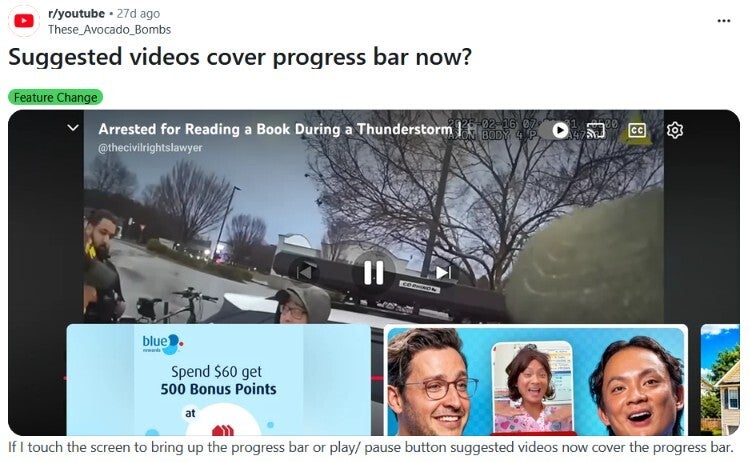
The suggested videos are blocking YouTube users on Android from seeing part of the screen, the watch timer, and the progress bar. | Image by Reddit
Here are some workarounds you can try
A similar complaint found on the YouTube community forum was posted nearly two weeks ago and a response from someone sounding suspiciously like a Googler passed along some suggestions:
- Open and close the YouTube app and make sure that you are running the latest update of the Android version of the app.
- Switch orientation of the YouTube app while a video is playing from landscape to portrait and back to landscape.
If none of these work, check to see if the issue occurs during certain kinds of videos. Instead of using the YouTube for Android app, you can use the mobile browser on your phone and go to the YouTube website to see if the issue occurs when using that platform.
You'd be surprised to see how many YouTube users complained about not being able to scrub videos on the platform. A Redditor did have a way to access the progress or the scrubber bar, although he says that this is not a fix.
To access the bar, even if it is covered up by the suggested videos bug, double-tap on the screen and then quickly tap the progress bar before it disappears. Keep your finger there until you can slide your finger. The YouTube user who suggested this said that it is not perfect, but it works. Other Reddit subscribers agreed, pointing out that following this will at least give you access to the bar, allowing you to scrub a video.
If none of the aforementioned suggestions work, you can report the issue by going to YouTube > Profile picture > Settings > Send feedback. Include a screenshot of the overlap so that YouTube gets a clear idea of the issue.
With the suggested videos bug continuing to make life difficult for YouTube users, hopefully Google can come up with a fix that will get rid of this issue permanently. It is surprising that an app as popular as YouTube has yet to receive an update even though the issue was first discovered last April. And let's face it, many of us navigate through a video by scrubbing.
Google needs to exterminate this bug now.
Here are some more great articles you can read right now:

Popular stories



Latest News




Things that are NOT allowed:
To help keep our community safe and free from spam, we apply temporary limits to newly created accounts: