Group-IB just published a report on an upgraded version of RedHook, an Android banking trojan that abuses wireless ADB, the same debugging tool that lets Galaxy S26 Ultra and Pixel 10 Pro owners tinker with their phones, to quietly grab shell-level access and drain victims' bank accounts. It first targeted Vietnam and has since spread into Indonesia.
RedHook just leveled up on Android
RedHook isn't new. Cyble first documented it in July 2025 as a fairly ordinary banking trojan that watched your screen and logged your keystrokes. Group-IB's newer analysis, published this month, found an updated version that can quietly turn on wireless ADB itself.
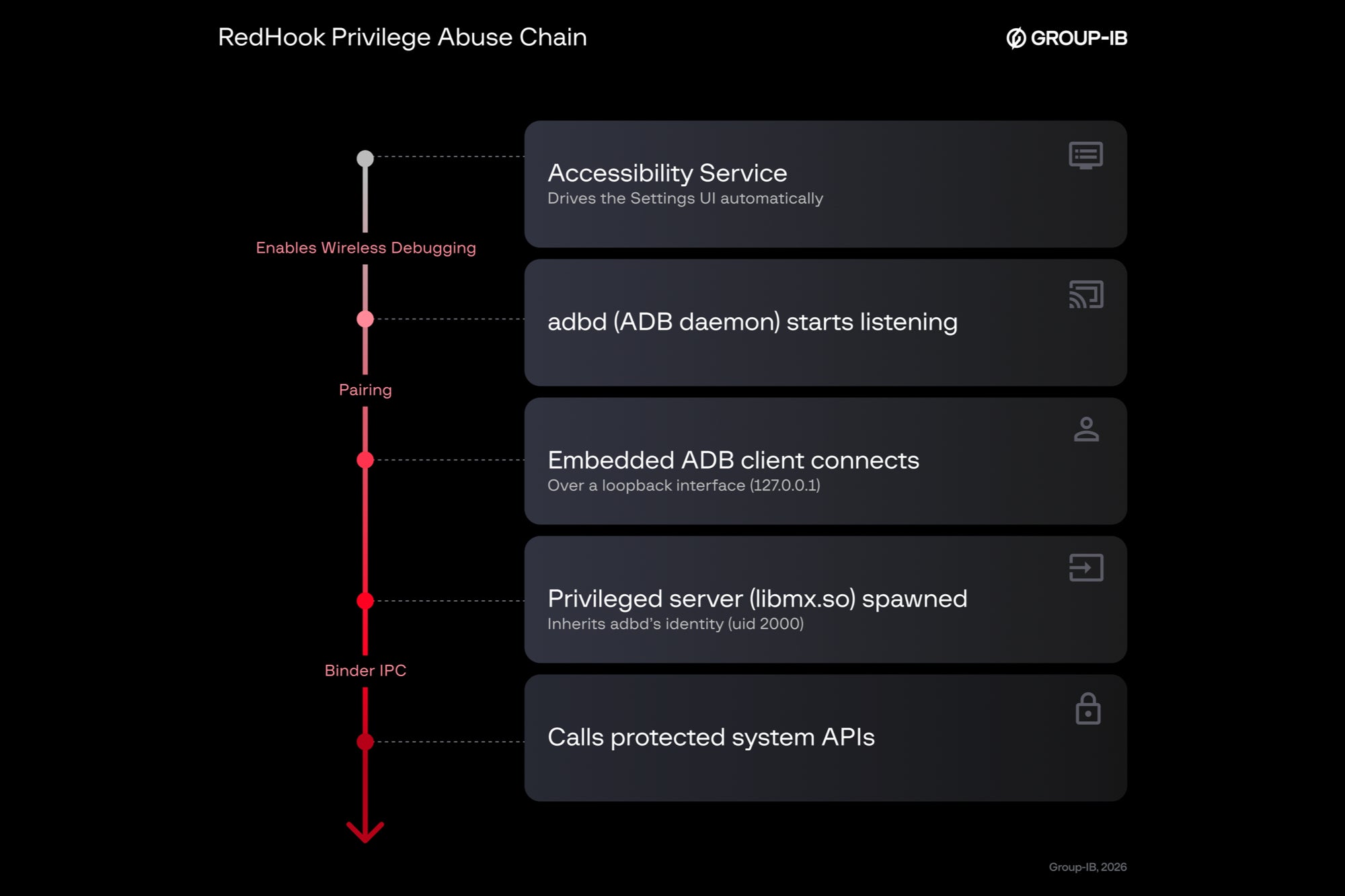
The trick to get in hasn't changed. Someone poses as a bank employee or government worker over a call, text, or message and talks the victim into installing an APK from a site dressed up to look like the Play Store. Once it's on the phone, RedHook asks for Accessibility permissions, then taps through Developer options on its own, flips on wireless debugging, and pairs itself like an authorized computer, which hands it shell-level access no ordinary app gets.
This is roughly how RedHook goes from a fake app install to shell-level access. | Image by Group-IB
There is no exploit here, merely turning a debugging interface into a path to shell-level privileges.
Group-IB, RedHook Returns with a Dangerous Upgrade report, July 9, 2026
Recommended For You
A text claiming to be your bank asks you to install an "urgent security update." What do you do?
51 Votes
Delete it, my bank never texts links like that
58.82%
Call the bank directly first to double check
17.65%
I'd probably click before thinking it through
0%
I ignore texts from numbers I don't recognize
23.53%
Why this matters, and who should actually worry
Mostly people who install apps from outside the Play Store need to worry, since RedHook still needs that first click on a fake site. Stick to Play with Play Protect on, and none of this reaches you.
Group-IB also found the malware fighting hard to stay alive. It plays silent audio, keeps the processor from sleeping, and runs two services that restart each other if either gets killed.
None of this works the same way on an iPhone, since Apple doesn't expose anything like wireless ADB to a downloaded app, though that's not the same as saying iPhones are immune to scams generally.
Google has also been working on a fix of sorts. Its Advanced Protection Mode, which we've covered before, is expected to eventually lock down Developer options for users who turn it on, though it isn't there yet.
How to keep RedHook off your phone
Sticking to official app stores and staying skeptical of unsolicited "urgent" messages from your bank stops RedHook cold.
How to protect yourself from RedHook (and malware like it)
Only install apps from Google Play or another official store.
Never grant Accessibility permissions to an app with no obvious reason to need them.
Treat unexpected calls or texts from your bank as suspicious until you verify them.
Check your Developer options screen occasionally for wireless debugging you didn't turn on.
Keep Google Play Protect turned on as your automatic backstop.
The pattern I keep seeing repeat
What stands out to me isn't the banking trojan part (we've seen plenty of those). It's the jump from watching a screen to actually running one, the same direction Vultur and Brokewell took when they leaned on Accessibility to get further into a device than they should.
The fix tends to be the one Google keeps promising: cut off Accessibility's blank check before malware finds a new use for it. I'd like to see that developer options lockdown ship broadly soon, because for now, avoiding this comes down to noticing the trick in time.
Mint Mobile is celebrating its 10-year anniversary with a special offer on its six-month subscription plans. For a limited time, you can get your preferred tier (6GB, 17GB, 23GB or unlimited) for just $10/mo. That saves you between 50% and 71% on the carrier's mobile plans, making it way easier to recommend.
Johanna Romero is a Senior News Writer at PhoneArena, covering mobile technology news across Android, iOS, wearables, and the Google ecosystem she knows best. Drawing on 15 years in IT and tech support from 2007 to 2022, she brings a user-friendly eye for the practical features and lesser-known tricks readers care about. Google named her an official #TeamPixel member in 2022, and she also reviews the latest devices on her YouTube channel, JoJo the Techie.
A discussion is a place, where people can voice their opinion, no matter if it
is positive, neutral or negative. However, when posting, one must stay true to the topic, and not just share some
random thoughts, which are not directly related to the matter.
Things that are NOT allowed:
Off-topic talk - you must stick to the subject of discussion
Offensive, hate speech - if you want to say something, say it politely
Spam/Advertisements - these posts are deleted
Multiple accounts - one person can have only one account
Impersonations and offensive nicknames - these accounts get banned
To help keep our community safe and free from spam, we apply temporary limits to newly created accounts:
New accounts created within the last 24 hours may experience restrictions on how frequently they can
post or comment.
These limits are in place as a precaution and will automatically lift.
Moderation is done by humans. We try to be as objective as possible and moderate with zero bias. If you think a
post should be moderated - please, report it.
Have a question about the rules or why you have been moderated/limited/banned? Please,
contact us.











Things that are NOT allowed:
To help keep our community safe and free from spam, we apply temporary limits to newly created accounts: