Android users now have two new malware families to be aware of. Cybersecurity experts are now disclosing FvncBot and SeepSnatcher, while a ClayRat upgrade has also been spotted in the dark corners of the internet.
New Android malware to be careful with has been discovered
Grab the Surfshark One VPN subscription for 24 months, and you can now save 87%. The subscription costs just €2.29/mo, or €61.83 for 27 months. Why 27? Because you're getting three extra months! Don't miss out.
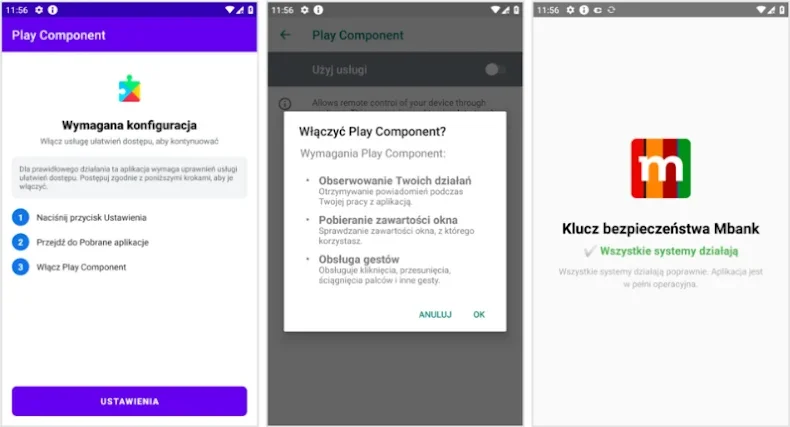
Let's start with FvncBot. This is malware that poses as a security app developed by mBank. Its target: mobile banking users in Poland. This malware is reportedly not based on other Android banking Trojans that have had their source code leaked, and it appears to be completely written from scratch.
The malware rocks features like keylogging (by taking advantage of Android's accessibility services), web-inject attack capabilities, screen streaming, and even hidden virtual network computing (HVNC). According to Intel 471, the malware is doing all of that to commit successful financial fraud.
The malware is protected by a crypting service known as apk0day, offered by Golden Crypt. This is a malicious app acting like a loader and installing the malware.
Recommended For You
Once the app is launched, you are prompted to install a Google Play component to "ensure the security and stability of the app". Obviously, that's not what happens; instead, the malware gets deployed on your phone. This approach has been used by other malicious apps to bypass the accessibility restrictions on Android phones with Android 13 and later.
According to researchers, Poland is the targeted country of this malware, and it appears to be in an early stage of development.
The malware asks the user to grant it accessibility services permission. Once done, it operates with elevated privileges, connects to an external server, and registers the infected device. Then, it receives commands.
Here are some of its reported functions:
Remote control of the device (swiping, clicking, scrolling)
Access to the list of installed apps
Access to device info and bot configuration
Show a full-screen overlay to capture and exfiltrate sensitive data
Hide the overlay
Check accessibility services status
Log keystrokes using accessibility services
Stream screen content
And if that's not enough, it can also inspect the device's screen and content, even if an app prevents screenshots from being taken.
At the moment, it's not known how the malware gets around. Usually, people get infected by Android banking trojans via SMS phishing or third-party app stores.
Of course, right now, this malware is targeting users in Poland, but that doesn't mean that its makers are not going to target other regions as well.
SeedSnaptcher: cryptocurrency theft
SeedSnaptcher is currently distributed under the name Coin through Telegram. It's designed to enable the theft of cryptocurrency. The malware can also intercept incoming SMS messages and steal two-factor authentication codes. Of course, with that, it can take over accounts. Apparently, the malware is also capable of capturing device data, files, call logs, contacts, and sensitive data by displaying an overlay on your display.
Reportedly, the operators of SeedSnatcher are China-based or Chinese-speaking (Chinese language instructions are shared via Telegram).
Meanwhile, there's also an improved version of ClayRat out and about.
Have you ever installed an app from outside the Google Play Store?
70 Votes
Yes, a few times
32.86%
Only once or twice
18.57%
Never, I stick to official sources
48.57%
ClayRat has been updated
ClayRat behavior. | Image Credit – Zimperium
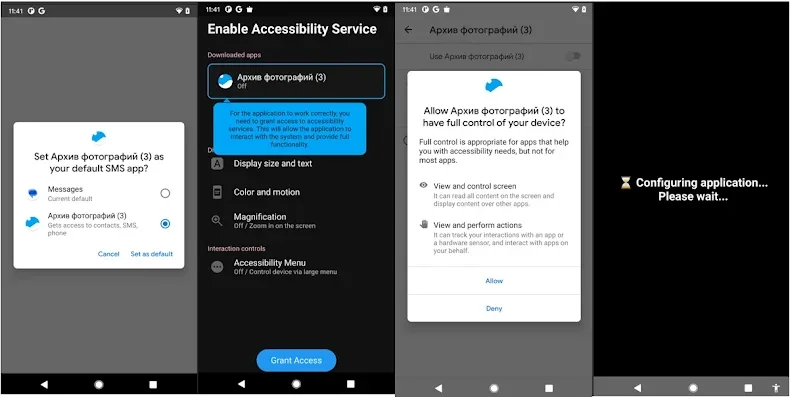
Apparently, there's also an updated version of ClayRat roaming around. The update allows the malware to abuse accessibility services and exploit its SMS permissions. With this new version, it's a more serious security threat and can now record keystrokes, show you overlays looking like a system update screen to hide its activity, and create fake notifications.
Basically, this allows for the ability of full device takeover by abusing accessibility services. It can automate unlocking the device, screen recording, gathering notifications, and showing you overlays.
The malware is distributed via 25 fraudulent phishing domains. These domains impersonate legitimate websites such as YouTube (advertising a Pro version).
How to protect yourself from Android malware
Staying safe on Android is mostly about a few simple habits. First, only download apps from the Google Play Store or trusted sources – most of these malware cases come from random links, fake apps, or Telegram downloads. Also, never install something just because a pop-up says it's "required for security." Real apps don't behave like that.
Keep your phone updated, avoid clicking links in strange SMS messages, and be careful with apps asking for accessibility permissions – that's the number-one trick these malware families use. If something feels off, just cancel it. And of course, using two-factor authentication apps (not SMS) makes things much safer.
Basic caution goes a long way
In my opinion, this stuff is scary, mostly because it all starts with one quick tap on the wrong link. The good news is that basic caution really does go a long way. As long as you stick to official app stores and don't grant big permissions to apps you don't trust, you're already much safer than most people. Honestly, the "too good to be true" downloads are the ones that always get you – so I'd rather skip them and keep my phone clean.
Six-month unlimited plan is now 57% off
$90
$210
$120 off (57%)
Mint Mobile is now allowing you to get whichever plan you like for either three, six, or 12 months for just $15/mo. If you go for the six-month unlimited service, for instance, you'll now have to pay just $90 upfront instead of $210.
Iskra Petrova is a news writer at PhoneArena, where she covers mobile tech news and maintains the site’s device hubs with the latest leaked specs, rumors, and official details for upcoming phones. She joined PhoneArena in 2020 after three years in technical support for Microsoft Exchange, giving her practical experience with software infrastructure and troubleshooting. Iskra holds a Master’s Degree in Literature, which helps her translate complex tech details into clear, reader-friendly coverage. She is a daily Apple ecosystem user, while also closely following Sony Xperia’s camera-focused phones and Samsung’s Galaxy Z Flip series.
A discussion is a place, where people can voice their opinion, no matter if it
is positive, neutral or negative. However, when posting, one must stay true to the topic, and not just share some
random thoughts, which are not directly related to the matter.
Things that are NOT allowed:
Off-topic talk - you must stick to the subject of discussion
Offensive, hate speech - if you want to say something, say it politely
Spam/Advertisements - these posts are deleted
Multiple accounts - one person can have only one account
Impersonations and offensive nicknames - these accounts get banned
To help keep our community safe and free from spam, we apply temporary limits to newly created accounts:
New accounts created within the last 24 hours may experience restrictions on how frequently they can
post or comment.
These limits are in place as a precaution and will automatically lift.
Moderation is done by humans. We try to be as objective as possible and moderate with zero bias. If you think a
post should be moderated - please, report it.
Have a question about the rules or why you have been moderated/limited/banned? Please,
contact us.











Things that are NOT allowed:
To help keep our community safe and free from spam, we apply temporary limits to newly created accounts: