If you're like me, you can't wait to try out Siri 2.0, which will arrive with the release of iOS 26.4 this spring. There is a way to get the updated version of Siri in just a couple of weeks and that is by installing the iOS 26.4 Beta releases. The developer version of iOS 26.4 Beta 1 will be dropped by Apple the week of February 23rd according to Bloomberg's Apple insider Mark Gurman who shared the date today in his Power On column.
Be the first on your block to have Siri 2.0 on your iPhone
Later on, I'll explain exactly what you have to do to be the first on your block with Siri 2.0. With this update, Siri will be able to access your texts, emails, calendar, reminders, photos/videos, browsing history, and phone/voicemail. Armed with this all-access pass, Siri should be able to answer queries such as "What time is my reservation at Benihana this Tuesday?"
Are you really looking forward to Siri 2.0?
92 Votes
Absolutely! I can't wait for Siri to get smarter.
76.09%
Nah. I really don't care.
23.91%
You might recall that Apple released an ad a couple of years ago starring U.K. actress Bella Ramsey. Ramsey portrayed a high school student who sees a boy in the hallway that she previously met at a restaurant and couldn't remember his name. She asks Siri to come up with his identity which leads the digital assistant to scan her apps to find the answer. After Apple delayed the release of Siri 2.0, the ad was pulled.
Siri will be powered by a custom developed 1.2 trillion parameter Gemini 3 AI model from Google
Siri will also be aware of what is on your screen and the iOS 26.4 Beta should debut its new brain courtesy of the $1 billion deal between Apple and Google. Titled "Apple Foundation Model (AFM) v10" by the tech giant, a custom developed 1.2 trillion parameter Gemini 3 AI model will power Siri. Siri's agentic capabilities will also debut with the iOS 26.4 Beta. With this feature, you'll be able to ask Siri to find a photo of your Driver's License and email it to your insurance company and Siri will do it for you.
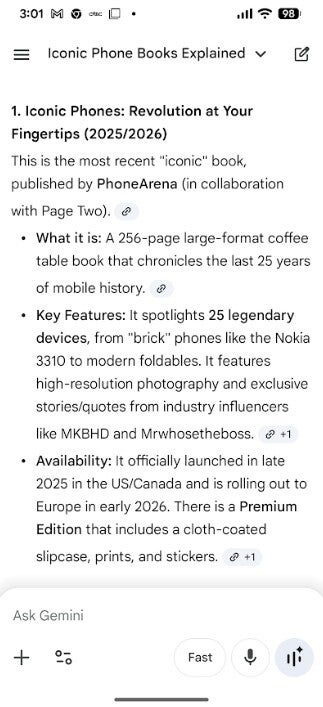
In iOS 27, this is the type of response you might see from Siri following its Gemini brain transplant. | Image credit-PhoneArena
What won't be available until iOS 27 is the change to Siri that makes it a chatbot like ChatGPT and Gemini. This version of Siri will be conversational and allow you to have back and forth chats with Siri. This version of Siri will be much more powerful and capable than the version coming in iOS 26.4. If you don't mind installing the iOS 27 Beta, you might be able to have this version of Siri as soon as this June after WWDC when the Beta is released.
Recommended For You
I've said this many times before and I'll say it again. Based on my experience using Gemini as an assistant on my Pixel 6 Pro, you want to use an AI model to answer your queries since the responses include in-depth answers. In case you didn't know, on all compatible Pixel models, Gemini will handle alarms and timers.
How to get the iOS 26.4 Beta on your iPhone
So, let's say you are now excited to have the new and improved Siri 2.0 on your iPhone, and you have decided to install the iOS 26.4 Beta, this is what you need to know and need to do. An incremental beta release is not as much of a potential problem as a major update (such as this summer's iOS 27 Beta). You still need to keep in mind that Beta updates are buggy. Not only will you lose some battery life, but you might also be unable to use certain features that you've become accustomed to using daily.
If you still want to go ahead, direct your browser to beta.apple.com or tap on this link. Follow the directions for signing up. Another thing to keep in mind is that once you install a Beta version of iOS on your iPhone, you cannot return to the stable version without having to wipe all of your data off of your iPhone. Once a new stable release of iOS is dropped, you will have a limited window of time to return to the stable path.
Once you have signed up for the Beta program, go to Settings > General > Software Update. On the top of the screen, you'll see a setting for Beta Updates. Tap on it and you will be given three options: Off, iOS 26 Public Betas, and iOS 26 Developer Beta. Since it will arrive first, and Apple no longer charges you to become a developer, select iOS 26 Developer Beta. When iOS 26.4 Beta 1 is released, you'll be able to install it and hopefully get your first look at Siri 2.0.
Get iPhone 18 Pro with Visible, get $480 off!
$719
/mo
$1199
$480 off (40%)
On the Visible+ Pro plan, you get access to 5G Ultra Wideband data on Verizon's fastest network. Along with unlimited roaming across Mexico and Canada, 2 days of Global Pass per month, 3x hotspot speeds, 4K streaming, and Smartwatch service.
Alan, an ardent smartphone enthusiast and a veteran writer at PhoneArena since 2009, has witnessed and chronicled the transformative years of mobile technology. Owning iconic phones from the original iPhone to the iPhone 15 Pro Max, he has seen smartphones evolve into a global phenomenon. Beyond smartphones, Alan has covered the emergence of tablets, smartwatches, and smart speakers.
A discussion is a place, where people can voice their opinion, no matter if it
is positive, neutral or negative. However, when posting, one must stay true to the topic, and not just share some
random thoughts, which are not directly related to the matter.
Things that are NOT allowed:
Off-topic talk - you must stick to the subject of discussion
Offensive, hate speech - if you want to say something, say it politely
Spam/Advertisements - these posts are deleted
Multiple accounts - one person can have only one account
Impersonations and offensive nicknames - these accounts get banned
To help keep our community safe and free from spam, we apply temporary limits to newly created accounts:
New accounts created within the last 24 hours may experience restrictions on how frequently they can
post or comment.
These limits are in place as a precaution and will automatically lift.
Moderation is done by humans. We try to be as objective as possible and moderate with zero bias. If you think a
post should be moderated - please, report it.
Have a question about the rules or why you have been moderated/limited/banned? Please,
contact us.









Things that are NOT allowed:
To help keep our community safe and free from spam, we apply temporary limits to newly created accounts: