Android 17 has introduced some really cool features like app bubbles, built-in screen reactions, and more. However, the update hasn't been very kind to some Pixel phones.
We've already seen reports of it causing problems like boot loops on certain Pixel phones like the Pixel 10 Pro XL. Now, we are seeing a few online complaints with users mentioning that their Google phone has been silently ignoring incoming calls ever since they updated to the latest Android version.
You might miss your important calls
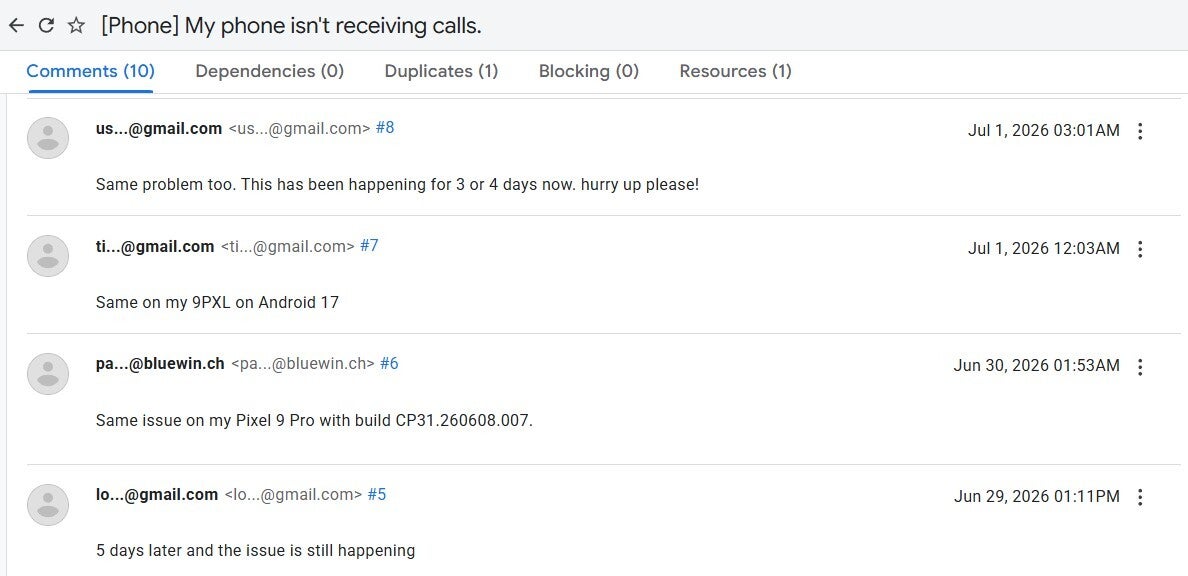
Texting and calling are two of the most important functions of any smartphone. However, online complaints suggest that the latter hasn't been functioning as it should. Pixel users have posted on Reddit and the Google Issue Tracker as well that their phones are now missing calls.
It's important to know that this isn't happening because the users aren't seeing the calls; instead, it's because their devices aren't allowing the calls through. The Pixel phone is basically silently ignoring the incoming calls. At the time of writing, I was able to spot only a handful of related reports, indicating it's currently not a widespread issue.
Still, a bug affecting the most basic functionality of a phone even for a single user can't be ignored. An affected user who appears to be in search of a new job commented on the Google Issue Tracker that they have missed a couple of calls from recruiters because of this frustrating issue.
Recommended For You
That said, the problem doesn't look to be exclusive to any particular Pixel model or series. I was able to spot complaints of it affecting the devices of the Pixel 10 lineup, Pixel 9 family, Pixel 8, and even the Pixel 6a.
There appears to be a solution, but it doesn't work for everyone
Complaints about Pixel not receiving calls on Google Issue Tracker. | Image by Google Issue Tracker
Currently, Google has not yet acknowledged this problem, let alone the talk of releasing a fix for it. However, a Reddit user who was affected by it on their Pixel 6a has come up with a solution that seems to work on some other affected Pixel phones as well. Basically, the Redditor claims that the problem is being caused by the Scam Detection and Call Screen settings of Google's Phone app.
They recommend disabling these settings and then restarting the phone to fix the problem for good. While some users commented that this fix actually resolves the issue, others mentioned that it makes no difference. In essence, if you notice that your Pixel phone is also ignoring incoming calls, you can give this fix a try and check if it works for you until Google rolls out something from its end.
Android 17's woes continues
It's only been days since Pixel phones received the stable Android 17 update, but we have already seen reports of it causing chaos. A Pixel 8 Pro user reported that their phone started experiencing touchscreen issues ever since downloading the latest Android update. A Pixel 9 Pro XL user also seems to be affected by this problem.
That's not all. I was also able to find complaints from users reporting that the home screen search bar is broken on certain Pixel phones, and also on some Pixel devices, the home screen widgets disappear automatically after the first reboot post-update.
Fortunately, most of these problems have been acknowledged by Google, and it is reportedly working on their respective fixes. However, as aforementioned, the call-related problem is yet to be recognized by the company.
Which Android 17 issue on Pixel phones frustrates you the most?
61 Votes
Ignoring incoming calls.
29.51%
Connectivity issue.
26.23%
Bootloop.
6.56%
Broken home screen search bar.
3.28%
Disappearance of home screen widgets.
6.56%
I'm not facing any problem.
27.87%
2026 hasn't been the best year for Pixel phones
Pixel phones are definitely great and have their own advantages over their competitors, like iPhones and Galaxies. However, this year hasn't been the best for them software-wise. The March Feature Drop introduced plenty of annoying bugs that the tech giant took months to resolve completely.
Now, the June update, which basically brought Android 17, is already reported to be causing plenty of problems, one of which is the phone ignoring incoming calls. That said, I am personally facing this problem on my Pixel 10, but interestingly for me, it's not happening with every call. I did try the solution that I shared above, but unfortunately it didn't work for me.
What's even more irritating is that this isn't the first call-related problem we have been hearing on Pixel phones. It was quite recently reported that the vibrate mode isn't working on some Google phones, causing users to miss important incoming calls. I really hope that the manufacturer quickly addresses the current concern before more complaints about it start to surface online.
Aman Kumar is a news writer at PhoneArena covering Google Pixel phones, Android features, AI-powered smartphone tools, and mobile tech news. Before joining PhoneArena, he spent over five years writing about consumer technology for publications like MakeUseOf, How-To Geek, and Guiding Tech. His current daily drivers are the Pixel 10 and Samsung Galaxy S26 Plus, while his red iPhone SE (2nd gen) remains a personal favorite. Aman also appreciates bold smartphone experiments and still considers the Nokia N-Gage one of the industry’s most iconic designs.
A discussion is a place, where people can voice their opinion, no matter if it
is positive, neutral or negative. However, when posting, one must stay true to the topic, and not just share some
random thoughts, which are not directly related to the matter.
Things that are NOT allowed:
Off-topic talk - you must stick to the subject of discussion
Offensive, hate speech - if you want to say something, say it politely
Spam/Advertisements - these posts are deleted
Multiple accounts - one person can have only one account
Impersonations and offensive nicknames - these accounts get banned
To help keep our community safe and free from spam, we apply temporary limits to newly created accounts:
New accounts created within the last 24 hours may experience restrictions on how frequently they can
post or comment.
These limits are in place as a precaution and will automatically lift.
Moderation is done by humans. We try to be as objective as possible and moderate with zero bias. If you think a
post should be moderated - please, report it.
Have a question about the rules or why you have been moderated/limited/banned? Please,
contact us.










![Another batch of Galaxy S26 series users in the US are getting a nice surprise today [UPDATED]](https://m-cdn.phonearena.com/images/article/183643-wide-two_350/Another-batch-of-Galaxy-S26-series-users-in-the-US-are-getting-a-nice-surprise-today-UPDATED.webp)
Things that are NOT allowed:
To help keep our community safe and free from spam, we apply temporary limits to newly created accounts: