The Google Photos Collections tab is a single hub that brings together and organizes the content in the Photos app. It provides users with quick access to shared content, albums, trash, favorites, and smart categories such as people, places, and documents.
Have you received the updated Google Photos app for iOS and Android?
Open the Google Photos app on your Android or iOS phone.
From the toolbar at the bottom of the screen, tap on Collections.
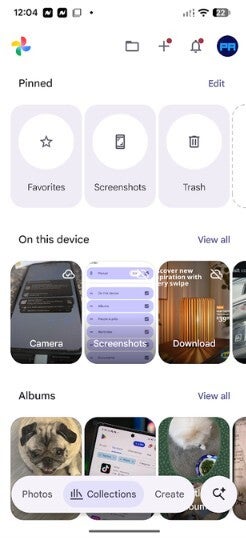
If you see Favorites, Screenshots, and Trash options at the top of the display, congrats! You have the latest version of the Google Photos app on your phone.
Pressing the Edit button on the right side of the Pinned section will allow you to change the order of the pinned items. Did I mention that this update is all about customization?
How to eliminate clutter from the Google Photos app
You can eliminate clutter by reordering folders, pinning your favorite and most frequently used folders on the top, hiding those categories that you rarely use, and when you reorder folders to put your favorite ones on top, you are saving time by making it faster to open the pinned folders.
Recommended For You
Updated Collections tab on the Google Photos app. | Image by PhoneArena
Underneath the Pinned carousel is one marked "On this device" with an option to view every picture related to this folder. Other folders I've set up on the app include:
Pinned
On this device
Albums
People & pets
Wardrobe
Places
Documents
Other Collections
Under "Other Collections," you'll find categories like Favorites, Screenshots, Moments, Videos, Recently Added, Stickers, Creations, Archive, Locked, and Trash. At the bottom is a Reorder button allowing you to customize these categories in the order you want.
Not everyone loves this update
The redesign is rolling out with versions 7.97 (Android) and 7.98 (iOS) of Google Photos. Be aware that some Google Photos users on Reddit are not pleased with this update. One Redditor wrote, "This design looks hideous, absolute trash; seems like they are copying the Apple Photos app layout."
Not everyone hates this update
Not every Reddit subscriber had something negative to say about the revised Google Photos app. One typed, "I think this is the best one yet because you can finally customize everything. The user gets to decide which sections they see and in which order."
Google Photos is the default photo gallery app on Android, but if you need to install it on your device, click on the appropriate link to install the app from your iOS or Android device.
Get a free Galaxy A17 with Straight Talk. To claim this deal, you need to pair the phone with activation on a Silver Unlimited Plan or higher. This tier costs $45 per month. Offer valid through 01/10/27 while supplies last online.
Alan, an ardent smartphone enthusiast and a veteran writer at PhoneArena since 2009, has witnessed and chronicled the transformative years of mobile technology. Owning iconic phones from the original iPhone to the iPhone 15 Pro Max, he has seen smartphones evolve into a global phenomenon. Beyond smartphones, Alan has covered the emergence of tablets, smartwatches, and smart speakers.
A discussion is a place, where people can voice their opinion, no matter if it
is positive, neutral or negative. However, when posting, one must stay true to the topic, and not just share some
random thoughts, which are not directly related to the matter.
Things that are NOT allowed:
Off-topic talk - you must stick to the subject of discussion
Offensive, hate speech - if you want to say something, say it politely
Spam/Advertisements - these posts are deleted
Multiple accounts - one person can have only one account
Impersonations and offensive nicknames - these accounts get banned
To help keep our community safe and free from spam, we apply temporary limits to newly created accounts:
New accounts created within the last 24 hours may experience restrictions on how frequently they can
post or comment.
These limits are in place as a precaution and will automatically lift.
Moderation is done by humans. We try to be as objective as possible and moderate with zero bias. If you think a
post should be moderated - please, report it.
Have a question about the rules or why you have been moderated/limited/banned? Please,
contact us.





Things that are NOT allowed:
To help keep our community safe and free from spam, we apply temporary limits to newly created accounts: