Earlier this month, we told you that latest Android Canary (the earliest experimental release channel for Android) release indicated that Apple and Google were working to make it easier to switch from iOS to Android and vice versa. Android Canary 2512 (ZP11.251121.010) has been rolling out to Pixel handsets carrying the Android end of the new switching tool, and iPhone users will get the software they need for the new transfer feature with the release of iOS 26.3. We know this because Apple just released iOS 26.3 Beta 1 which introduces the latest and greatest shortcut for those switching platforms.
I've been known to switch between Android and iOS often and I've used the Quick Switch Adapter that used to come in the box with a new Pixel. This was a small USB-A to USB-C adapter that would connect between your old iOS or Android phone to your new Pixel. These days, the charging cable is used and is plugged in the charging port of your old phone and the same port on your new Pixel allowing you to transfer to your new phone some of the data (contacts, photos, messages, apps, etc.) from the handset you're retiring.
Until the new feature is up and running, the apps are the best way to transfer your data to a new Android or iPhone
Both Apple and Google have apps that make it easier to switch platforms. If you're leaving your iPhone for an Android device and you hate dealing with cables, from the App Store install the Android Switch app by tapping this link. If you're moving from Android to iOS, go to the Play Store and download Move to iOS. You can do this by tapping on this link. Until Apple and Google fully reveal the new switching tool they are working on, using these apps is the easiest way to switch.
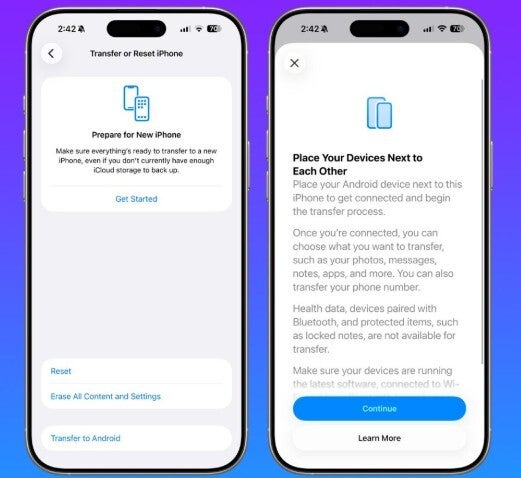
Screenshots show the iOS 26.3 Move to Android feature. | Image credit-MacRumors
Yesterday, Apple dropped iOS 26.3 Beta 1 which you can install if you're subscribed to the Beta program by going to Settings > General > Software Updates. Follow the instructions to install the update. One of the new features in the first Beta update of OS 26.3 is called "Transfer to Android." Go to Settings > General > Transfer or Reset iPhone; when it is ready to be used, there will be a button that says "Transfer to Android." This new feature will allow iPhone users to move their contacts, messages, notes and photos to a new Android device.
"Transfer to Android" relies on the same technology as another key iPhone feature
"Transfer to Android" doesn't require any wires or cables and relies on a peer-to-peer Wi-Fi and Bluetooth connection similar to how AirDrop works. The latter feature will wirelessly transfer files between nearby iPhone units. If you've ever considered leaving iOS for Android but was never confident enough to pull the trigger on the move, "Transfer to Android" might give you the confidence to give switching a real shot knowing that you'll be able to move your contacts, messages and media-based files from your iPhone to your new Android phone.
Google has a similar "Transfer to iOS" feature
When the feature is up and running and you press the "Transfer to Android" button, you will place your iPhone and Android phone side-by-side to get connected and start the transfer process. Once connected, you'll be able to choose what you want connected such as your photos, messages, notes, apps, and more. You can even transfer your own phone number. Health data, devices paired with Bluetooth, and protected items such as locked notes, cannot be transferred.
Recommended For You
Would you use "Move to Android" if you were switching platforms?
23 Votes
Yes. It makes switching faster.
86.96%
No. I don't trust the security of the feature.
13.04%
Both devices will need to have the latest software installed and a QR code on the Android device can be scanned by the iPhone to start the transfer process. Another option, besides a QR code, is to use a session ID and pairing code. Google has also created a similar feature that will allow both phones to be placed side-by-side allowing data to be transferred from the Android phone to the iPhone.
Six-month unlimited plan is now 57% off
$90
$210
$120 off (57%)
Mint Mobile is now allowing you to get whichever plan you like for either three, six, or 12 months for just $15/mo. If you go for the six-month unlimited service, for instance, you'll now have to pay just $90 upfront instead of $210.
Alan, an ardent smartphone enthusiast and a veteran writer at PhoneArena since 2009, has witnessed and chronicled the transformative years of mobile technology. Owning iconic phones from the original iPhone to the iPhone 15 Pro Max, he has seen smartphones evolve into a global phenomenon. Beyond smartphones, Alan has covered the emergence of tablets, smartwatches, and smart speakers.
A discussion is a place, where people can voice their opinion, no matter if it
is positive, neutral or negative. However, when posting, one must stay true to the topic, and not just share some
random thoughts, which are not directly related to the matter.
Things that are NOT allowed:
Off-topic talk - you must stick to the subject of discussion
Offensive, hate speech - if you want to say something, say it politely
Spam/Advertisements - these posts are deleted
Multiple accounts - one person can have only one account
Impersonations and offensive nicknames - these accounts get banned
To help keep our community safe and free from spam, we apply temporary limits to newly created accounts:
New accounts created within the last 24 hours may experience restrictions on how frequently they can
post or comment.
These limits are in place as a precaution and will automatically lift.
Moderation is done by humans. We try to be as objective as possible and moderate with zero bias. If you think a
post should be moderated - please, report it.
Have a question about the rules or why you have been moderated/limited/banned? Please,
contact us.












Things that are NOT allowed:
To help keep our community safe and free from spam, we apply temporary limits to newly created accounts: