A lot of your important credentials are stored under your AT&T account. Someone gaining access to it would directly mean their getting their hands on some really crucial details about you. Given the importance of an AT&T account, you might enter panic mode if you receive an email or message saying that your account password has been changed.
Well, that's what has happened with some AT&T customers recently. Here is everything you need to know, including what you should do if such an email lands in your inbox.
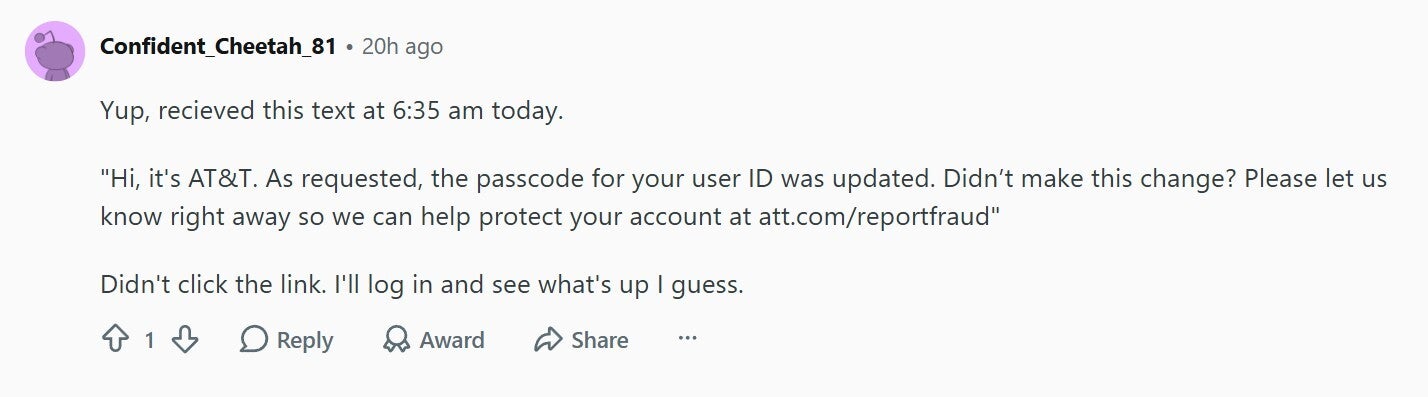
Here's what the text says: "Hi, it's AT&T. As requested, the passcode for your user ID was updated. Didn't make this change? Please let us know right away so we can help protect your account at att.com/reportfraud."
Password reset message by AT&T. | Image by Reddit
An affected user mentioned that, since they themselves did not request this change, they decided to immediately log out of their AT&T account and change their passwords everywhere as a precautionary measure. Another user commented that they received the same alert this morning and hinted that the carrier might have been hacked.
Recommended For You
Has it now become difficult to differentiate between a real and fraud message?
2 Votes
Is this some sort of cyber fraud?
Many users anticipated that this could be a phishing attack, which is one of the most popular types of cyber fraud. In case you're not aware, in a phishing attack, you receive an email or text message from what appears to be a trusted source. Its main purpose is to trick you into submitting all your personal data to the fraudster.
A user commented and advised everyone who has received the email and text message to check the email header and make sure it is coming from a legitimate AT&T email address. They also suggested expanding and checking the sender name, as it might contain some irrelevant characters if the email isn't legitimate.
There's nothing to panic about
The good news is that the mail wasn't from a hacker group that was looking for its next phishing attack target. Instead, it was sent from AT&T itself, though due to a system error. Many affected users updated their comments under the relevant post and mentioned that they received a new mail from AT&T that reportedly says:
Hi, it's AT&T. We recently sent you a passcode change notification in error. Your passcode was not changed, your account remains secure, and no action is required. We apologize for any confusion or concern this may have caused.
In essence, there is nothing to panic about if the password reset email or message has landed in your inbox. You can simply ignore it, as it was an email misfire from the carrier.
Stay vigilant
While this particular case was related to a glitch in the system rather than a cyberattack intended to steal users' credentials, we also can't ignore the fact that the next time, it could actually be the latter. Statista reports that there were more than a million unique phishing attacks worldwide in just the second quarter of 2026.
Because of this, it's very important to remain careful and never click on any untrusted links. You should look for mistakes in the emails or text messages that you find suspicious. In particular, you should look for things like the sender's address, the attached links, and the language.
Generally, you'll find mistakes in these things if mail has not come from a trusted source. In the case of carriers, in particular, you can reach out to their dedicated team (AT&T, Verizon, T-Mobile) if you suspect anything fishy in any text message or email from someone claiming to represent the carrier you use.
Mint Mobile is celebrating its 10-year anniversary with a special offer on its six-month subscription plans. For a limited time, you can get your preferred tier (6GB, 17GB, 23GB or unlimited) for just $10/mo. That saves you between 50% and 71% on the carrier's mobile plans, making it way easier to recommend.
Aman Kumar is a news writer at PhoneArena covering Google Pixel phones, Android features, AI-powered smartphone tools, and mobile tech news. Before joining PhoneArena, he spent over five years writing about consumer technology for publications like MakeUseOf, How-To Geek, and Guiding Tech. His current daily drivers are the Pixel 10 and Samsung Galaxy S26 Plus, while his red iPhone SE (2nd gen) remains a personal favorite. Aman also appreciates bold smartphone experiments and still considers the Nokia N-Gage one of the industry’s most iconic designs.
A discussion is a place, where people can voice their opinion, no matter if it
is positive, neutral or negative. However, when posting, one must stay true to the topic, and not just share some
random thoughts, which are not directly related to the matter.
Things that are NOT allowed:
Off-topic talk - you must stick to the subject of discussion
Offensive, hate speech - if you want to say something, say it politely
Spam/Advertisements - these posts are deleted
Multiple accounts - one person can have only one account
Impersonations and offensive nicknames - these accounts get banned
To help keep our community safe and free from spam, we apply temporary limits to newly created accounts:
New accounts created within the last 24 hours may experience restrictions on how frequently they can
post or comment.
These limits are in place as a precaution and will automatically lift.
Moderation is done by humans. We try to be as objective as possible and moderate with zero bias. If you think a
post should be moderated - please, report it.
Have a question about the rules or why you have been moderated/limited/banned? Please,
contact us.





Things that are NOT allowed:
To help keep our community safe and free from spam, we apply temporary limits to newly created accounts: