Google is making a big change to the home screen search bar on its Pixel devices, as it now offers a search experience powered by the Google app.
It's being done to promote Google AI mode
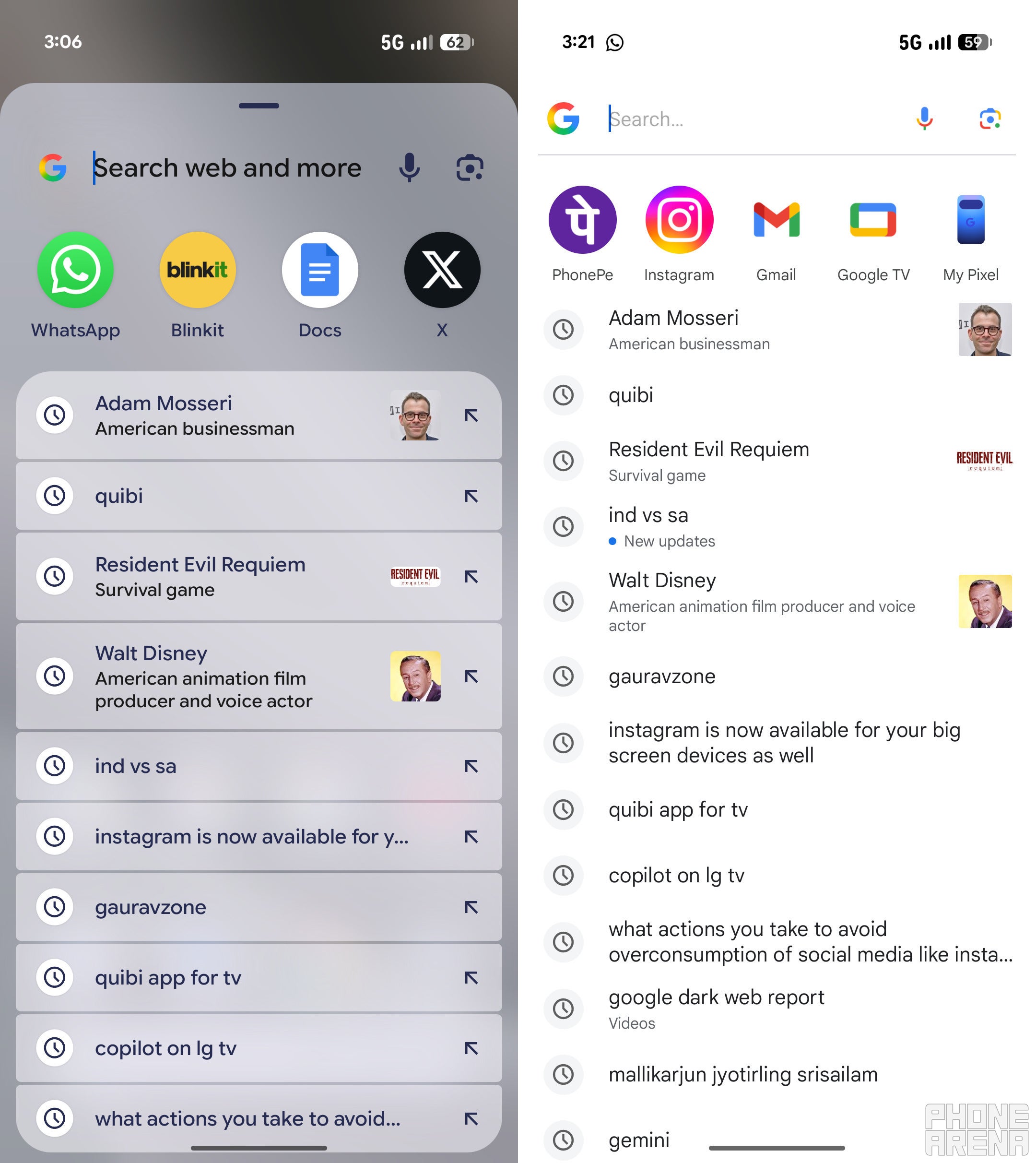
The Pixel Launcher on your Google Pixel smartphones contains two search bars – one at the bottom of the home screen and another accessible by swiping up from the bottom of the screen. Previously, both search bars offered the same experience, allowing you to search the web as well as your device settings, contacts, apps, and more. That's now changing, as the home screen search bar now offers a search experience powered by the Google app.
Initially, it was speculated that there was a bug causing changes to the Pixel search. However, the search giant has now confirmed that this change is intentional and part of the November 2025 Feature Drop.
Following this change, tapping the home screen search bar widget opens a full-screen window that looks very similar to what you see when you open the Google app and tap the search bar there. There's still a row of five suggested apps, but below it, you'll now find a few more recent online searches than what used to appear in the previous search bar, which wasn't powered by the Google app. You can still search for installed apps, but the Google-powered search bar doesn't let you search for contacts or browse through device settings.
Recommended For You
Google's November 2025 Pixel Drop announcement post states that this change is being made to make the AI mode easily accessible directly from your Pixel smartphone's home screen. It will also make sure that you can quickly start and continue your searches using the AI mode.
What are you going to do about this change on your Pixel smartphones?
20 Votes
I actually love the AI mode, so I love this change.
15%
Maybe I’ll install a different Android launcher.
85%
It's a downgrade, Google
Previous search experience on the left and new search experience on the right. | Image by PhoneArena
It's been a while since the search giant introduced the AI Mode feature. Although it can be accessed by opening Google Chrome on your smartphone and tapping the AI Mode button on the homepage, the company now wants to make access easier by integrating the Google app into the home screen search bar of Pixel smartphones. But who actually asked for this? I personally don't like this change at all.
It makes the search bar less useful. In my testing, I also found that the new search experience isn't as fast as the previous one. Furthermore, it takes away the uniqueness of the search bar, as the new experience is similar to what you get on non-Pixel Android smartphones.
It's been a few months since I purchased the Pixel 10, and I've now developed the habit of tapping the search bar at the bottom of the home screen whenever I need to search through the device settings. Unfortunately, I can't do that anymore. There's also no way to remove the search bar from the home screen, so I'm pretty sure I'll accidentally keep tapping it for a while because of muscle memory.
There's always the option to switch to a different launcher, but I think that would be an extreme step for now. Hopefully, Google rolls back this change or provides an option to switch to the previous search, because the new one doesn’t look good from either a visual or functional perspective.
iPhone 13 Pro flash sale! Limited time offer!
Save $30 on iPhone 13 Pro from Back Market. Discount automatically applied at checkout. Offer ends 20 September 2026 at 23:59.
Aman Kumar is a news writer at PhoneArena covering Google Pixel phones, Android features, AI-powered smartphone tools, and mobile tech news. Before joining PhoneArena, he spent over five years writing about consumer technology for publications like MakeUseOf, How-To Geek, and Guiding Tech. His current daily drivers are the Pixel 10 and Samsung Galaxy S26 Plus, while his red iPhone SE (2nd gen) remains a personal favorite. Aman also appreciates bold smartphone experiments and still considers the Nokia N-Gage one of the industry’s most iconic designs.
A discussion is a place, where people can voice their opinion, no matter if it
is positive, neutral or negative. However, when posting, one must stay true to the topic, and not just share some
random thoughts, which are not directly related to the matter.
Things that are NOT allowed:
Off-topic talk - you must stick to the subject of discussion
Offensive, hate speech - if you want to say something, say it politely
Spam/Advertisements - these posts are deleted
Multiple accounts - one person can have only one account
Impersonations and offensive nicknames - these accounts get banned
To help keep our community safe and free from spam, we apply temporary limits to newly created accounts:
New accounts created within the last 24 hours may experience restrictions on how frequently they can
post or comment.
These limits are in place as a precaution and will automatically lift.
Moderation is done by humans. We try to be as objective as possible and moderate with zero bias. If you think a
post should be moderated - please, report it.
Have a question about the rules or why you have been moderated/limited/banned? Please,
contact us.












Things that are NOT allowed:
To help keep our community safe and free from spam, we apply temporary limits to newly created accounts: