There have always been questions about the capabilities of Google's vetting process for new apps getting listed in the Play Store. We've written several times about an app found in Google's digital Android app storefront that ends up containing malware. Google eventually gets around to tossing the rogue app out of the Play Store.
There are reasons why a malicious app can escape detection from Google. Often a clean, lightweight app is submitted for testing and passes the scan. But once the app is installed on a device, a remote Command & Control (C2) server downloads the actual malicious code as an update.
Bogus Chrome app listed on the Play Store has over 100,000 installs
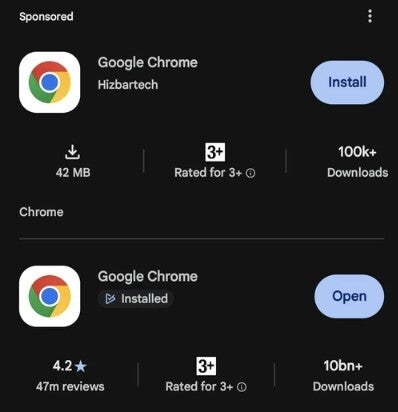
Recently, another app slipped through Google's protective scanning and ended up with a listing in the Play Store. Reddit subscriber nikhilchacko posted on the platform about a fake Google Chrome app. The Reddit post included a screenshot showing the actual Play Store listing for the fake app, which was located right above the listing for the real Chrome app.
Others said that the fake app should be reported
Some other Redditors chimed in, suggesting that someone alert Google and report the fake Chrome app before some people fall for the deception and install it. Interestingly, the listing shows that the fake Chrome has over 100,000 installs, which obviously pales next to the more than 10 billion downloads for the real Chrome.
Recommended For You
Image showing the listing for the fake Chrome app and the real one underneath. | Image by Reddit
Google did remove the fake Chrome app
The screenshot also included the name of the developer behind the Chrome imposter, Hizbartech. The latest information we have is that Google did remove the fake Chrome from the Play Store, although we shouldn't miss the point that the Alphabet subsidiary also allowed the app to list in the Play Store in the first place.
Before the fake Chrome was removed, a Reddit user (_penetration_nation_) installed the fake Chrome app to see what it looked like and he wrote that "after downloading it and opening it, I've been prompted with so many things including selecting a bloody avatar for no reason lol."
If you had noticed the fake app, what would you have done?
2 Votes
He goes on to say, "Upon finishing setup, it brings me to this page, wtf they didn't even copy chromium and put some kind of tracking or info stealer they just put in some weird ass contact app with a ton of AI avatars."
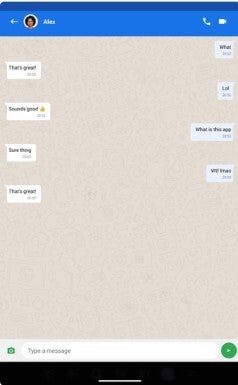
Screenshot showing the phony chat feature of the fake Chrome app. | Image by Reddit
Additionally, when he tried to chat using the app, he received random responses. We've embedded the screenshot taken by the Redditor of the chat and you can find it in this article.
The bogus Chrome app started as a game called "Ball Bounce"
The bogus Chrome app has a backstory, too. It was originally uploaded to the Play Store as a game called "Ball Bounce." The developer subsequently changed the name of the app to Chrome using the copied app icon.
The timeline for this app is interesting. On August 18, Google announced its "advanced flow" for sideloading apps. On August 22, Ball Bounce appeared in the Play Store and became Chrome on September 30.
So what is the bottom line here? Well, no matter how hard Google tries to prevent this from happening, there are always ways to slip malicious apps into the Play Store even though Google always manages to remove them in the end.
Mint Mobile is celebrating its 10-year anniversary with a special offer on its six-month subscription plans. For a limited time, you can get your preferred tier (6GB, 17GB, 23GB or unlimited) for just $10/mo. That saves you between 50% and 71% on the carrier's mobile plans, making it way easier to recommend.
Alan, an ardent smartphone enthusiast and a veteran writer at PhoneArena since 2009, has witnessed and chronicled the transformative years of mobile technology. Owning iconic phones from the original iPhone to the iPhone 15 Pro Max, he has seen smartphones evolve into a global phenomenon. Beyond smartphones, Alan has covered the emergence of tablets, smartwatches, and smart speakers.
A discussion is a place, where people can voice their opinion, no matter if it
is positive, neutral or negative. However, when posting, one must stay true to the topic, and not just share some
random thoughts, which are not directly related to the matter.
Things that are NOT allowed:
Off-topic talk - you must stick to the subject of discussion
Offensive, hate speech - if you want to say something, say it politely
Spam/Advertisements - these posts are deleted
Multiple accounts - one person can have only one account
Impersonations and offensive nicknames - these accounts get banned
To help keep our community safe and free from spam, we apply temporary limits to newly created accounts:
New accounts created within the last 24 hours may experience restrictions on how frequently they can
post or comment.
These limits are in place as a precaution and will automatically lift.
Moderation is done by humans. We try to be as objective as possible and moderate with zero bias. If you think a
post should be moderated - please, report it.
Have a question about the rules or why you have been moderated/limited/banned? Please,
contact us.





Things that are NOT allowed:
To help keep our community safe and free from spam, we apply temporary limits to newly created accounts: