AnTuTu makes major change to how it computes benchmark results
Instead of pushing out incredibly high benchmark scores, AnTuTu is focusing on delivering real-world performance.


AnTuTu makes major change to benchmark results | Image by PhoneArena
There was a time when benchmarking sites like AnTuTu and Geekbench carried a little more weight than they do now. But it was soon discovered that some phone manufacturers like HTC, LG, ASUS, and Samsung were cheating. In the case of the Galaxy Note 3, when the device detected a benchmark program running (like Geekbench), it would enable a "benchmark booster" that prevented the cores of the Snapdragon 800 chipset from idling, artificially boosting performance.
Geekbench and AnTuTu are two of the most popular benchmark apps
Keep in mind that popular benchmark sites have different areas of expertise. Geekbench measures the performance of a mobile device's CPU handling tasks that represent real world tasks. AnTuTu measures the performance of a mobile device's total system as it combines the performance measured by the CPU, GPU, RAM and the smoothness of the UI and measures it all with a single score.
AnTuTu releases a public beta for Version 12
Check out these great articles to read:
The new AnTuTu seeks to reveal real world performance instead of flashy video game scores
In other words, instead of trying to impress mobile tech fans with scores like 2.6 million for the iPhone 17 Pro Max, the new tests will run revised core algorithms, testing items, and scoring methods. To create a baseline for mobile devices, AnTuTu tested them at a room temperature of 79°F, with battery levels above 80%, and display brightness of 300 nits.
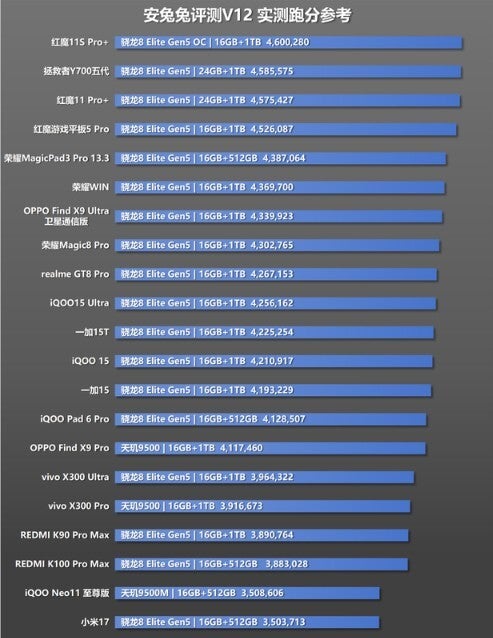
AnTuTu V12 scores. | Image by AnTuTu
The CPU benchmarks will adjust single-core and multi-core use to reflect real-life behavior. Instead of trying to measure maximum clock speed, AnTuTu V12 will note how well the SoC switches between high-frequency power bursts and low-frequency efficiency modes.
The GPU test measures how much adding detailed 3D scenes with soft shadows and realistic lighting will strain the chipset. AnTuTu V12 adds a dynamic latency stress test that analyzes the behavior of the graphics processing unit's memory under various workloads. A brand-new memory fragmentation test will measure how well a device performs as more storage is used over time.
The new version of AnTuTu uses a card-based information feed that organizes content into categories, making it easier to read data from the app. AnTuTu's app adjusts seamlessly, allowing it to be easily read on foldable phones and tablets.
How to Install AnTuTu and the AnTuTu public beta on your Android or iOS devices
For the iPhone, you can install AnTuTu from the App Store by tapping on this link. To install the Version 12 Beta, follow these directions:
- Install Apple TestFlight from the App Store.
- From the Safari browser on your iPhone, go to antutu.com and tap the iOS V12 Public Beta download link, which will send you to an invitation.
- In TestFlight tap on Accept and then tap on Install.
- Open the installed AnTuTu Beta from your Home Screen or via TestFlight.
- If you receive a prompt in Settings > General > VPN & Device Management, approve the profile.
- Allow your phone to sideload apps by going to Settings > Apps > Special App Access > Install Unknown Apps. Select your browser (e.g., Chrome) and toggle on Allow from this source.
- Go to antutu.com/web/download using the mobile browser on your phone. Download the AnTuTu Benchmark V12 Public Beta.
- Download the 3D Bench Plugin: V12 requires a dedicated GPU rendering package. Download the accompanying AnTuTu 3D Bench APK (V12 version) from the same download page.
- Install Both APKs: Open your downloads, tap the main AnTuTu V12 APK to install it, then install the 3D Bench APK.
To verify success: Open the app and check the version number at the bottom of the home screen; it should read V12.x.x-beta.

Popular stories






Latest News






Things that are NOT allowed:
To help keep our community safe and free from spam, we apply temporary limits to newly created accounts: