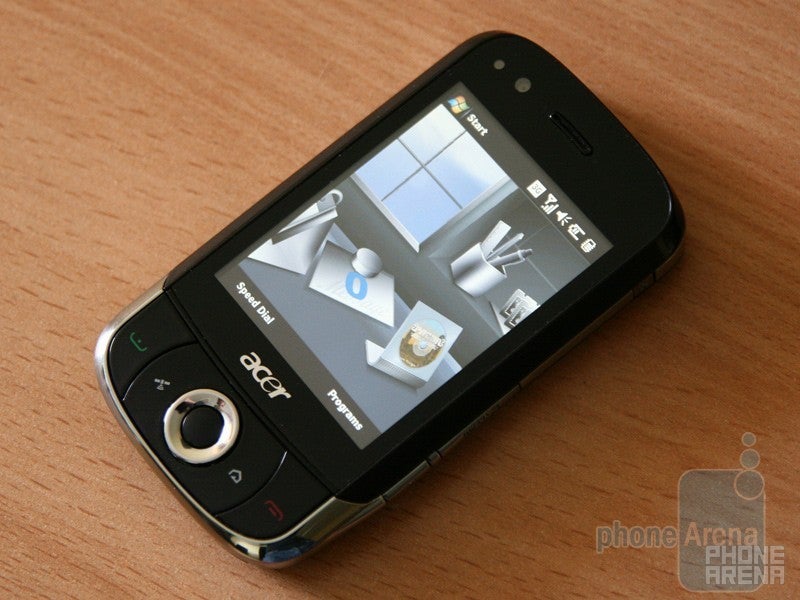
Finally, we´ve got our hands on the Windows Mobile-powered Acer X960. Hold on – this is not just another WM phone. The Acer X960 is actually equipped with the company’s gorgeous OS personalization, called simply Acer Shell. But let’s begin with the appearance of the device, for looks is often more important than performances…
We did not fall in love with the X960 at first sight, but we’ve got to admit – it looks quite cute. It is not too big, with length about the average and width a bit over what´s usual. The 2.8-inch display isn’t huge but at least has VGA resolution that delivers detailed images. Unfortunately, similarly to almost all WM handsets, it becomes illegible when exposed to direct sunlight.
The Acer Shell interface is obviously the most interesting aspect of the phone. It features a virtual 3D office desk, with all kinds of objects scattered around. These are actually shortcuts to over-used functions, such as calls, messages, calendar, weather, music player, etc. Moving the objects around is really funny, especially with the 3D effect that makes them appear smaller as you´re dragging them around.
Recommended For You
The good thing is the personalization does not end here, since the manufacturer has also included additional apps to preview messages, favorite contacts, music playback and so on.
Overall, we have some quite positive impressions of the Acer X960, so stay tuned for our review that is coming soon.
Get Visible as low as $20/mo for 1 year. Limited time offer with code: FRESHSTART
$20
/mo
$25
$5 off (20%)
Offer Ends 6.1.2026 at 11.59pm ET. New members get $5/mo off the $25/mg Visible plan, $35/mo Visible+ plan, or $45/mo Visible+ Pro plan for the first 12 months. Promo code FRESHSTART required at checkout.
Rad Slavov is the Editor-in-Chief at PhoneArena. He joined the media in 2008, right on the cusp of the modern smartphone revolution. Through time and perseverance, he amassed a great deal of knowledge and industry know-how, allowing him to guide and organize the company's growing line-up of talented content creators and ever-expanding content portfolio.
A discussion is a place, where people can voice their opinion, no matter if it
is positive, neutral or negative. However, when posting, one must stay true to the topic, and not just share some
random thoughts, which are not directly related to the matter.
Things that are NOT allowed:
Off-topic talk - you must stick to the subject of discussion
Offensive, hate speech - if you want to say something, say it politely
Spam/Advertisements - these posts are deleted
Multiple accounts - one person can have only one account
Impersonations and offensive nicknames - these accounts get banned
To help keep our community safe and free from spam, we apply temporary limits to newly created accounts:
New accounts created within the last 24 hours may experience restrictions on how frequently they can
post or comment.
These limits are in place as a precaution and will automatically lift.
Moderation is done by humans. We try to be as objective as possible and moderate with zero bias. If you think a
post should be moderated - please, report it.
Have a question about the rules or why you have been moderated/limited/banned? Please,
contact us.








Things that are NOT allowed:
To help keep our community safe and free from spam, we apply temporary limits to newly created accounts: