PhoneArena is looking for new authors! To view all available positions, click here.
  • Home
  • News
  • Easily Root your DROID 4 & 3, RAZR, RAZR MAXX, and BIONIC

Easily Root your DROID 4 & 3, RAZR, RAZR MAXX, and BIONIC

Posted: , by FAUguy

Categories:

Share:

Discuss 27
Easily Root your DROID 4 & 3, RAZR, RAZR MAXX, and BIONIC
With each new Android phone that is released comes the challenge of rooting it. Sometimes it's easy, while other times it can be quite involved.

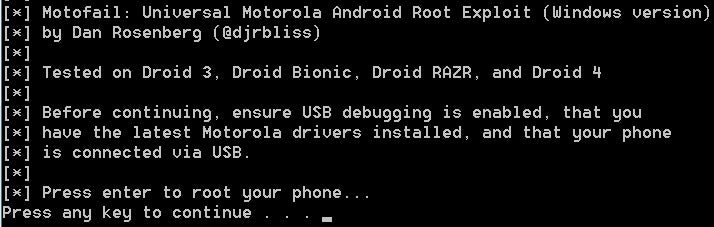
Now users of the Motorola DROID 4, DROID 3, DROID RAZR, DROID RAZR MAXX, and DROID BIONIC can easily root their phone. Thanks to Dan Rosenberg's new MotoFail program for PCs, it can be accomplished in just a few short steps and in less than 5 minutes.

First, you need to make sure you have Motorola 5.4.0 drivers installed on your system. Then download the MotoFail file to your desktop and unzip it. On your phone, go into the Settings/Applications and check "Unknown Sources" and in Development check "USB Debugging". Connect the phone to your PC and select the "Charge Only" on the phone (this may be in the top notification bar). After it is connected, and the Motorola USB drivers find the phone, open the MotoFail folder on the PC and click on the "run.bat" file. This will start the rooting process, and the phone will restart a couple times. When it is done, the program will say the rooting process is completed and you can unplug the phone from the PC. Now you can use Superuser, BusyBox, AdsGone, Titanium Backup, Root Explorer and any other program that requires the phone to be rooted.

source: vulnfactory (Dan Rosenberg)

Easily Root your DROID 4 & 3, RAZR, RAZR MAXX, and BIONIC


Share:

Discuss27

27 Comments

  • Options
    Close


Want to comment? Please login or register.

1. sgogeta4 posted on 14 Feb 2012, 05:58

Now just need the bootloader to be unlocked...

2. iicpaii posted on 14 Feb 2012, 15:54

i get a message saying the following:

* daemon not running. starting it now *
* daemon started successfully *

My phone does NOT restart or do anything.

any ideas?

14. salkatib posted on 04 Jun 2012, 18:49

I got it to work after I checked "Unknown Sources".

3. gfresh404 posted on 14 Feb 2012, 16:20

Does this void warranty?

4. impsybin posted on 14 Feb 2012, 17:43

Answer for #2 post: Try unplugging the phone from the computer. Make sure you have the Motorola Drivers installed on your computer and the USB Debugging checked. Next, try plugging the phone back into the computer, but use a different USB port. If you are using a PC, typically the ports on the back of the computer work the best. Attempt to run again, and if it fails again, try to download & unzip the program again. If it fails yet again, I have no clue.

Answer for #3 post: YES! Rooting a phone allows you access to everything the phone company doesn't want you to have access to. Some of these things will turn your phone into a very expensive paperweight. Some of these things give you access to abilities like backing up your apps & data.

5. iicpaii posted on 15 Feb 2012, 14:41

turned out that it was my drivers. i reinstalled them. couldn't think of an easier way to root your device.

Thank you

19. ryane84 posted on 20 Aug 2012, 18:32

how do i root my razor maxx can it be done?is it safe?

6. WillSann posted on 02 Mar 2012, 18:40

great,.,,,,easy and smooth. Just fallow the instructions

20. ryane84 posted on 20 Aug 2012, 18:34

where do i find instructions

7. jfelici455 posted on 04 Mar 2012, 19:05

After rooting the Razor maxx, will tethering work with this procedure ...
Also how do you unroot the phone

8. Twashbush posted on 05 Mar 2012, 21:57

i just did this and i still am unable to use any of the wifi tethering apps ( seems verizons wifi tething program still blocks it ) if you are planning a pc/laptop tether just get easytether or pdanet they both work without rooting

9. jfelici455 posted on 07 Mar 2012, 05:42

I think this root procedure is useless, There has to be another root procedure out there..... There may be another file or process to add to this procedure to make the tethering work.

10. impsybin posted on 07 Mar 2012, 19:45 1

Rooting does a lot more than allow you to bypass paying for tethering. If you really want tethering to work, pay for it or get yourself a ROM with it built into the ROM. Calling the one click root procedure useless is just ignorant. If you can't even get the tethering to work on your own, I highly doubt that you are competent enough to use ADB and Command Prompt aptly enough to be able to root your phone through traditional manners. I'm not meaning to flame you, comments like that just annoy me.

11. MattLung31 posted on 21 Apr 2012, 20:16

how can i unroot my droid razr maxx? it was very helpful and easy to root it but i was wondering if there is a way to unroot it just a s easily?

12. batantx posted on 07 May 2012, 12:43

Well my phone reboots, but then the script keeps running while it's rebooting. "see below" Any suggestions??

[*] Waiting for phone to reboot.
* daemon not running. starting it now *
* daemon started successfully *
[*] Attemping persistence...
remount succeeded
1146 KB/s (22364 bytes in 0.019s)
error: device not found
[*] Cleaning up...
error: device not found
[*] Rebooting...
error: device not found
error: protocol fault (no status)
[*] Exploit complete!
[*] Press any key to exit.
Press any key to continue . . .

13. w5aus posted on 17 May 2012, 00:39

before rooting ppl with problems, do a restore than start new.

15. hit689 posted on 23 Jun 2012, 20:38

dude you are the greatest. it took less than 5 mins to root . its so easy just follow his steps and it works. thanks alot !!!

16. AlphaDog posted on 11 Jul 2012, 18:41

My phone has upgraded to ICS 4.0.4. System version 6.16.211.

Will this procedure work on my phone now? Or do I need to wait for an ICS root?
A quick reply from someone in the know would be greatly appreciated.

Thanks

17. apope89 posted on 18 Jul 2012, 09:23

My phone has that new system update and I just tried to root mine using this procedure and it will not work. It fails to copy all the files to the phone.

18. ryane84 posted on 20 Aug 2012, 17:01

i want to know if i can root my razor maxx?if i can can you tell me how

21. impsybin posted on 21 Aug 2012, 07:10

To my knowledge, this method worked for gingerbread, not ice cream sandwich. Look on droidrzr.com and find matt's utility. I used the method here to root all three razrs in my family's plan. The utility method works the same for both the razr and the maxx. It also lets you go back to stock pretty easy.

22. ryane84 posted on 22 Aug 2012, 11:50

How can i root my razar maxx back to gingerbread i have ice cream sandwich and i hate it

23. ryane84 posted on 22 Aug 2012, 12:49

I went to droidrzr.com but i couldn't find a way to email them i want someone to tell me if i can root my razor max that has ice cream sandwich on it back to gingerbread?if i can can you tell me how to root my razor max and put gingerbread back on?

24. christopherj87 posted on 11 Sep 2012, 02:36

I just tried this 3 times on my razr maxx and it didnt work. it kept on saying that installation failed or something like that.

25. christopherj87 posted on 11 Sep 2012, 02:41

It keeps on saying after deploying payload "cannot stat 'motofail': no such file on directory. then further down "cannot copy su' to' then more things like that. is it my device?? or the new android system?

26. trianglerelic posted on 03 Feb 2013, 20:58

I keep getting the following error and it fails to root:

[*]
[*] Motofail: Universal Motorola Android Root Exploit (Windows version)
[*] by Dan Rosenberg (@djrbliss)
[*]
[*] Tested on Droid 3, Droid Bionic, Droid RAZR, and Droid 4
[*]
[*] Before continuing, ensure USB debugging is enabled, that you
[*] have the latest Motorola drivers installed, and that your phone
[*] is connected via USB.
[*]
[*] Press enter to root your phone...
Press any key to continue . . .
[*]
[*] Waiting for device...
[*] Device found.
[*] Deploying payload...
failed to copy 'motofail' to '/data/local/motofail': Permission denied
Unable to chmod /data/local/motofail: No such file or directory
[*] Owning phone...
/system/bin/sh: /data/local/motofail: not found
[*] Rebooting device...
[*] Waiting for phone to reboot.
[*] Attemping persistence...
remount failed: Operation not permitted
failed to copy 'su' to '/system/bin/su': Read-only file system
Unable to chmod /system/bin/su: No such file or directory
link failed Read-only file system
failed to copy 'busybox' to '/system/xbin/busybox': Read-only file system
Unable to chmod /system/xbin/busybox: No such file or directory
/system/bin/sh: /system/xbin/busybox: not found
failed to copy 'Superuser.apk' to '/system/app/Superuser.apk': Read-only file sy
stem
[*] Cleaning up...
/system/bin/sh: /data/local/motofail: not found
rm failed for /data/local/motofail, No such file or directory
[*] Rebooting...
[*] Exploit complete!
[*] Press any key to exit.
Press any key to continue . . .

Any suggestions please? This is for my GF's Motorola Razr Maxx, She is running Android version 4.0.4, System version 6.16.211.xt912verizon.en.us

27. pako123 posted on 07 Mar 2013, 18:49

por que se me reinicia el telefono una vez roooteado y con acceso concedido a superusuario y me pone swaper activator y otra vez se reinicia y se reinicia ayuda por favor!!!

Want to comment? Please login or register.

Hot Phones

  • Samsung Galaxy S4Samsung Galaxy S4
  • Apple iPhone 5Apple iPhone 5
  • Samsung GALAXY Note IISamsung GALAXY Note II
  • HTC OneHTC One
  • Sony Xperia ZSony Xperia Z
  • Google Nexus 4Google Nexus 4
  • LG Optimus GLG Optimus G
  • Nokia Lumia 920Nokia Lumia 920