Kentucky launches Kentucky mobile ID app for iPhone
The app is now available on the App Store. Kentucky residents will have to finish a verification process in order to access their digital ID. This process includes scanning your physical license and taking a selfie. After the process is completed, you can use that ID exclusively at TSA checkpoints in more than 250 airports.
Kentucky Gov. Andy Beshear said that the Mobile ID app offers residents of Kentucky more options for air travel and protects them from identity theft.
We want our families to be safe and feel safe while they are traveling, and this is just another step Team Kentucky is taking to increase safety for our people.
Kentucky Gov. Andy Beshear
This digital ID doesn't replace your physical license, though. You should still carry it with you at all times. For now, if you get pulled over or interact with law enforcement, you'll still have to present your physical license and not the app.
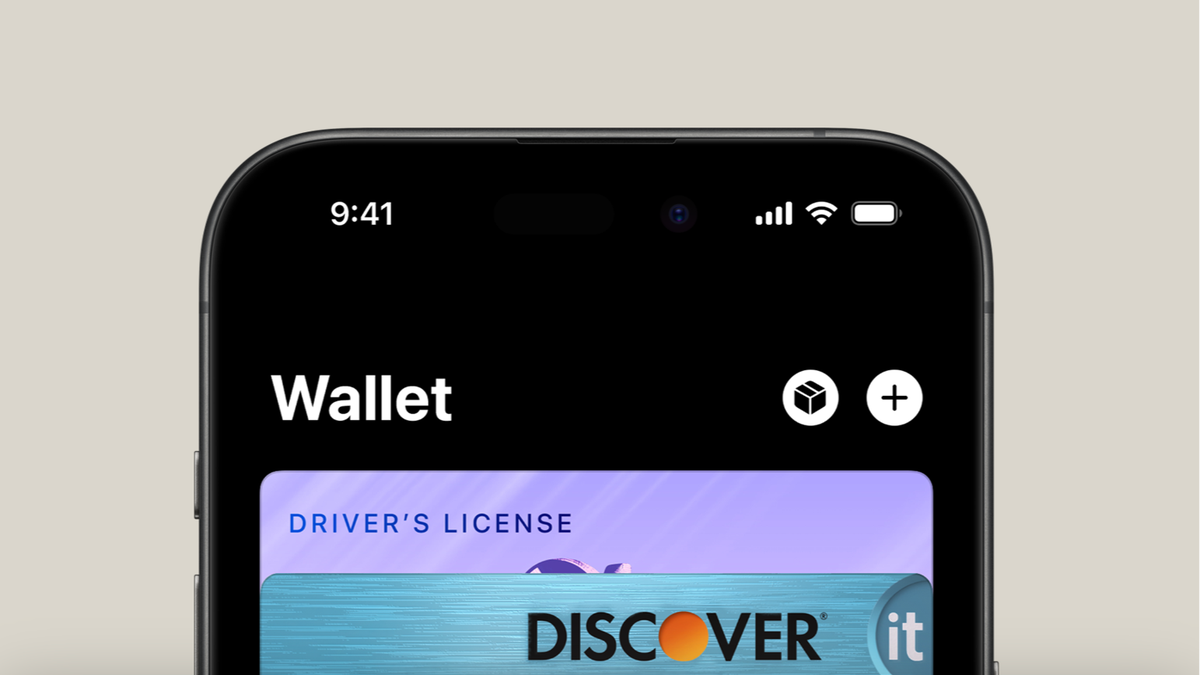
But that's not all. Apparently, Kentucky is working on adding Apple Wallet support for this digital ID. At the moment, the mobile driver's license or ID system is only supported on the Kentucky mobile ID app. But that's going to change in the summer.
Recommended For You
Would you use a digital ID on your phone if it worked everywhere?
17 Votes
Yes, I’d switch immediately
41.18%
Maybe, I’d still want my physical ID
11.76%
Only for airports and travel
11.76%
No, I don’t trust digital IDs
35.29%
Kentucky is actively working with Apple on Apple Wallet support, and the feature is reportedly going to launch later this year. There's also ongoing work with Google and Samsung to make the Kentucky Mobile ID and Mobile Driver's License available in their digital wallets as well.
There will be a new Kentucky driver licensing system that launches in Summer 2026 called KINDL (Kentucky Information Network for Driver Licensing). The support for Apple Wallet is expected to come with this new system.
Digital IDs are getting more and more popular
Image Credit - Apple
Digital IDs aren't just a Kentucky thing. The idea of storing your driver's license or state ID on your phone is starting to take off across the U.S. and beyond. Apple's Wallet app already lets people in a number of states add their driver’s license or state ID to their iPhone or Apple Watch, and those digital IDs are accepted at more than 250 TSA checkpoints for domestic travel in the U.S. right now.
Apple has also introduced a standalone Digital ID feature that lets users upload their U.S. passport information into Wallet, which can be presented at airports instead of a physical passport (though not for international travel).
Android users aren't left out, either. Google Wallet supports digital IDs and driver’s licenses too. You can add them securely and present them at TSA checkpoints where supported, with the data encrypted on your device and shared only when you choose.
Samsung Wallet has its own version of this feature as well: in some states, people can add a mobile driver's license or state ID directly to their Samsung phone or watch and use it at participating airport security checkpoints.
States like Georgia have expanded their digital ID programs to support both Apple Wallet and Samsung Wallet.
But across all platforms, officials still recommend carrying a physical ID as a backup, because digital acceptance isn't universal yet and law enforcement or other checkpoints may still require the physical card.
I can't wait for digital IDs to work everywhere
This is one of those features I'm genuinely excited about. The idea of having my ID on my phone – the same device I already double-check before leaving the house – just makes sense. Airports are the perfect place to start, and once we all get used to tapping our phones instead of pulling out a wallet, it's going to be hard not to want this everywhere.
It's still early days, but seeing more states and big tech companies move in the same direction makes me hopeful. When digital IDs finally work at traffic stops, hotels, and everyday situations, it's going to feel like a real upgrade to daily life. Until then, I'll unfortunately carry both – but I’m definitely ready for the future where I don't have to.
Mint Mobile's 6-month plans now cost $10/mo
$10
/mo
$35
$25 off (71%)
Mint Mobile is celebrating its 10-year anniversary with a special offer on its six-month subscription plans. For a limited time, you can get your preferred tier (6GB, 17GB, 23GB or unlimited) for just $10/mo. That saves you between 50% and 71% on the carrier's mobile plans, making it way easier to recommend.
Iskra Petrova is a news writer at PhoneArena, where she covers mobile tech news and maintains the site’s device hubs with the latest leaked specs, rumors, and official details for upcoming phones. She joined PhoneArena in 2020 after three years in technical support for Microsoft Exchange, giving her practical experience with software infrastructure and troubleshooting. Iskra holds a Master’s Degree in Literature, which helps her translate complex tech details into clear, reader-friendly coverage. She is a daily Apple ecosystem user, while also closely following Sony Xperia’s camera-focused phones and Samsung’s Galaxy Z Flip series.
A discussion is a place, where people can voice their opinion, no matter if it
is positive, neutral or negative. However, when posting, one must stay true to the topic, and not just share some
random thoughts, which are not directly related to the matter.
Things that are NOT allowed:
Off-topic talk - you must stick to the subject of discussion
Offensive, hate speech - if you want to say something, say it politely
Spam/Advertisements - these posts are deleted
Multiple accounts - one person can have only one account
Impersonations and offensive nicknames - these accounts get banned
To help keep our community safe and free from spam, we apply temporary limits to newly created accounts:
New accounts created within the last 24 hours may experience restrictions on how frequently they can
post or comment.
These limits are in place as a precaution and will automatically lift.
Moderation is done by humans. We try to be as objective as possible and moderate with zero bias. If you think a
post should be moderated - please, report it.
Have a question about the rules or why you have been moderated/limited/banned? Please,
contact us.










Things that are NOT allowed:
To help keep our community safe and free from spam, we apply temporary limits to newly created accounts: