In addition to getting a bloatware-free Android experience, there are plenty of other advantages of owning a Pixel phone. You get to try the Android updates before anyone else, and if you have one of the latest Pixel models like the Pixel 10, you can also enjoy some really cool features like Add Me and Magic Cue.
While all these capabilities are great, I discovered a very annoying volume limitation of Pixel phones while going through Reddit recently. Here's what the problem is exactly about and what's the best thing you can do to work around it.
This one volume quirk could really drive you nuts
While going through r/AndroidQuestions, I found a post from a Pixel 8 Pro user who has the Android 17 update installed, asking whether it's possible to increase the notification volume while keeping the ring volume at zero. In case you are not aware, if you move the ring volume slider all the way to zero, then the notification sound is also automatically disabled.
You won't be able to only increase the notification volume and will see a message that says, "unavailable because the ring is muted." This limitation isn't exclusive to the Pixel 8 Pro, but you can spot it in all the Pixel models, including the latest Pixel 10 family.
Recommended For You
As of now, there is no official setting that you can enable or disable to get rid of this restriction. However, there are two very smart workarounds that could actually help you in this situation.
Use the Do Not Disturb function
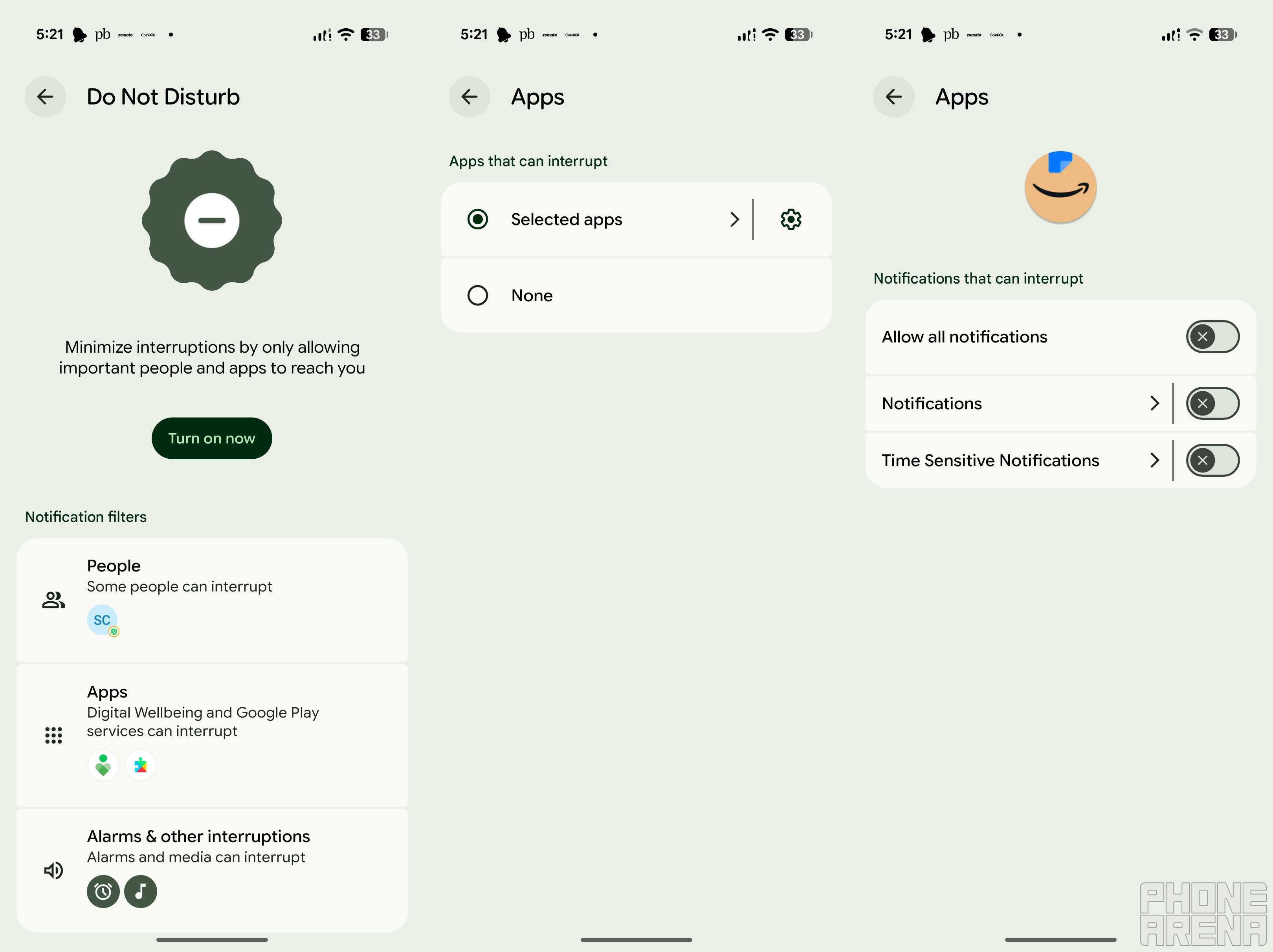
Configuring Do Not Disturb mode in Pixel. | Image by PhoneArena
Similar to all Android devices, Pixel phones also come with the Do Not Disturb feature. As you can guess by its name, once you enable it, your phone will ensure that you are not disturbed by anything like calls or message notifications. This feature is basically used during meetings or situations when you don't want calls to interrupt your workflow; however, you can use it to solve the problem at hand as well.
What you basically need to do is configure the Do Not Disturb feature to allow notifications from selected applications. This way, you will continue to hear the notification sound and see its pop-up appearing on the screen while also not getting disturbed by calls. Here's how you can configure this on a Pixel phone:
Open the Settings menu and select Modes
Choose Do Not Disturb
Select Apps, and tap the gear icon next to Selected apps
Hit Add apps and choose the app whose notification you want to receive even when the DND mode is enabled
Enable Allow all notifications, or turn on the toggle next to the type you want to receive
Set your ringtone to a silent audio file
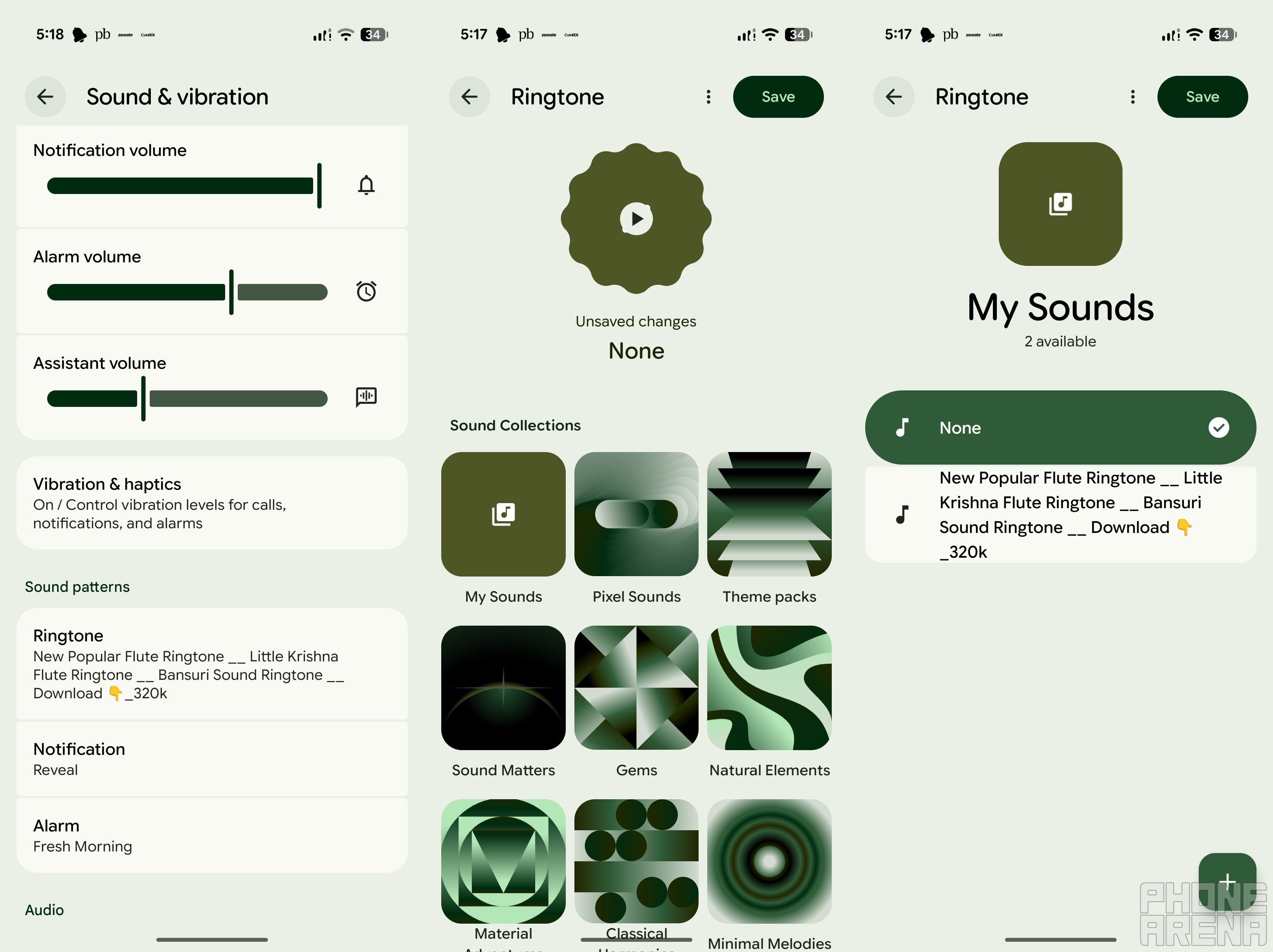
Setting Ringtone in Pixel phone. | Image by PhoneArena
This is the workaround that I personally perform on my Pixel 10. You need to basically set a silent audio file as your ringtone.
This way, you will not hear the ringing sound even when the ring volume is set to its highest level. The device will simply vibrate. Fortunately, you don't need to download a silent audio file from the internet, as the "None" option in the Sound and Vibration settings of Pixel phones performs the same function.
Here's exactly what you need to do:
Open settings and go to Sound & vibration
Select Ringtone, and then My Sounds
Choose None from the available options, and then tap Save at the top-right corner
What one sound settings change do you really want to see in Pixel phones?
14 Votes
Separate ringtone and notification volume.
71.43%
Per-app volume controls.
21.43%
More customizable Do Not Disturb settings.
7.14%
More controls to customize vibration intensity.
0%
It's actually an Android problem
Interestingly, the problem isn't exclusive to Pixel phones, but you will find it on almost all Android devices. I checked it on the Oppo Find X9 Pro and the Samsung S26 Plus as well, and on both devices you can't increase the notification volume when the ringer is set to zero. So basically, it appears to be an Android limitation.
I really hope that Google quickly addresses this limitation. Until then, you can try either of the workarounds I mentioned above.
Mint Mobile's 6-month plans now cost $10/mo
$10
/mo
$35
$25 off (71%)
Mint Mobile is celebrating its 10-year anniversary with a special offer on its six-month subscription plans. For a limited time, you can get your preferred tier (6GB, 17GB, 23GB or unlimited) for just $10/mo. That saves you between 50% and 71% on the carrier's mobile plans, making it way easier to recommend.
Aman Kumar is a news writer at PhoneArena covering Google Pixel phones, Android features, AI-powered smartphone tools, and mobile tech news. Before joining PhoneArena, he spent over five years writing about consumer technology for publications like MakeUseOf, How-To Geek, and Guiding Tech. His current daily drivers are the Pixel 10 and Samsung Galaxy S26 Plus, while his red iPhone SE (2nd gen) remains a personal favorite. Aman also appreciates bold smartphone experiments and still considers the Nokia N-Gage one of the industry’s most iconic designs.
A discussion is a place, where people can voice their opinion, no matter if it
is positive, neutral or negative. However, when posting, one must stay true to the topic, and not just share some
random thoughts, which are not directly related to the matter.
Things that are NOT allowed:
Off-topic talk - you must stick to the subject of discussion
Offensive, hate speech - if you want to say something, say it politely
Spam/Advertisements - these posts are deleted
Multiple accounts - one person can have only one account
Impersonations and offensive nicknames - these accounts get banned
To help keep our community safe and free from spam, we apply temporary limits to newly created accounts:
New accounts created within the last 24 hours may experience restrictions on how frequently they can
post or comment.
These limits are in place as a precaution and will automatically lift.
Moderation is done by humans. We try to be as objective as possible and moderate with zero bias. If you think a
post should be moderated - please, report it.
Have a question about the rules or why you have been moderated/limited/banned? Please,
contact us.









Things that are NOT allowed:
To help keep our community safe and free from spam, we apply temporary limits to newly created accounts: