I bought the Pixel 10 the day it became available in my country. Since it has been almost a year of using this phone, I was confident that I was aware of everything it can do.
But quite recently I decided to go on a hunt for some lesser-known Pixel features. Surprisingly, I found these seven features on my Pixel 10 that I didn't know existed on my phone.
The Now Playing app
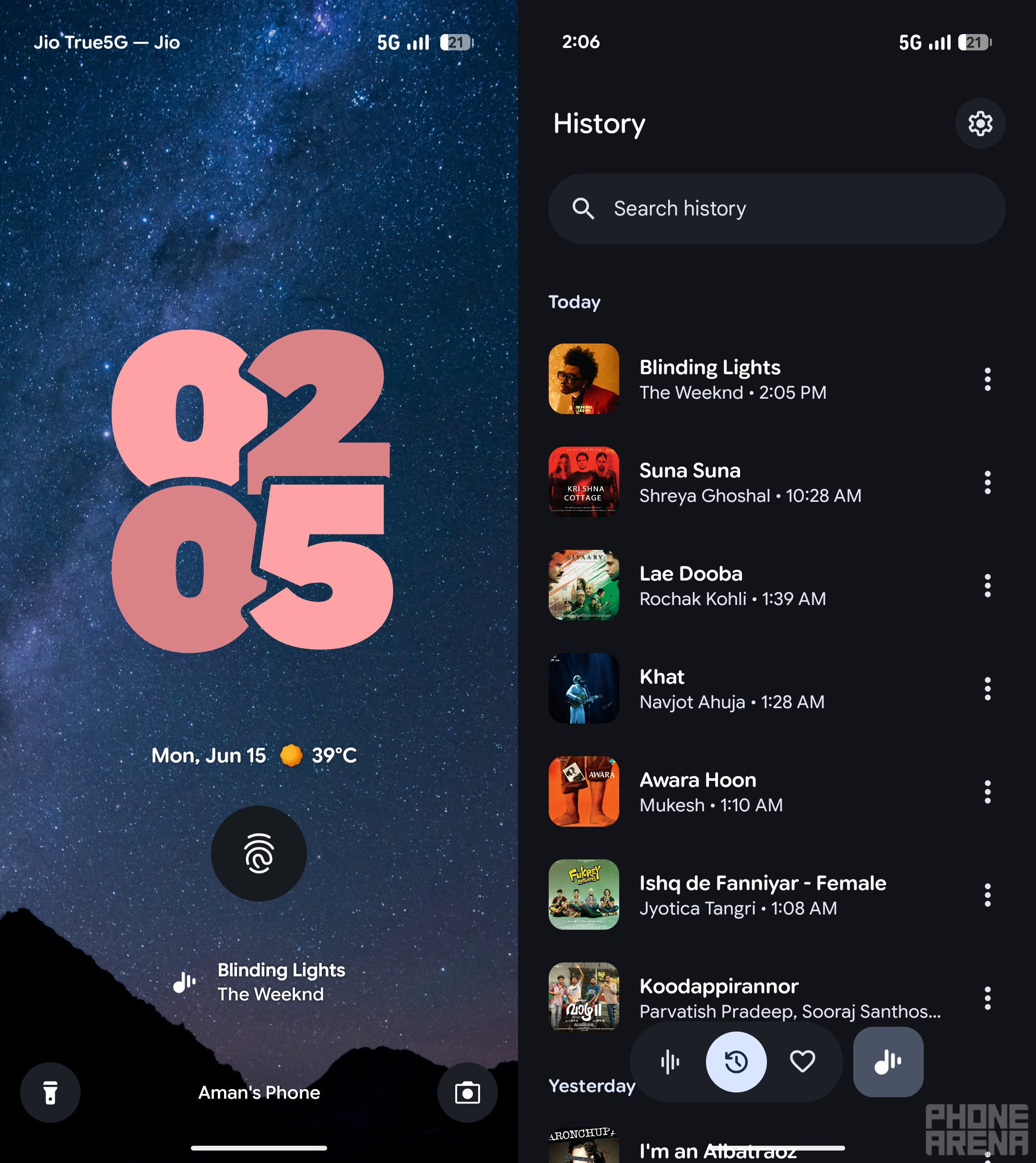
The Now Playing app. | Image by PhoneArena
I used to always rely on applications like Shazam to find out the names of songs that were playing in my surroundings. While the app is great, it requires a lot of manual work. You need to open it, tap the listen button, and then Shazam will start its process of identifying the music.
The Now Playing app, on the other hand, works in the background and constantly and automatically recognizes the music that's being played near you. It doesn't require any manual work; instead, it automatically shows the name of the song on the lock screen. Furthermore, it also keeps a log of all the previously identified songs, which you can check by opening the History section within the app.
Overview selection
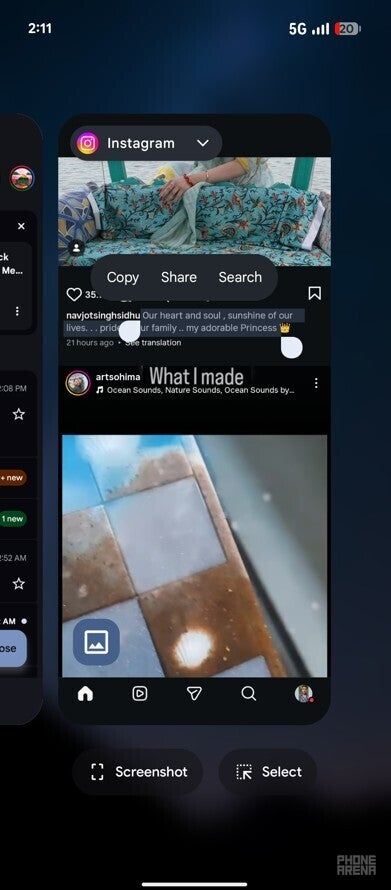
Overview selection feature of Pixel 10. | Image by PhoneArena
Selecting texts on the Pixel phone is easy. You simply need to tap and hold the text you want to select, and then the context menu will appear with the different options like cut, copy, and select all. However, you must have noticed that there are some applications that don't allow you to select certain parts of text displayed in them.
For instance, you can't simply select the captions mentioned under the Instagram post using the regular text selection method. But on Pixel phones, there's a clever trick that you can use to select text that can't be selected using the regular method.
Let's say you want to copy an Instagram caption. Then, open the Instagram app and navigate to the post whose caption you want to copy. Next, open the Recent Apps tab by swiping up from the bottom of the phone.
Recommended For You
Now, you can select the text you want to copy directly from the app preview. You will also get all the context menu options that appear when you use the regular method.
New way to open the Clocks app
Similar to any other application, you can launch the Clocks app by simply searching for it and then tapping on its icon. However, I recently found an even quicker way to open it. You simply need to go to the Quick Settings menu by swiping down from the top and then tap the time that's being displayed at the top-left corner.
Set rules
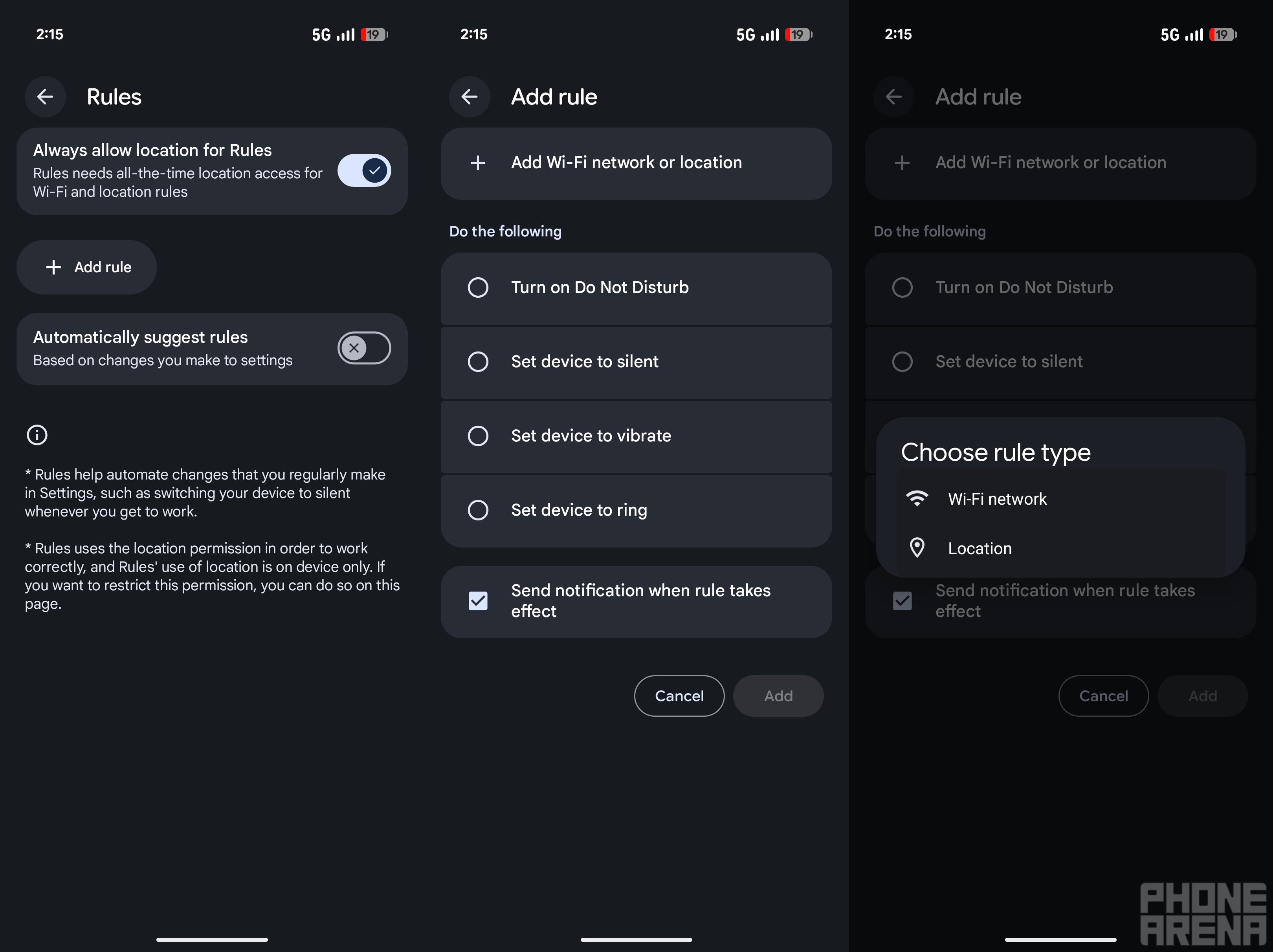
Rules feature of Pixel phones. | Image by PhoneArena
You would definitely not want your smartphone to ring loudly while you are in the middle of a meeting in your office. To ensure it doesn't happen, you can put your phone on silent whenever you enter your office premises. But there may be times when you forget to do this.
For these situations, you can rely on the rules capability of Pixel phones. In this particular case, you can set a rule that your Pixel phone will automatically enable silent mode when it gets connected to your office Wi-Fi.
In addition to Wi-Fi, you can also configure your Pixel phone to rely on your current location to know when to run a configured rule. For instance, you can create a rule that your smartphone automatically turns on silent mode when you reach a particular location.
Quick Tap gesture
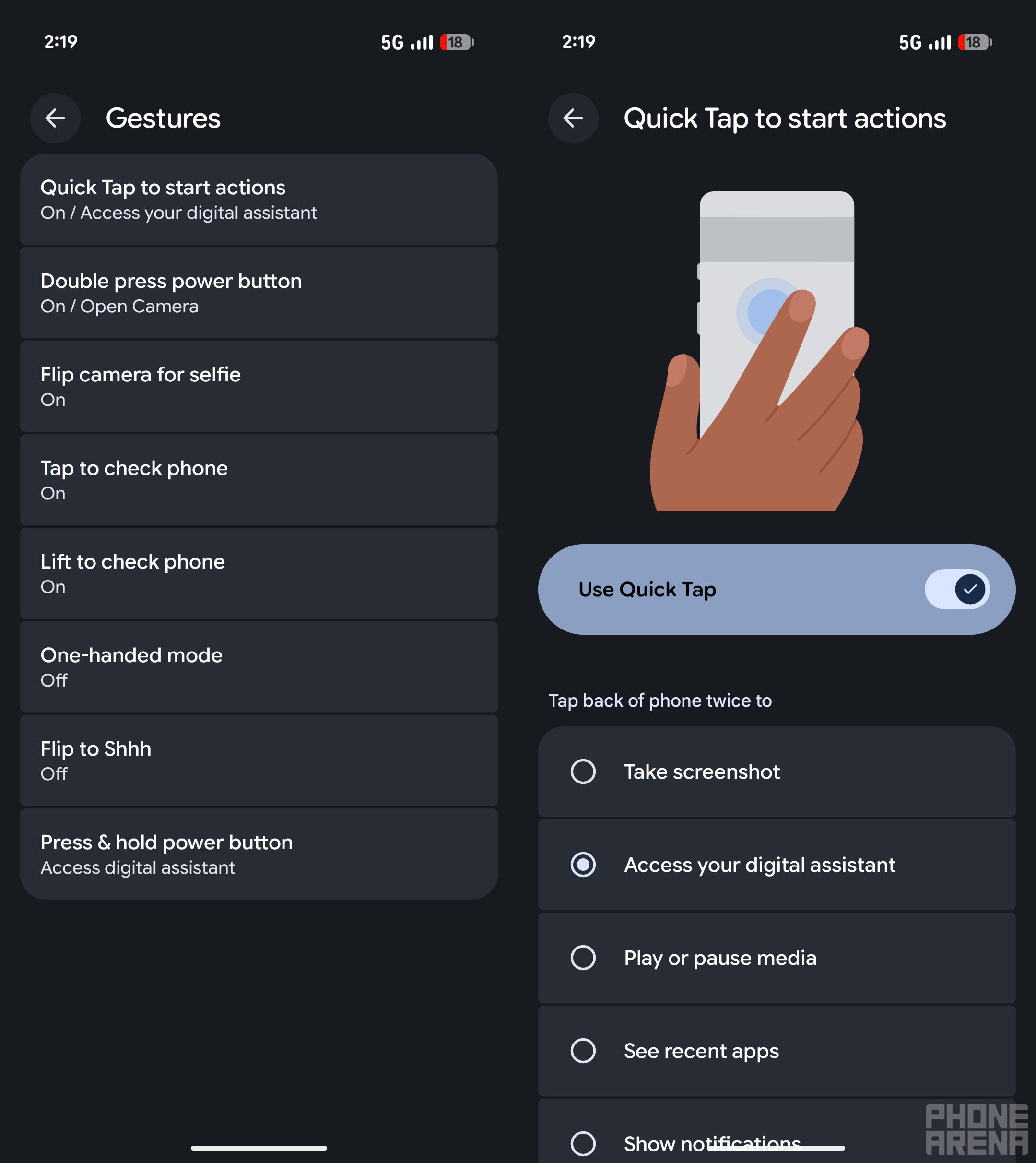
Quick Tap gesture feature of Pixel 10. | Image by PhoneArena
I have become a big fan of gesture controls ever since I used one on a Motorola phone to turn on its flashlight. For reference, you can shake a Motorola phone twice to toggle on or off its flashlight. Pixel phones also come with some really cool gesture controls, especially the ones that you can activate by simply double-tapping the G logo at the back of the phone.
You need to open the Settings app and navigate to System > Gestures > Quick Tap to start actions. Then, turn on the Use Quick Tap toggle and choose the action that you want your phone to perform when you double tap the G logo at its back. I have configured it to take a screenshot on my device.
It's worth noting that this feature only works when your phone is unlocked. I have also noticed that it works best when used without any phone case, as it allows the taps to get properly registered.
Add shortcuts to the home screen
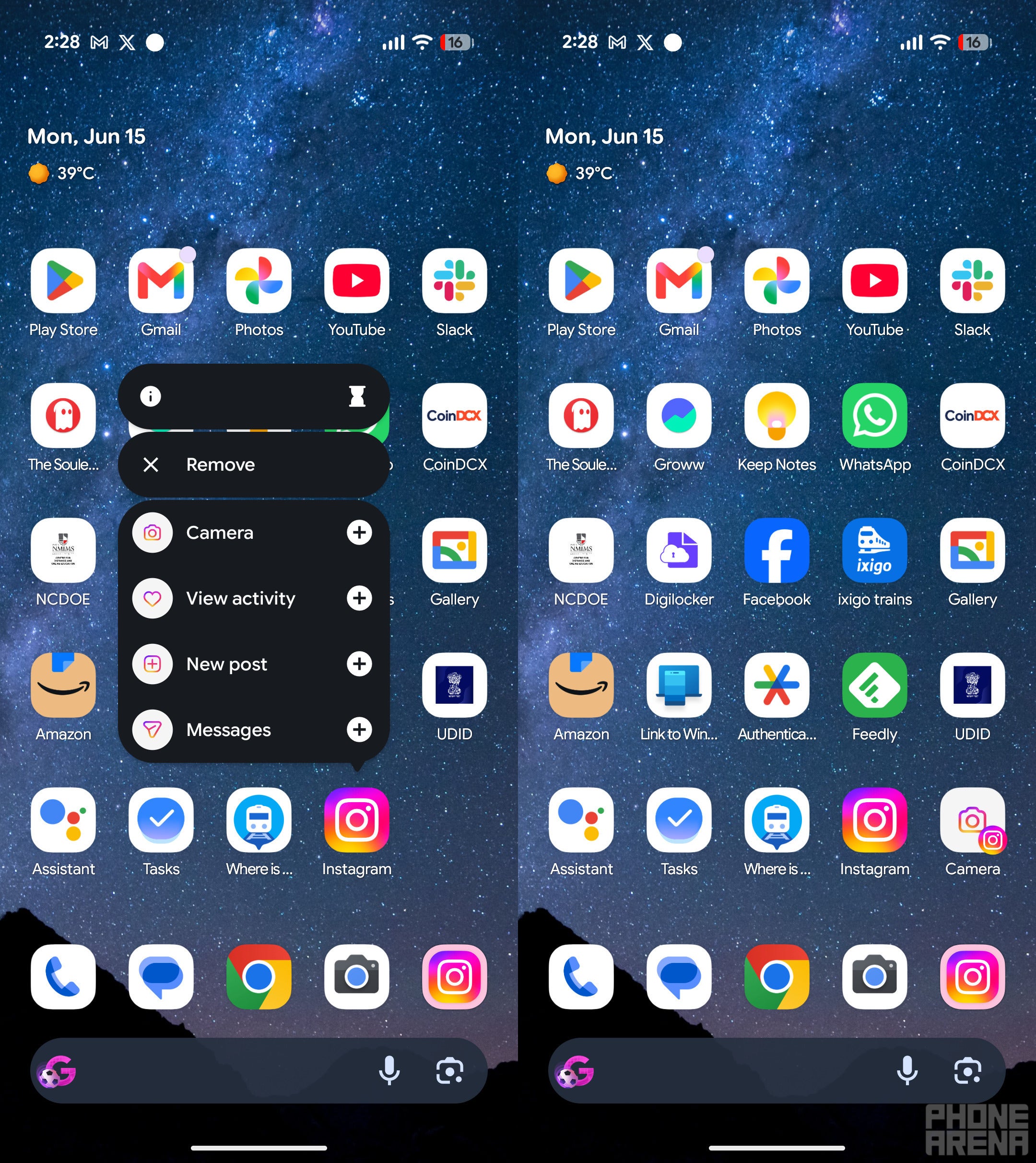
Shortcuts of Instagram features. | Image by PhoneArena
Pixel phones allow adding a particular part of an application that you regularly use directly to your home screen. For instance, if you tap and hold the Instagram icon, your phone will intelligently determine and show things with which you regularly engage. You can then tap the plus icon next to it to add a shortcut directly to the home screen.
I, along with many other users, have found this capability really useful. A Redditor even mentioned that it helped save the battery life of their handset to some extent.
Hold for me and direct my call
Google phones offer plenty of calling features, but Hold for Me and Direct My Call are the two I like the most. The Hold for Me feature is really helpful when you are talking with customer support on a call. There are times when the customer care executive puts your call on hold while they are checking something.
During this period, you need to hear the tone, waiting for them to come back online. Instead of you personally waiting for them, you can enable the Hold for Me feature, which will automatically notify you when the tone has stopped and the customer care executive is back.
The Direct My Call is another handy feature, which listens to automatic calls on your behalf and then gives you tappable options to select. This basically saves you from listening to robotic company calls and having to remember which number corresponds to which option. The feature will simply show you a tappable number, which you can select to register your response.
Which of these Pixel features you liked the most?
32 Votes
The Now Playing app.
28.13%
Overview selection.
6.25%
New way to open the Clocks app.
3.13%
Set rules.
9.38%
Quick Tap gesture.
18.75%
Add shortcuts to homescreen.
3.13%
Hold for me and direct my call.
31.25%
There's definitely plenty more capabilities
While the above are the features that I recently found, I'm confident there are many more I haven't yet found. The exciting thing is that Google keeps adding new features to its phones with almost every update. For instance, the March Feature Drop added plenty of new things to the phones.
That said, I would really appreciate you using the comment section for sharing Pixel features that you think are underrated and more users should know about.
Get iPhone 18 Pro with Visible, get $480 off!
$719
/mo
$1199
$480 off (40%)
On the Visible+ Pro plan, you get access to 5G Ultra Wideband data on Verizon's fastest network. Along with unlimited roaming across Mexico and Canada, 2 days of Global Pass per month, 3x hotspot speeds, 4K streaming, and Smartwatch service.
Aman Kumar is a news writer at PhoneArena covering Google Pixel phones, Android features, AI-powered smartphone tools, and mobile tech news. Before joining PhoneArena, he spent over five years writing about consumer technology for publications like MakeUseOf, How-To Geek, and Guiding Tech. His current daily drivers are the Pixel 10 and Samsung Galaxy S26 Plus, while his red iPhone SE (2nd gen) remains a personal favorite. Aman also appreciates bold smartphone experiments and still considers the Nokia N-Gage one of the industry’s most iconic designs.
A discussion is a place, where people can voice their opinion, no matter if it
is positive, neutral or negative. However, when posting, one must stay true to the topic, and not just share some
random thoughts, which are not directly related to the matter.
Things that are NOT allowed:
Off-topic talk - you must stick to the subject of discussion
Offensive, hate speech - if you want to say something, say it politely
Spam/Advertisements - these posts are deleted
Multiple accounts - one person can have only one account
Impersonations and offensive nicknames - these accounts get banned
To help keep our community safe and free from spam, we apply temporary limits to newly created accounts:
New accounts created within the last 24 hours may experience restrictions on how frequently they can
post or comment.
These limits are in place as a precaution and will automatically lift.
Moderation is done by humans. We try to be as objective as possible and moderate with zero bias. If you think a
post should be moderated - please, report it.
Have a question about the rules or why you have been moderated/limited/banned? Please,
contact us.













Things that are NOT allowed:
To help keep our community safe and free from spam, we apply temporary limits to newly created accounts: