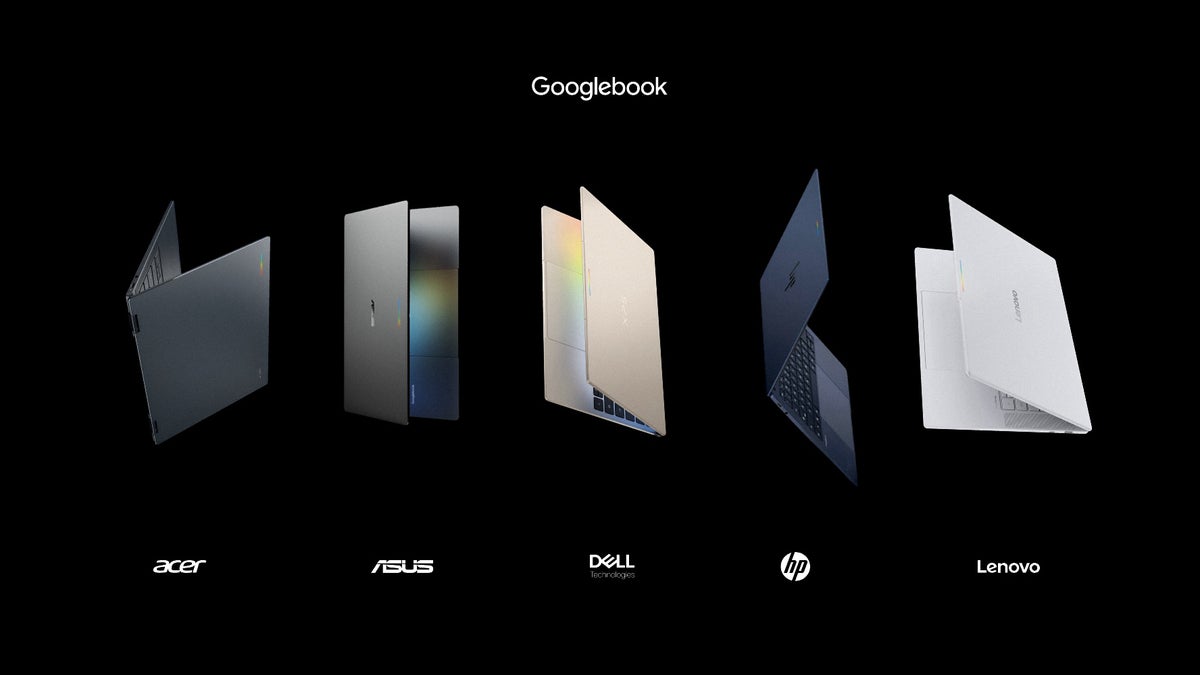
Googlebook pre-orders are live, and Google's new Android-based laptop category shows up with five flagship models from Acer, Asus, Dell, HP and Lenovo, starting at $899. If you carry a Pixel 11 Pro XL or any of the best Android phones, the entire pitch is that your laptop stops treating that phone like a stranger.
Five Googlebook models, and only one of them actually costs $899
Google announced the launch tolday on its blog, with pre-orders opening on the Google Store, Best Buy and other select retailers. Devices reach shelves on October 4 in the US, and on October 5 in Canada, the UK, Ireland, France, Germany and Australia.
If you use an Android phone, your laptop shouldn't treat it like a stranger.
John Solomon, Vice President and General Manager of Laptops, Tablets and Android Enterprise at Google, in Google's Googlebook announcement blog post, September 21, 2026
That $899 figure is worth sitting with for a second, though. It repeats throughout the announcement, but the spec sheet shows it belongs to the Acer convertible alone. The XPS Googlebook opens at $1,199, and the HP, Lenovo and Asus models all start at $1,299, which is MacBook Air money rather than Chromebook money.
Poll
146 Votes
At these prices, which Googlebook makes sense to you?
The $899 Acer convertible, the only sane entry point
27.40%
The $1,199 XPS, thinnest and lightest of the five
10.96%
A $1,299 model, if the Gemini features deliver
9.59%
None, I'd put that money toward a MacBook Air
30.14%
None, my Chromebook still covers everything I need
21.92%
What a Googlebook really is, and why ChromeOS ended up here
Google has spent the past couple of years folding its two desktop efforts together, and we covered the plan to replace ChromeOS with an Android-based desktop system back when it was still turning up in job listings.
Recommended For You
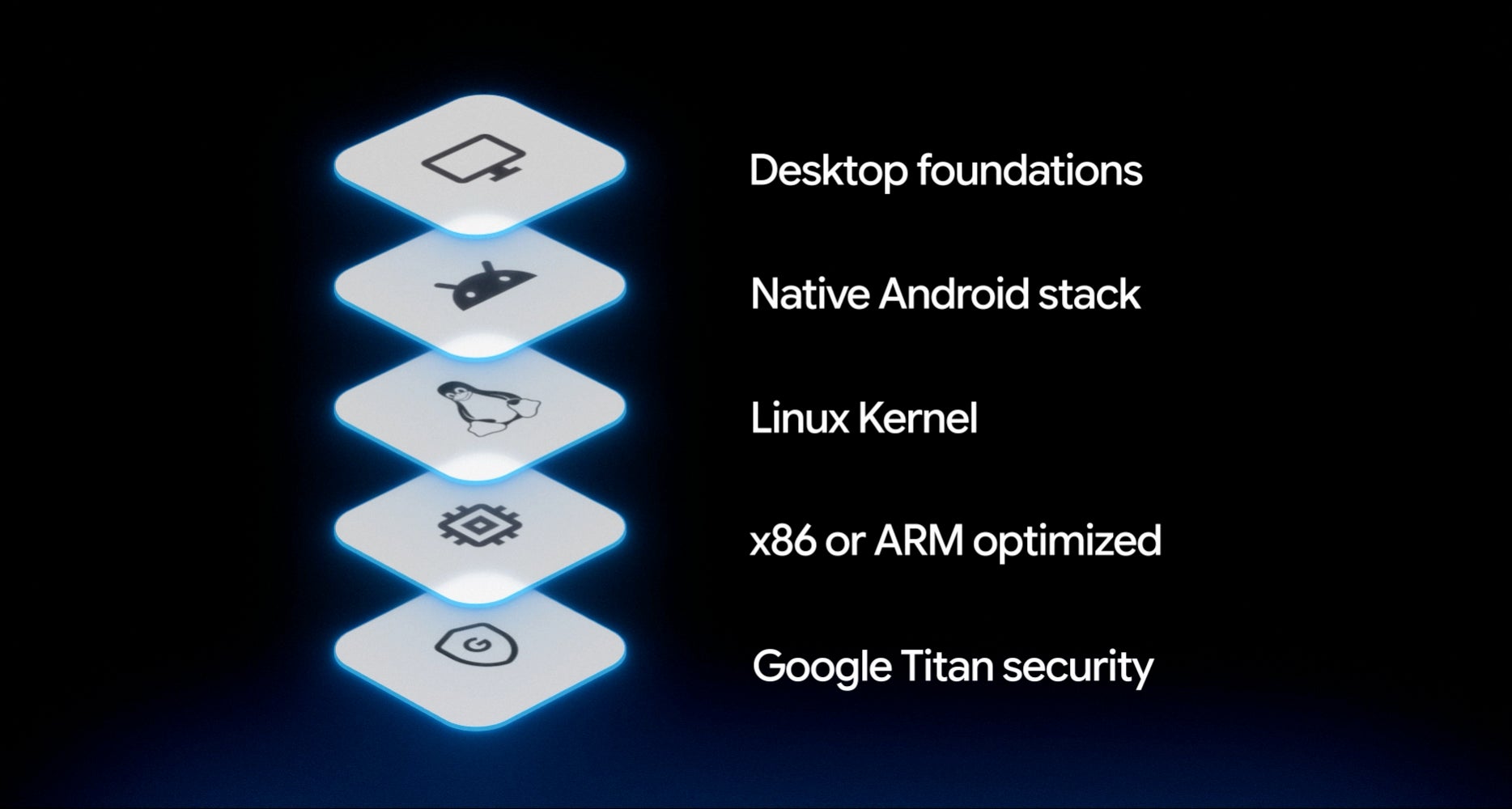
Googlebook runs a native Android stack on a Linux kernel, with desktop foundations carried over from ChromeOS. | Image by Google
What ships is a native Android stack running on a Linux kernel, optimized for x86 or ARM, sitting on desktop foundations inherited from ChromeOS and anchored by Google Titan security. The practical difference is where your software comes from, since apps arrive through Google Play instead of living as web apps in a browser tab. Existing Chromebooks aren't going anywhere and keep their update support, but this is clearly where the line continues from here.
A $1,299 Googlebook is aimed at the Air, not the Neo, so nobody shopping purely on price is the target audience here. If you're on a MacBook, the thing to watch is Continue On, since we already found Android 17 quietly building its own Handoff system, and Apple has had that running across its devices for years.
The five flagship Googlebooks, from a 13.4-inch XPS to a 15.3-inch Lenovo
Each partner took the brief somewhere different, and the spec sheet makes the spread clearer than the marketing does:
Acer Googlebook 14: $899, the only convertible in the lineup, with Intel Core Ultra Series 3, a 14-inch 2.8K OLED touchscreen and 2.5 pounds on the scale.
XPS Googlebook: $1,199, the thinnest of the group at 12.7mm and 2.2 pounds, pairing Snapdragon X Elite with a 13.4-inch 2.5K touch display.
HP Googlebook 14: $1,299, Snapdragon X Elite in an all-aluminum body, with face authentication alongside the fingerprint sensor.
Lenovo Googlebook 15: $1,299, the 15.3-inch workhorse, built from magnesium alloy and carbon fiber with Dolby Atmos tuning.
Asus Googlebook 14: $1,299, matching Dell at 2.2 pounds, with Intel Core Ultra silicon and a haptic touchpad.
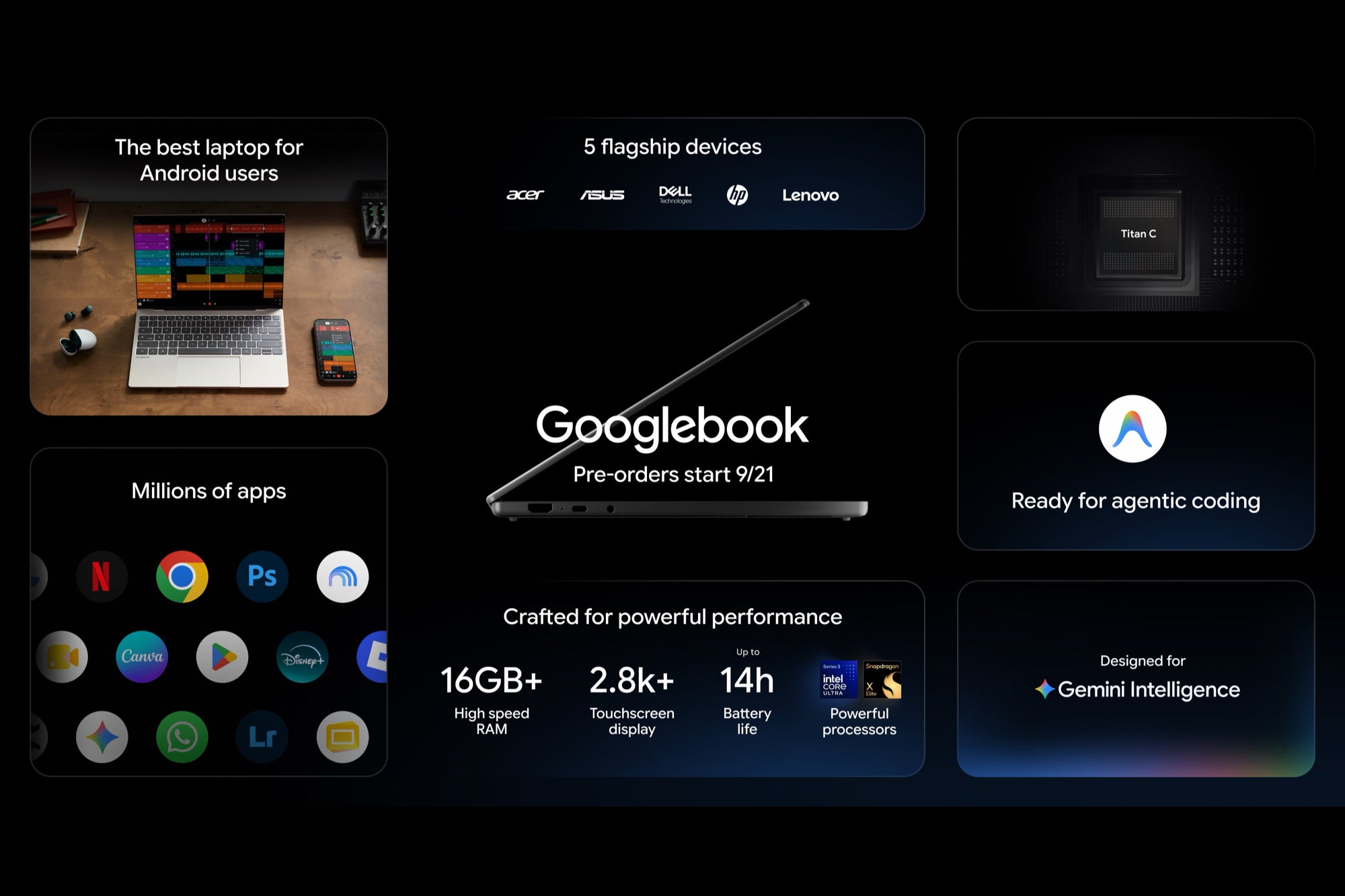
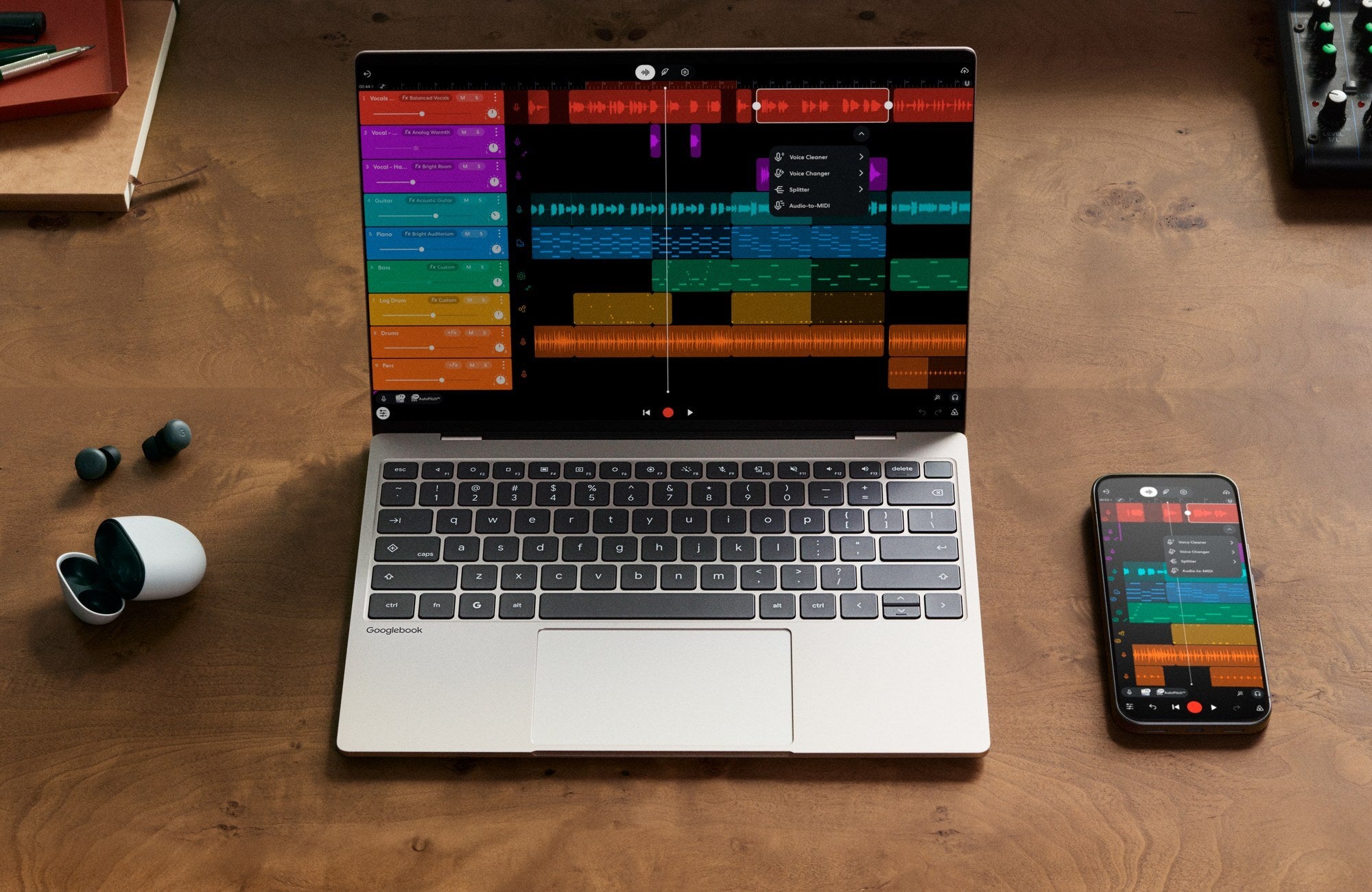
Googlebook starts at 16GB of RAM, with up to 2.8K touchscreens and an NPU rated above 40 TOPS. | Image by Google
You get backlit keyboards, haptic glass trackpads, touchscreens rated at 500 nits, up to six speakers with Dolby Atmos and up to 14 hours of video playback. Every NPU runs above 40 TOPS, and the Glowbar returns on the lid, sweeping to show battery level and reacting when you talk to Gemini, with developer access opening for custom animations.
Magic Pointer, Rambler and the Gemini features built into the desktop
This is where Google is spending most of its energy, and a couple of these only turn up in the spec sheet rather than the blog posts:
Magic Pointer: wiggle the cursor and Gemini reads whatever is on screen, text and images alike, so you can ask it to schedule a training plan or check whether an email is a scam.
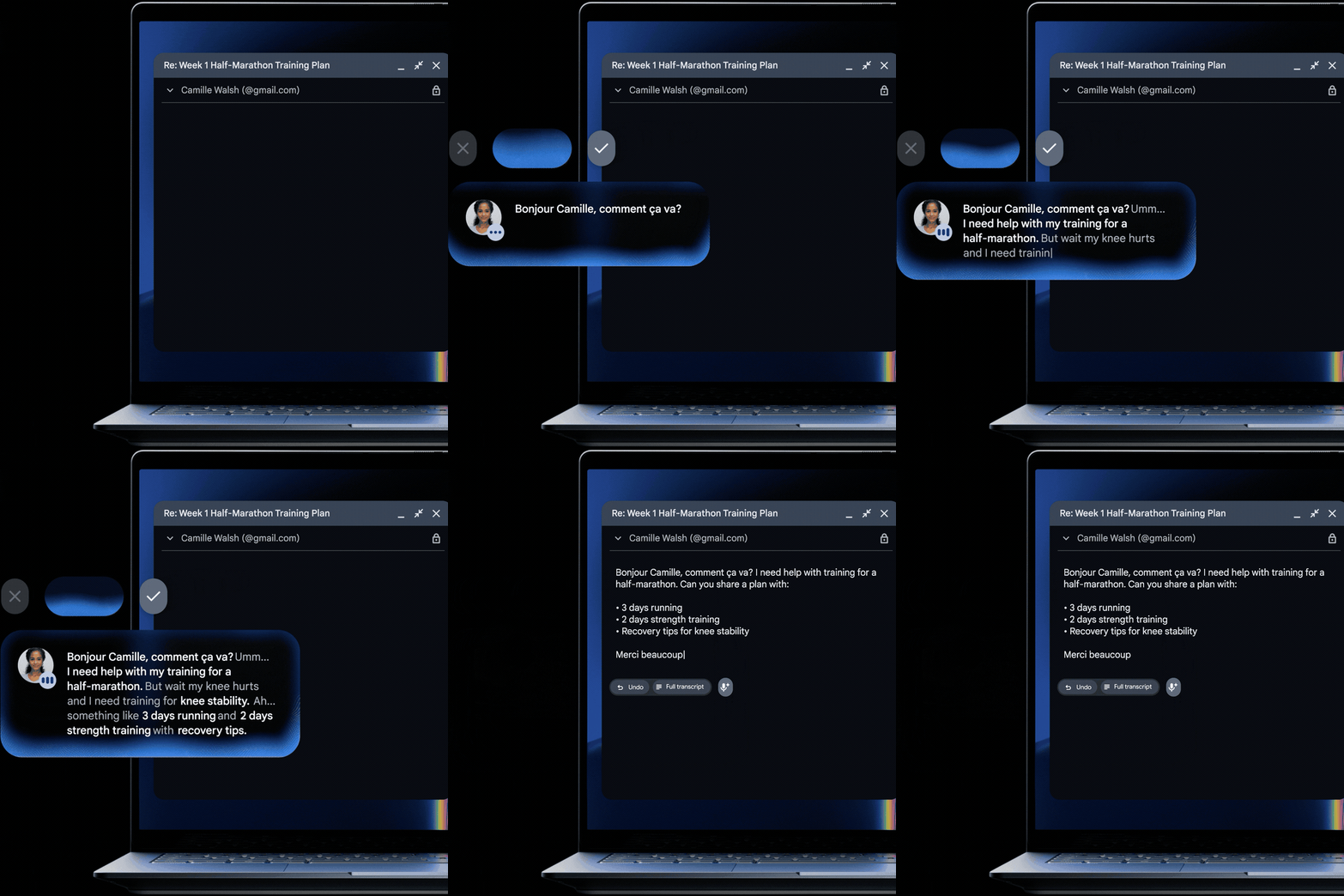
Rambler: sitting next to the Quick Insert key, it turns a spoken ramble into structured writing with clean headers and checklists, and it handles switching languages mid-sentence.
Create My Widget: describe the widget you want in plain language and it builds one, though the spec sheet lists this as a beta.
Magic Cues: proactive help drawn from your schedule, email and whatever you have open, which the announcement posts skip entirely.
Rambler cleans up a spoken stream of thought into organized, formatted writing. | Image by Google
Google says Magic Pointer only wakes on that wiggle and can be switched off entirely, which I'm more interested in than the feature itself. Developers also get Antigravity preinstalled for building and deploying apps on the device, plus a full Linux terminal.
Continue On, Cast My Apps and what this does with your phone every day
Signing in pulls your Android phone's settings, saved passwords, Wi-Fi networks and messages across with end-to-end encryption, so the laptop arrives already knowing your setup.
Continue On picks up a task from your phone directly in the Googlebook taskbar. | Image by Google
Continue On resumes a phone task straight from the taskbar, Files lets you browse and open your phone's files and photos without emailing yourself anything, and Cast My Apps streams a phone app into a desktop window so you can grab a code from Messages without breaking stride.
On the software side you get desktop Chrome with extensions next to Play Store apps built for large screens, native Photoshop, Lightroom and CapCut, offline viewing on Netflix and HBO Max, and a complimentary year of GeForce NOW.
The part I want to see tested before anyone pre-orders
Continue On and Cast My Apps are the features that would genuinely change how I work, because moving between a phone and a laptop is still the clumsiest part of most days.
The pricing is the part I'd want people to go in clear-eyed about. I'm hopeful, and I'd love to see Continue On work as cleanly in practice as it does in the demos, but I'd wait for the reviews before putting down $1,299 on a first-generation category.
Get a free Galaxy A17 with Straight Talk. To claim this deal, you need to pair the phone with activation on a Silver Unlimited Plan or higher. This tier costs $45 per month. Offer valid through 01/10/27 while supplies last online.
Johanna Romero is a Senior News Writer at PhoneArena, covering mobile technology news across Android, iOS, wearables, and the Google ecosystem she knows best. Drawing on 15 years in IT and tech support from 2007 to 2022, she brings a user-friendly eye for the practical features and lesser-known tricks readers care about. Google named her an official #TeamPixel member in 2022, and she also reviews the latest devices on her YouTube channel, JoJo the Techie.
A discussion is a place, where people can voice their opinion, no matter if it
is positive, neutral or negative. However, when posting, one must stay true to the topic, and not just share some
random thoughts, which are not directly related to the matter.
Things that are NOT allowed:
Off-topic talk - you must stick to the subject of discussion
Offensive, hate speech - if you want to say something, say it politely
Spam/Advertisements - these posts are deleted
Multiple accounts - one person can have only one account
Impersonations and offensive nicknames - these accounts get banned
To help keep our community safe and free from spam, we apply temporary limits to newly created accounts:
New accounts created within the last 24 hours may experience restrictions on how frequently they can
post or comment.
These limits are in place as a precaution and will automatically lift.
Moderation is done by humans. We try to be as objective as possible and moderate with zero bias. If you think a
post should be moderated - please, report it.
Have a question about the rules or why you have been moderated/limited/banned? Please,
contact us.









Things that are NOT allowed:
To help keep our community safe and free from spam, we apply temporary limits to newly created accounts: