Change to Google Messages app makes group creation faster and easier
A change by Google to its Messages app removes one step from the process of creating a group.
Google makes it faster and easier to create a group in its Messages app. | Image by PhoneArena
Google is working on a change to the Google Messages app. In version messages.android_20260217_00_RC00.phone.openbeta_dynamic of the app, Google adds a new path for users to start a group message. Currently, you can open the app and tap the "Start chat" button in the lower right of the screen. You can chat one-on-one by selecting a name from the Contacts list that pops up.
Google makes it easier to create a group in the Google Messages app
To create a group to have a group chat with, you press the "Create group" button under the address bar. Start selecting those members of the group by pressing on names from the Contacts list. Once you have everyone you want in this group, hit the "Next" button and follow the directions on the screen.
Do you like this change?
9 Votes
Yes. I create new groups often.
66.67%
No. Sending an individual chat might require an extra step.
33.33%
Google, as is its wont, is always looking to streamline processes, and it has done so here in Google Messages by eliminating the "Create group" button. Now, when you arrive at the "New chat" screen, you can instantly create a group. After you've selected the first person from your Contacts list to be the initial group member, the address bar asks you, "Anyone else?" If not, hit the "Next" button, and you have a one-on-one chat ready to go.
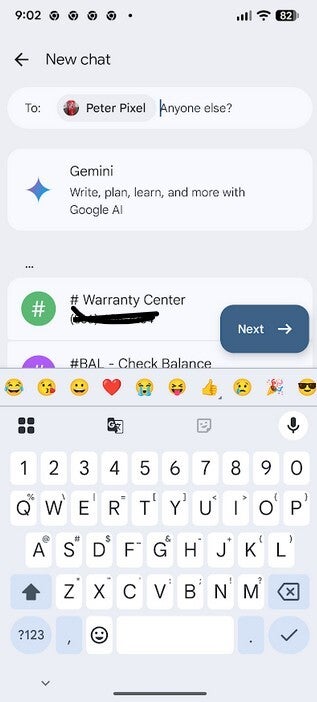
Google removes a step from creating a group chat in Google Messages. | Image by PhoneArena
If you want to add more group members, just select names from the Contacts list. Keep tapping names until you have everyone in the address bar that you want in your group. Hit the "Next" button, and you'll be able to give this particular group of recipients a catchy name to help you remember them. Hit the "Done" button and you're ready to message the group. The bottom line is that you are adding an extra step when creating an individual text, but saving one when you are creating a group.
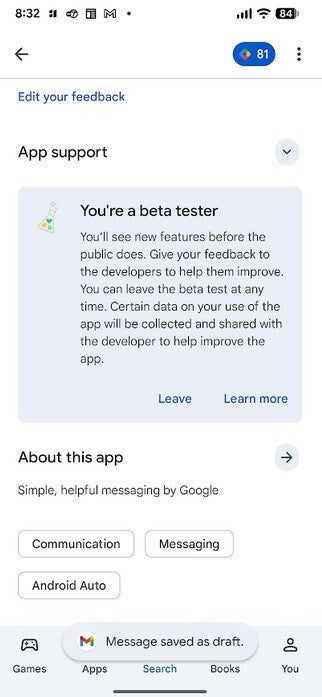
You might want to become a Beta tester for first-party Google apps on Android. | Image by PhoneArena
The new UI is available to me through the Google Messages app on my Pixel 6 Pro running Android 17 Beta 1. You need to be a Google Messages Beta tester to have the new version right now. I do recommend that Android users, when installing Google first-party apps like Messages, or Contacts or Phone by Google, subscribe to these app's Beta programs. The list of Google apps that offer this includes:
- Google Messages
- Phone by Google
- Google Contacts
- Google Play Services
- Android System WebView
- Google App
- Gboard
- Google Maps
- Google Chrome
- Android Auto
- Google Home
- YouTube
- YouTube Music
How to become a Beta tester for first-party Google apps on Android
If you want to join a Beta program for one of the above listed apps for Android, this is what you do. Open the Google Play Store app and tap on your Profile Icon found in the top right of the page. Tap Manage apps & devices > Manage. Tap the name of the app whose Beta program you want to join. Scroll down to the section marked "Join the beta." If there is space open, tap on "Join."
Apps that are extremely popular like Google Messages, Gboard, and Google Maps often reach the maximum number of Beta testers. If you don't see the "Join" button, don't give up. Just keep on trying and eventually an opening might appear when others leave the Beta. Joining these Beta programs is one of the best phone-based decisions I ever made. Once you're in, you get first crack at new features. You can exit a Beta program anytime with the tap of a button.
There is a trade-off, and you should be aware that if you do join a first-party Google app Beta, issues can lock you out of using the app. For example, on August 7, 2025, a bug took down the Google Messages Beta preventing the app's Beta testers from using it for hours. If that were to happen to the Phone by Google app, you could lose the ability to make a phone call until a patch is disseminated to users. These incidents are rare; however, the final decision is yours.


Popular stories




Latest News






Things that are NOT allowed:
To help keep our community safe and free from spam, we apply temporary limits to newly created accounts: