After the official closure of Samsung Messages, Google Messages is the only mainstream messaging option left for Android. The Big G is constantly making important changes to it so that one of the best messaging apps becomes even better.
The app could soon get yet another major upgrade, but this time, it won't be the addition of any new feature; instead, it will be a complete makeover of the Google Messages UI.
Google Messages could soon get a new look
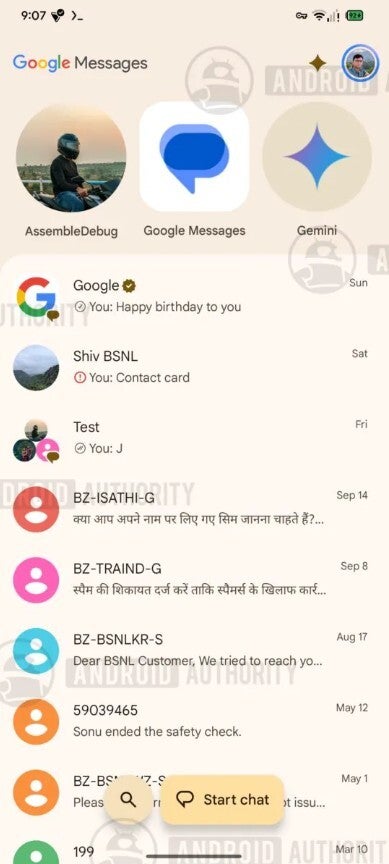
In the latest beta build of the Google Messages app, the locations of many on-screen elements have reportedly been changed. Let's start with the search icon that appears in the top-right corner of the app. In the beta version of the app, it has been moved to the bottom center of the texting app.
The Gemini icon, which appears in the bottom-right corner, has been shifted to the top-right corner. It has basically been given the search icon's current place. The placement of the Start Chat button, which also currently appears in the bottom-right corner, has been changed.
Google Messages new look. | Image by Android Authority
In the beta version, it appears at the bottom center next to the search icon. All these changes have reportedly been made to make the search experience more robust than before. Furthermore, the placement of both the search icon and the Start Chat button at the bottom center indicates that Google is trying to make using the app a lot easier with one hand.
Recommended For You
What do think about Google Messages makeover?
4 Votes
The behavior of buttons has also changed
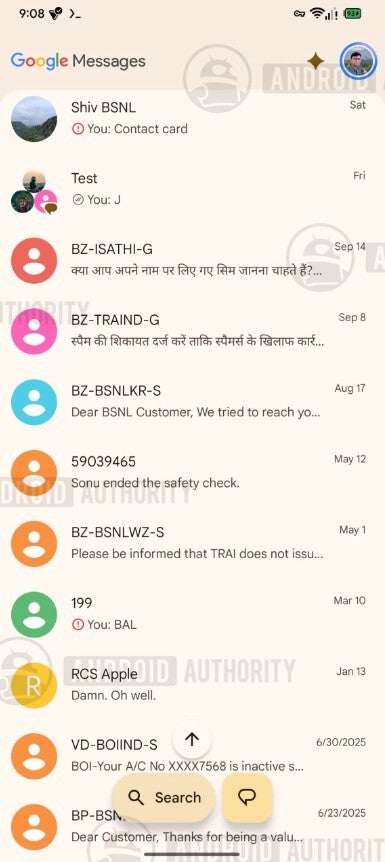
Search icon new look when scrolling messages. | Image by Android Authority
In addition to changing the placement of certain buttons, the Big G has also reportedly changed their behavior in the beta version of the messaging app. Specifically, the behavior of the search icon and the Start Chat button has been updated. When you open Google Messages, you will see the collapsed version of the search option and the expanded version of Start Chat.
But once you start scrolling, the app will intelligently understand that you are trying to look for a particular message; as a result, you will see the expanded version of the search option and just a small new icon for the Start Chat function. This change has most likely been made to let users know that they can use the search function of the app to quickly land on the message they are looking for.
That's not the only UI change coming to Google Messages
The placement of certain on-screen elements is not the only UI change Google is planning for its messaging app. It was recently reported that the company is looking to redesign the interface for pinned conversations. In the new design, Google has apparently taken inspiration from iMessage, as all the pinned chats are shown as large contact icons on the app's homepage.
The SMS app displays a preview whenever one of the pinned conversations receives a new message. It's also worth noting here that there are signs that Google could reduce the number of conversations you can pin from 20 to 6, and, as expected, most of you seem unhappy with this change.
Google Messages is getting better with every update
Without any doubt, I am against Google reducing the pinned chat limits, but I really like the new changes the company is planning for some of its on-screen elements, like the search icon, Gemini, and the Start Chat button. This will give the app a fresh new look and ultimately make it even easier to use.
That said, the Big G has recently released very crucial updates so that even Samsung Messages users will start loving the Google texting app. For instance, it finally received the ability to customize chats with different backgrounds. A new trash folder has also been added, which keeps the deleted messages for 30 days before they are permanently removed from the system.
These three Google Messages stories are worth reading:
Mint Mobile is now allowing you to get whichever plan you like for either three, six, or 12 months for just $15/mo. If you go for the six-month unlimited service, for instance, you'll now have to pay just $90 upfront instead of $210.
Aman Kumar is a news writer at PhoneArena covering Google Pixel phones, Android features, AI-powered smartphone tools, and mobile tech news. Before joining PhoneArena, he spent over five years writing about consumer technology for publications like MakeUseOf, How-To Geek, and Guiding Tech. His current daily drivers are the Pixel 10 and Samsung Galaxy S26 Plus, while his red iPhone SE (2nd gen) remains a personal favorite. Aman also appreciates bold smartphone experiments and still considers the Nokia N-Gage one of the industry’s most iconic designs.
A discussion is a place, where people can voice their opinion, no matter if it
is positive, neutral or negative. However, when posting, one must stay true to the topic, and not just share some
random thoughts, which are not directly related to the matter.
Things that are NOT allowed:
Off-topic talk - you must stick to the subject of discussion
Offensive, hate speech - if you want to say something, say it politely
Spam/Advertisements - these posts are deleted
Multiple accounts - one person can have only one account
Impersonations and offensive nicknames - these accounts get banned
To help keep our community safe and free from spam, we apply temporary limits to newly created accounts:
New accounts created within the last 24 hours may experience restrictions on how frequently they can
post or comment.
These limits are in place as a precaution and will automatically lift.
Moderation is done by humans. We try to be as objective as possible and moderate with zero bias. If you think a
post should be moderated - please, report it.
Have a question about the rules or why you have been moderated/limited/banned? Please,
contact us.









Things that are NOT allowed:
To help keep our community safe and free from spam, we apply temporary limits to newly created accounts: