Google Messages is arguably one of the best messaging apps available for Android smartphones. It comes with some useful capabilities like RCS chat, spam alerts, and more.
The app also allows you to pin some of your important conversations so that you can quickly access them. Chat pinning could soon receive a massive update, and honestly, I think most users would like it.
There's a new limit
If you use Google Messages as the go-to app to communicate via text with your loved ones, then you must have a few chats that you would want to always appear at the top and not get lost among the other tons of promotional messages you receive. In such a case, you can take advantage of the chat pinning facility of the app, which currently allows you to pin up to 20 conversations.
To do this, you need to tap and hold a conversation and then select the pin icon that appears at the top. The order of the pinned conversations is currently managed by the app; the chat that receives the most recent message is moved to the top of the list automatically. To unpin, you need to tap and hold a pinned chat and then choose the unpin icon at the top.
All that said, the Big G is reportedly working on reducing the number of chats you can pin in its messaging application. In the latest beta build of the app, you only have the option to pin up to six conversations. If you try to pin more than that, you will see a message that says, "Limit reached. Unpin one to add more."
Recommended For You
What do you think of Google Messages new pinned chat UI?
948 Votes
It looks amazing.
32.91%
I think it takes up too much space.
18.25%
UI is great, but Google shouldn't change the chat pin limit.
48.84%
That's not the only change
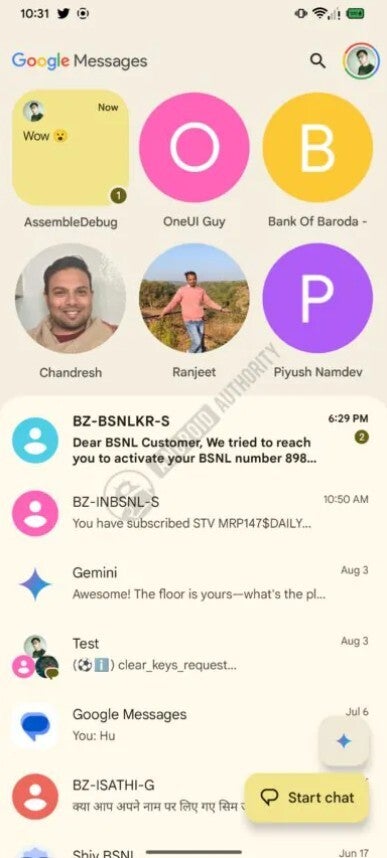
New chat pin UI of Google Messages. | Image by Android Authority
In addition to downgrading the limit, Google is reportedly also changing the UI of its pinned chats, as spotted in the app version messages.android_20260814_00_RC00.phone.openbeta_dynamic. If this change goes live, you will see a big circle featuring the profile pictures of all your pinned chats at the top of the app. And when you receive a new message from any of these conversations, the circle will be replaced by a square, which will preview the received message.
You will also see a number at the bottom right corner of the square icon denoting the number of new messages you have received from that pinned chat. Interestingly, you will also get the option to manually change the order of the pinned conversations, unlike currently, where it is managed automatically by the app.
It looks very similar to how iMessage keeps pinned chats
The chat pinning facility isn't something that's exclusive to the Google messaging option; it's also available in iMessage for Apple devices. Interestingly, if you have used iMessage before, you would realize that the new chat pinning UI in the Google texting app is very similar to how the pinned chats appear in iMessage. It's not only me; many other users were quick enough to identify that.
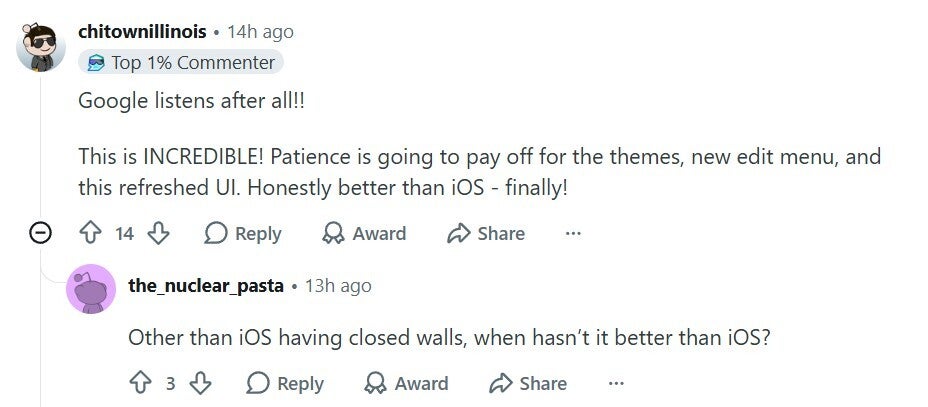
User appreciating the new pinned chats UI. | Image by Reddit
A Reddit user commented under a relevant post that it actually looks better than what is available in iOS. Another user thanked Google for working on this change, as they believe that the existing pinning functionality is chaos in its texting app.
Six is too less
While I, personally, liked the new UI, at the same time, I believe Google shouldn't have reduced the number of chats you can pin, at least by that much. I would have appreciated bringing it to 10 from 20, but downgrading it to 6 is definitely a very big reduction. For comparison, you can pin up to nine chats in iMessage.
The good news is that everything mentioned above has been spotted in the beta build. That means there might be a possibility that the company actually decides not to make such a big downgrade to the number of chats you can pin when the feature actually becomes live in this stable build.
That's not the only change Google Messages is rumored to get:
Thanks to these two long-overdue fixes, Google Messages finally feels like a real messaging app
Google tests new features designed to make the Google Messages app easier to use
Google Messages falls another version behind the RCS standard it was meant to lead
How about giving me a follow on my social accounts?
On the Visible+ Pro plan, you get access to 5G Ultra Wideband data on Verizon's fastest network. Along with unlimited roaming across Mexico and Canada, 2 days of Global Pass per month, 3x hotspot speeds, 4K streaming, and Smartwatch service.
Aman Kumar is a news writer at PhoneArena covering Google Pixel phones, Android features, AI-powered smartphone tools, and mobile tech news. Before joining PhoneArena, he spent over five years writing about consumer technology for publications like MakeUseOf, How-To Geek, and Guiding Tech. His current daily drivers are the Pixel 10 and Samsung Galaxy S26 Plus, while his red iPhone SE (2nd gen) remains a personal favorite. Aman also appreciates bold smartphone experiments and still considers the Nokia N-Gage one of the industry’s most iconic designs.
A discussion is a place, where people can voice their opinion, no matter if it
is positive, neutral or negative. However, when posting, one must stay true to the topic, and not just share some
random thoughts, which are not directly related to the matter.
Things that are NOT allowed:
Off-topic talk - you must stick to the subject of discussion
Offensive, hate speech - if you want to say something, say it politely
Spam/Advertisements - these posts are deleted
Multiple accounts - one person can have only one account
Impersonations and offensive nicknames - these accounts get banned
To help keep our community safe and free from spam, we apply temporary limits to newly created accounts:
New accounts created within the last 24 hours may experience restrictions on how frequently they can
post or comment.
These limits are in place as a precaution and will automatically lift.
Moderation is done by humans. We try to be as objective as possible and moderate with zero bias. If you think a
post should be moderated - please, report it.
Have a question about the rules or why you have been moderated/limited/banned? Please,
contact us.











Things that are NOT allowed:
To help keep our community safe and free from spam, we apply temporary limits to newly created accounts: