Gemini on Android Auto is getting an upgrade with the addition of Personal Intelligence, which can use your own Google apps to answer your requests. This capability starts rolling out today when you plug in a Pixel 11 Pro or another Android phone, while iPhone 18 Pro Max owners already have Siri AI in CarPlay.
Gemini gets new Personal Intelligence powers in the car
Google announced in a blog post that Gemini is now available globally on Android Auto and cars with Google built-in. However, starting today, Android Auto is also getting Personal Intelligence, while cars with Google built-in will be getting it "in the coming months." For those who already have Personal Intelligence on in their Android phone's Gemini settings, the feature will follow to the car as well.
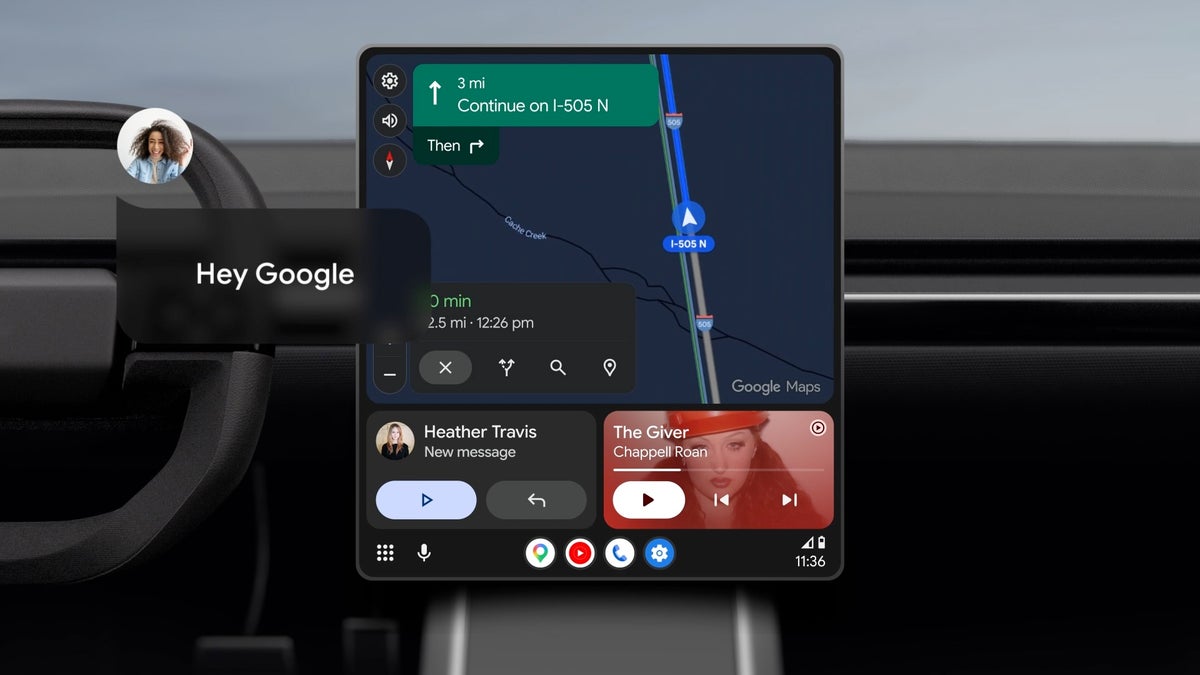
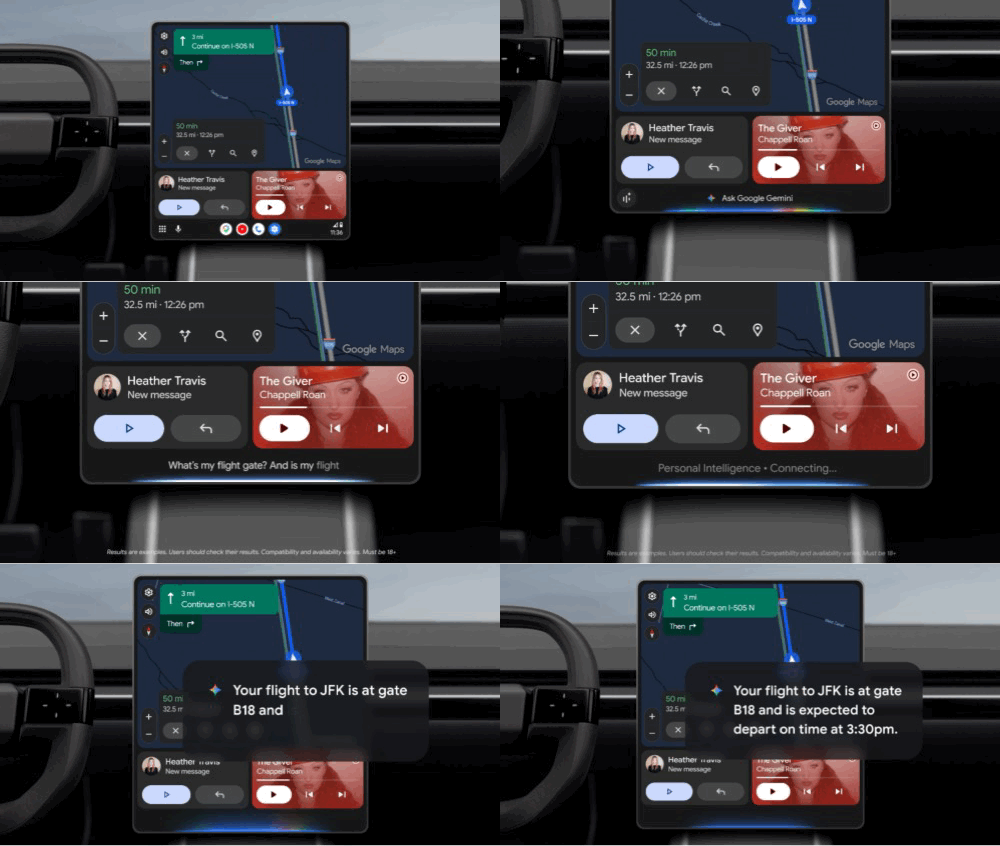
Gemini on Android Auto pulls flight details from Gmail. | Image by Google
For those not familiar, Personal Intelligence helps find specific details, such as a photo or an email, since it can search across several sources at once. This can be helpful in situations where you don't want to get into explaining context or digging for info when you are driving.
Personal Intelligence is opt-in and can access Google apps such as Gmail, Calendar, Photos, Maps, YouTube and Search.
Google offered two examples of this feature being handy. One of those is driving to the airport and asking Gemini for your gate and whether the flight is on time without having to pull out your confirmation email. Another is finding a place based on a photo, like asking Gemini to find the car wash from a photo you took last week, then asking it to navigate there.
Recommended For You
Which Personal Intelligence request would you use most while driving?
3 Votes
Personal context and the CarPlay comparison
Gemini replaced Google Assistant on Android Auto in a staged rollout that we covered all through the past year. However, until now, most requests that you could make in the car to Gemini weren't tailored to you. This Personal Intelligence rollout is meant to change that.
On Apple's side, iOS 27 brought Apple's new Siri AI to CarPlay, which also uses personal context to draw information from your messages, emails and calendar for chatbot-style answers. Ironically, Apple's new Siri AI is built on Google's own Gemini models.
Gemini itself isn't on CarPlay, which is an important distinction to make. However, as of last month, CarPlay does have ChatGPT, Claude, Perplexity, Grok, Meta AI and Copilot.
For iPhone 15 Pro or newer users on iOS 27, Siri AI already covers much of what Gemini is attempting to do here. For those on older iPhones or anyone who is a heavy Google apps user on iOS, nothing announced today will improve that experience.
Who gets Gemini Personal Intelligence and how to turn it on
Anyone with a personal Google account who is 18 years and older is eligible to receive this update. Exceptions include Workspace business, enterprise or school accounts as well as those located in the EEA (European Economic Area), Switzerland, the UK and Nigeria.
The feature will be off by default until you turn it on, which you can do from your Gemini settings. You can also turn it back off anytime you choose, which will not affect navigation, music, calls and questions. Just know that should you keep it off, the answers won't be tailored, which is how it worked before the update.
For those waiting who have cars with Google built-in, know that Personal Intelligence will only give personal answers when your phone is connected.
Why Personal Intelligence is more helpful in the car than anywhere else
The car is the place where, if you are driving, digging through your phone is most dangerous. Having Gemini answer things that are relevant to you beats having to pull over just to find that one email with the confirmation code you need.
I'm looking forward to testing whether Gemini can give me helpful information while I'm driving to the airport for my next trip.
More on Gemini, Android Auto and the Pixel 11 Pro:
Mint Mobile is celebrating its 10-year anniversary with a special offer on its six-month subscription plans. For a limited time, you can get your preferred tier (6GB, 17GB, 23GB or unlimited) for just $10/mo. That saves you between 50% and 71% on the carrier's mobile plans, making it way easier to recommend.
Johanna Romero is a Senior News Writer at PhoneArena, covering mobile technology news across Android, iOS, wearables, and the Google ecosystem she knows best. Drawing on 15 years in IT and tech support from 2007 to 2022, she brings a user-friendly eye for the practical features and lesser-known tricks readers care about. Google named her an official #TeamPixel member in 2022, and she also reviews the latest devices on her YouTube channel, JoJo the Techie.
A discussion is a place, where people can voice their opinion, no matter if it
is positive, neutral or negative. However, when posting, one must stay true to the topic, and not just share some
random thoughts, which are not directly related to the matter.
Things that are NOT allowed:
Off-topic talk - you must stick to the subject of discussion
Offensive, hate speech - if you want to say something, say it politely
Spam/Advertisements - these posts are deleted
Multiple accounts - one person can have only one account
Impersonations and offensive nicknames - these accounts get banned
To help keep our community safe and free from spam, we apply temporary limits to newly created accounts:
New accounts created within the last 24 hours may experience restrictions on how frequently they can
post or comment.
These limits are in place as a precaution and will automatically lift.
Moderation is done by humans. We try to be as objective as possible and moderate with zero bias. If you think a
post should be moderated - please, report it.
Have a question about the rules or why you have been moderated/limited/banned? Please,
contact us.











Things that are NOT allowed:
To help keep our community safe and free from spam, we apply temporary limits to newly created accounts: