If you're an iPhone user, I have a question to ask you. Have you ever encountered a situation where you were trying to access sensitive information but couldn't open an app because Face ID didn't recognize you? If that ever happens to you, try cleaning the top of the screen. Doing this will usually fix the problem and allow you to open that app.
An annoying Face ID bug is affecting some new iPhone 18 Pro units
However, there are several iPhone 18 Pro users who are experiencing a much worse issue. Instead of celebrating the receipt of their brand-new iPhones, they have been unable to get their handset to unlock using their faces. To make matters worse, after Face ID failed, these affected iPhone 18 Pro models would freeze and reboot.
This bug can be a pain in the butt for iPhone users
Considering that most iPhone 18 Pro users just received their new phones, this Face ID bug can really be aggravating. Interestingly, not every iPhone 18 Pro unit is impacted and 9to5Mac said it was able to replicate the issue on one European iPhone 18 Pro handset.
The problem appears when unlocking apps protected by Face ID
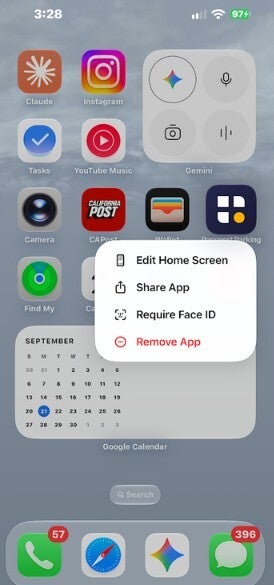
In addition, this bug seems to surface only when using Face ID to unlock apps that you have decided to protect behind Face ID. You can arrange this extra protection by long-pressing an app icon on the home screen and then selecting "Require Face ID."
Run this test to see if your iPhone 18 Pro is infected with this bug
You can do a quick test to see if your iPhone 18 Pro has this bug by covering your face the next time Face ID wants to verify your identity. When the "Try Face ID Again" button appears, tap on it and watch how your iPhone 18 Pro reacts. If your device has caught this Face ID bug, it will freeze up and you will not be able to use touch to input any data. After a few seconds, the iPhone 18 Pro will reboot to the lock screen.
Poll
91 Votes
When you think of bugs, which manufacturer first comes to mind?
Google (Pixel handsets)
36.26%
Apple (iPhone)
42.86%
Samsung (Galaxy)
20.88%
While this sounds like a bug that would require a software update to exterminate, one Redditor claimed to have spoken with Apple support and they ran a diagnostics test that supposedly found that the phone was defective. According to this iPhone 18 Pro owner, Apple started the process of sending him a new unit. Another Reddit subscriber said that his iPhone 18 Pro has restarted twice, once in the middle of a call. His new Apple Watch Series 12 timepiece also did the same thing.
Opening an app protected by Face ID seems to cause the iPhone to freeze and reboot. | Image by PhoneArena
I suspect that setting aside the one iPhone 18 Pro user who says he is getting a replacement from Apple, this is going to be a software issue. My crystal ball tells me to expect Apple to release an update soon to fix this Face ID bug.
Recommended For You
Check out some more fabulous articles, like these:
Alan, an ardent smartphone enthusiast and a veteran writer at PhoneArena since 2009, has witnessed and chronicled the transformative years of mobile technology. Owning iconic phones from the original iPhone to the iPhone 15 Pro Max, he has seen smartphones evolve into a global phenomenon. Beyond smartphones, Alan has covered the emergence of tablets, smartwatches, and smart speakers.
A discussion is a place, where people can voice their opinion, no matter if it
is positive, neutral or negative. However, when posting, one must stay true to the topic, and not just share some
random thoughts, which are not directly related to the matter.
Things that are NOT allowed:
Off-topic talk - you must stick to the subject of discussion
Offensive, hate speech - if you want to say something, say it politely
Spam/Advertisements - these posts are deleted
Multiple accounts - one person can have only one account
Impersonations and offensive nicknames - these accounts get banned
To help keep our community safe and free from spam, we apply temporary limits to newly created accounts:
New accounts created within the last 24 hours may experience restrictions on how frequently they can
post or comment.
These limits are in place as a precaution and will automatically lift.
Moderation is done by humans. We try to be as objective as possible and moderate with zero bias. If you think a
post should be moderated - please, report it.
Have a question about the rules or why you have been moderated/limited/banned? Please,
contact us.









Things that are NOT allowed:
To help keep our community safe and free from spam, we apply temporary limits to newly created accounts: