Every product we review or recommend is thoroughly tested by our in-house experts in real-world conditions, following our
review methodology
and
ethics statement
to ensure honest, independent, and data-driven results.
Introduction:
Before rushing to judgment, don’t let its model name fool you for one bit, well, that’s because the Samsung Captivate Glide isn’t merely a rehashed device with a physical keyboard. Rather, it’s a transitive smartphone that’s tastefully modernized, thanks to its hardware, to meet the demands of power and elite users all around. In fact, it boasts a snazzy looking Super AMOLED display, dual-core processor, HSPA+ connectivity, and an always useful landscape style keyboard – all packaged together for a reasonable $149.99 with a 2-year contract.
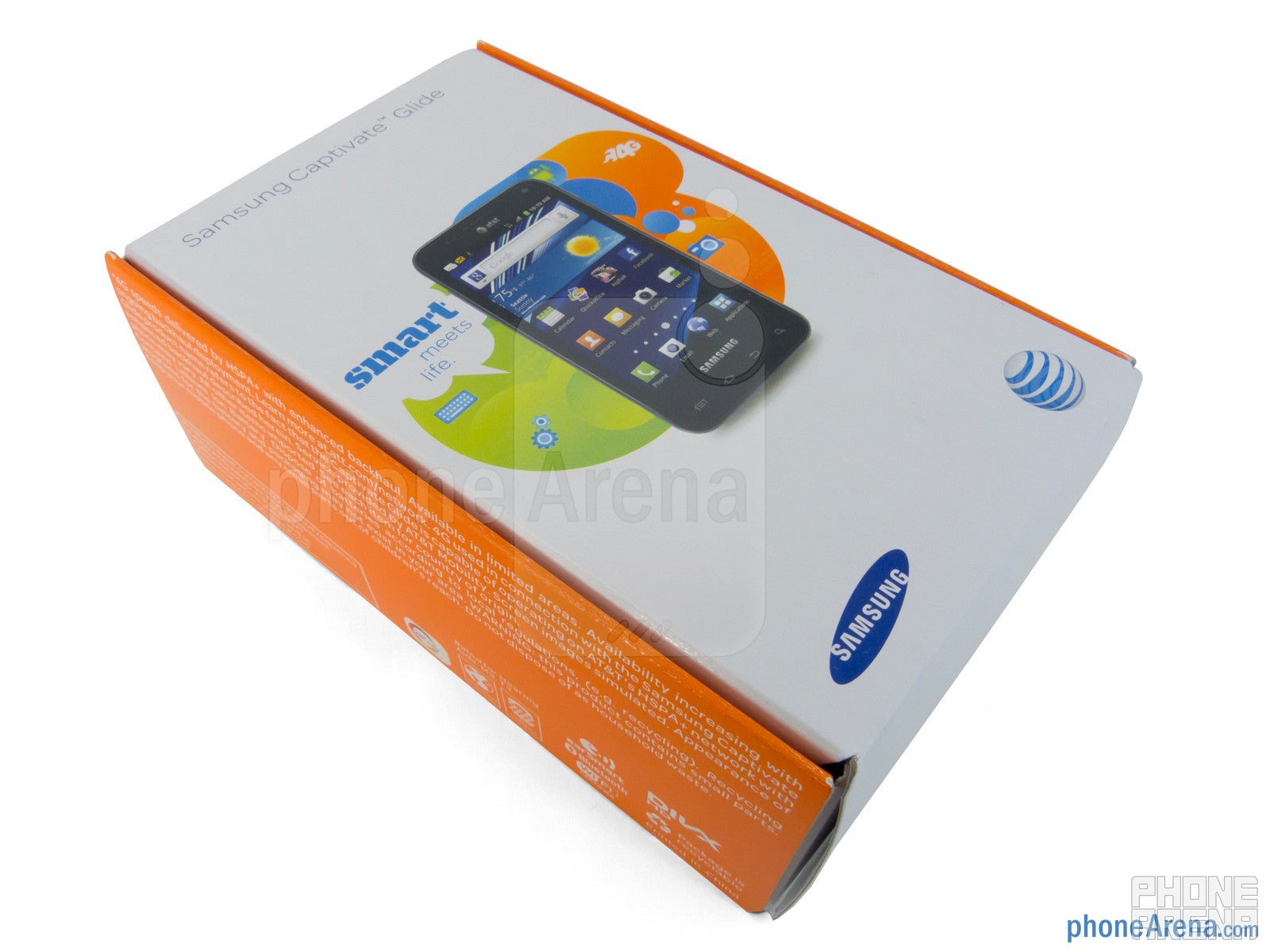
The package contains:
microUSB cable
Wall Charger
Quick Start Guide
Health & Safety and Warranty Guide
Design:
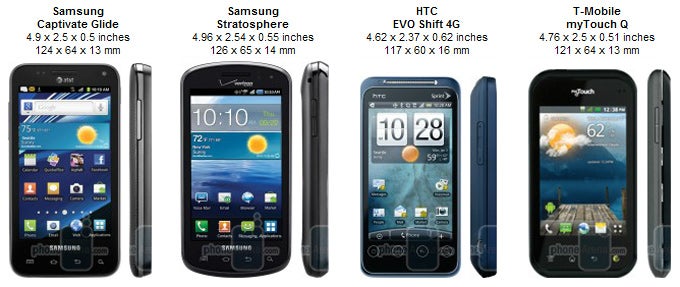
For starters, it doesn’t look exactly like a Samsung Captivate with a physical keyboard attached to it, nor does it bear any striking resemblance to Samsung’s line of Galaxy S II smartphones, but instead, the Captivate Glide is a totally different looking handset on its own. Constructed out of plastic, it’s nice to see that it’s rather compact in form (0.5” thick) and lightweight (5.2 oz) in the hand, but it tends to give it an overall flimsy build quality – though, it’s not that bad at all.
You can compare the Samsung Captivate Glide with many other phones using our Size Visualization Tool.
Just like the Captivate before it, the handset features a 4” WVGA (480 x 800) Super AMOLED panel that delivers a lot of eye-candy right from the start thanks to its high-contrast, overly saturated color production, wide-viewing angles, and average details. No, it’s not a Super AMOLED Plus panel, but nevertheless, it’s able to reel our eyes from afar thanks to its polarizing glow. As much as we’re entranced by it, we’re still finding ourselves shielding it from the sun to make out what’s on screen.
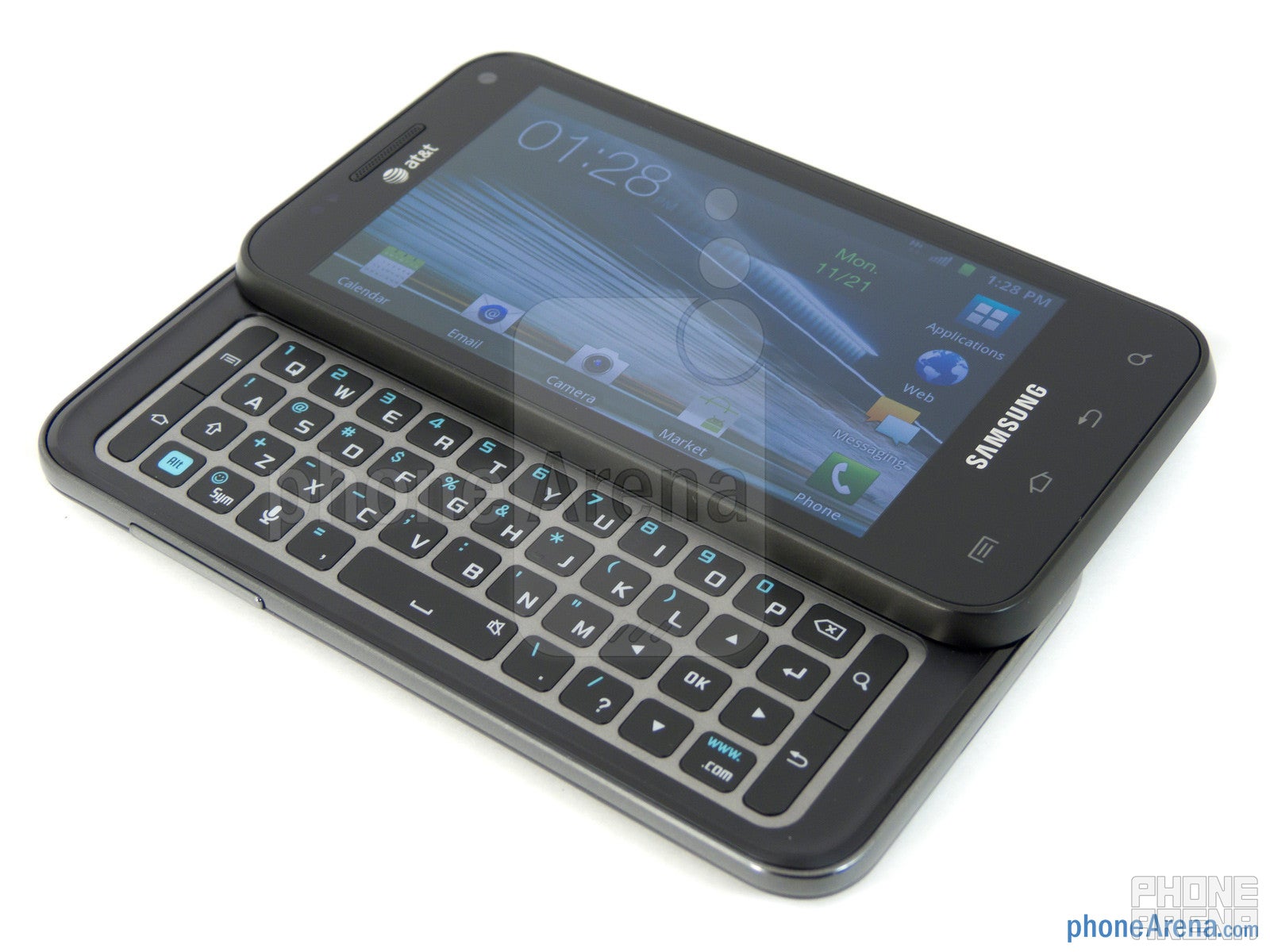
Thankfully, it doesn’t require much force to expose its 4-row landscape style keyboard seeing that its mechanism is very springy in nature. Despite the flat and nearly flush appearance of its keyboard buttons, our thumbs are able to type away with relative ease thanks to their sufficient size and tactile response. After some practice, we get into the groove of typing with minimal mistakes – plus, it’s nice that we have access to the usual set of Android buttons and a directional pad with its layout.
Since the set of Android capacitive buttons are placed very near to the bottom edge of the phone, we still find ourselves accidentally pressing them on occasion. Meanwhile, the handset’s earpiece and front-facing 1.3-megapixel camera are located above the display.
Around its sides, we find its microphone, volume rocker, dedicated power button, 3.5mm headset jack, and a plastic sliding cover that hides away a microUSB port. With the latter, you can use an optional MHL adapter to gain video-out functionality.
In the rear, its 8-megapixel auto-focus camera with LED flash and speakerphone notches lay flush towards the top side. Finally, removing the plastic cover provides us access to its SIM card slot, 1,650 mAh battery, and microSD slot.
Interface and Functionality:
Not surprisingly, the Samsung Captivate Glide features the same old TouchWiz UI we’ve been accustomed to seeing on so many countless Android powered Samsung devices of late. Naturally, it offers its own unique blend of enhancements to provide users with an agreeable experience, but it’s clearly not yet on the same level that we find with HTC’s Sense UI. Nevertheless, it boasts all of the wonderful depth of customization elements that we find with Android 2.3.5 Gingerbread as a whole.
To keep it in good light after the Samsung Galaxy S II and the 4G LTE enabled Skyrocket, the Captivate Glide is able to muster up a respectable performance thanks to its 1GHz dual-core NVIDIA Tegra 2 processor with 1GB of RAM. Even though we still witness a subtle amount of choppiness with its operation when graphically intensive live wallpapers are used, it’s never to the point debilitating, and honestly, it’s nearly instantaneous when static wallpapers are used instead. Overall, it’s not the fastest thing on the block, but it exhibits enough oomph and power to its operation to make us feel confident in its abilities.
When it comes to typing, there’s no arguing that we prefer doing it all with the physical keyboard, but if you must use the on-screen one, it provides a tolerable experience that firmly keeps our rate of input steady. Yes, the portrait layouts are rather cramped, but its peppy responsiveness helps us in quickly composing messages. Fortunately, we’re given three keyboard options, which include the stock one, Samsung keypad, and Swype keyboard.
Whether it’s the Samsung Email app or Gmail one, the experience is essentially the same as we’re presented with deep functionality to get us organized. As always, setup is a breeze just like any other Android smartphone, as it only requires our email address and password for automatic set up.
Being the AT&T bound device it is, there are quite a few AT&T branded apps in for the ride – like AT&T Code Scanner, AT&T FamilyMap, AT&T Navigator, Featured Apps, Live TV, and myAT&T. Also, some of the other third party apps bundled with the handset include AllShare, Asphalt 6, Qik Lite, Quickoffice, and YPmobile. Lastly, if your heart yearns for video content, you can get your fill with Samsung’s Media Hub.
Internet and Connectivity:
In addition to the fast data speeds we’re exposed to with the handset’s HSPA+ connection, it’s able to render complex sites properly, display fluid navigational controls, and handles heavy Flash content without working up a sweat. When it comes down to it, the Samsung Captivate Glide is indeed one equipped handset to deliver a resounding web browsing experience.
Being a GSM enabled smartphone, it’s naturally compatible to work on a wealth of GSM networks littered around the world – so it’s constantly connected, even with data connectivity. Meanwhile, its connectivity options are further expanded with other items like aGPS, Bluetooth 3.0, 802.11 b/g/n Wi-Fi, and mobile hotspot functionality.
Camera:
Photo enthusiast will surely be content with the quality provided by the handset’s 8-megapixel auto-focus camera, since they are similar to the results we find with Samsung’s Galaxy S II line. Of all things, macro shots look absolutely gorgeous, but outdoor shots fare equally well with their average details and correct but saturated color production. However, shots taken under low lighting suffer from noticeable digital noise that soften its overall appearance – albeit, the LED flash appears to be most effective with shots up to 5 feet away.
On the other hand, we’re sorely disappointed with the Captivate Glide’s 720p video recording since it’s undoubtedly on the sub-par side. Well, it records video at the smooth rate of 30 frames per second and captures mostly clear audio, but in terms of detail, its muddy and indistinct appearance is by far its biggest distraction – thus, softening its overall quality.
Recommended For You
Samsung Captivate Glide Sample Video:
Multimedia:
When it comes to playing music, it follows in similar fashion to what we’ve seen already with other devices with its conventional presentation – yet, we wholeheartedly adore the visualization and extensive equalizer settings available with it. In complementing its functionality, audio quality from its speaker is robust with its strong tones, and at the same time, doesn’t sound distorted at the loudest volume setting.
Much like any device out there with some sort of AMOLED panel, our eyes are strapped in for a visual treat – and rightfully so, that’s what we get with the Captivate Glide. Aside from the flowing nature exhibited by the handset as it plays our video encoded in DivX 1920 x 1080 resolution, there’s plenty of sharp details and robust colors to accompany the visual feast.
Storage is undeniably miniscule with the handset, as we’re given only 3.75GB of free storage with another 1.83GB reserved for system storage. Fortunately, you can supplement that capacity by adding microSD cards up to 32GB in size into the unoccupied slot.
Performance:
While it’s not the best thing we’ve heard, calling quality is manageable enough to make out conversations, though, voices have a subtle crackle sound to them through the earpiece, which is already rather neutral in volume. Fortunately, our callers didn’t have any problems on their end. Finally, the speakerphone is evidently strong in output, but voices have a scratchy tone to them.
Signal strength remained rock steady throughout our usage as it’s able to display roughly 4 out 5 bars during most times in high coverage areas. Furthermore, we didn’t experience any dropped calls either.
Love chatting a lot? Well, you’ll be content with the battery life with the handset seeing that we’re able to get a continuous talk time of 9 hours with a single charge, which beats the manufacturer’s rating of 8 hours. Additionally, its everyday battery performance is rather average, as we’re able to get roughly a day with normal usage. Still, it’s something that’ll require nightly charges to hold a good enough charge for the next working day.
Conclusion:
After seeing nothing but some stellar Android smartphones back-to-back, like the AT&T Samsung Galaxy S II and the 4G LTE Skyrocket, it’s hard to imagine the Samsung Captivate getting some credible recognition following those two. Surprisingly enough, it’s able to establish its own identity by proving to be a commendable solution with its useful physical keyboard. Even though it might not have the brand name recognition like its siblings, the Samsung Captivate Glide is easily deemed as a high-end offering with its dual-core processor, HSPA+ connectivity, and vivid Super AMOLED display.
Meticulously looking at its arsenal of features, we’re pleased to see it priced competitively at $149.99 on-contract. Obviously, if you don’t fancy keyboard devices, the previously aforementioned smartphones are great offerings, but if you simply require something with a more physical feel when typing, then the Captivate Glide is surely the right one for you.
A discussion is a place, where people can voice their opinion, no matter if it
is positive, neutral or negative. However, when posting, one must stay true to the topic, and not just share some
random thoughts, which are not directly related to the matter.
Things that are NOT allowed:
Off-topic talk - you must stick to the subject of discussion
Offensive, hate speech - if you want to say something, say it politely
Spam/Advertisements - these posts are deleted
Multiple accounts - one person can have only one account
Impersonations and offensive nicknames - these accounts get banned
To help keep our community safe and free from spam, we apply temporary limits to newly created accounts:
New accounts created within the last 24 hours may experience restrictions on how frequently they can
post or comment.
These limits are in place as a precaution and will automatically lift.
Moderation is done by humans. We try to be as objective as possible and moderate with zero bias. If you think a
post should be moderated - please, report it.
Have a question about the rules or why you have been moderated/limited/banned? Please,
contact us.







 FCC OKs Cingular\'s purchase of AT&T Wireless
Things that are NOT allowed:
To help keep our community safe and free from spam, we apply temporary limits to newly created accounts: