Samsung SGH-i708 hits the FCC: a WP Mango remake of the Omnia 7?
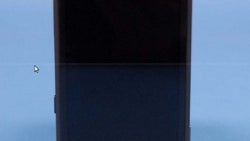
The Samsung SGH-i708 has just hit the FCC and it’s a dual-mode CDMA/GSM handset running an unspecified version of Windows Phone and looking much like the Samsung Omnia 7 with a square relatively slim body. But even though the version is not pointed out, it looks like the SGH-i708 will run Mango as up front it seems to sport a snapper, and front-facing cameras are a feature expected to come only with the soon-to-come Windows Phone update.
On top there’s the standard 3.5mm headset jack and next to it we have a microUSB port for charging the device. On the bottom, the picture gets blurred, but judging by the design of the original Omnia 7, it should be a microphone, though it does look strange and might turn out to be something different, possibly a hot-swappable microSD card slot, but this could be just our wishful thinking speaking here.
On the back, there’s another camera with a single LED flash. There are four buttons on the sides - one should be the volume rocker on the left accompanied by a mysterious toggle-like button, which was missing on the while on the right there is what might be a power key and hopefully a dedicated shutter button.
The Samsung SGH-i708 sports the usual suspects for connectivity - Bluetooth and Wi-Fi, and as far as we could tell there's a 2,000mAh battery that powers the device. The SGH-i708 goes by an FCC ID of A3LSGHI708 and seems like a possible match for CDMA-basedUS carriers like Verizon, Sprint and US Cellular, judging by the frequencies alone. It has the look of an Omnia 7 successor, but Samsung could also market it differently - in any case, it’s your opinion that matters the most, so feel free to share your thoughts about the handset below.
source: FCC

Follow us on Google News





 FCC OKs Cingular\'s purchase of AT&T Wireless
Things that are NOT allowed:
To help keep our community safe and free from spam, we apply temporary limits to newly created accounts: