Google Maps for iOS updated with option to order from food delivery services
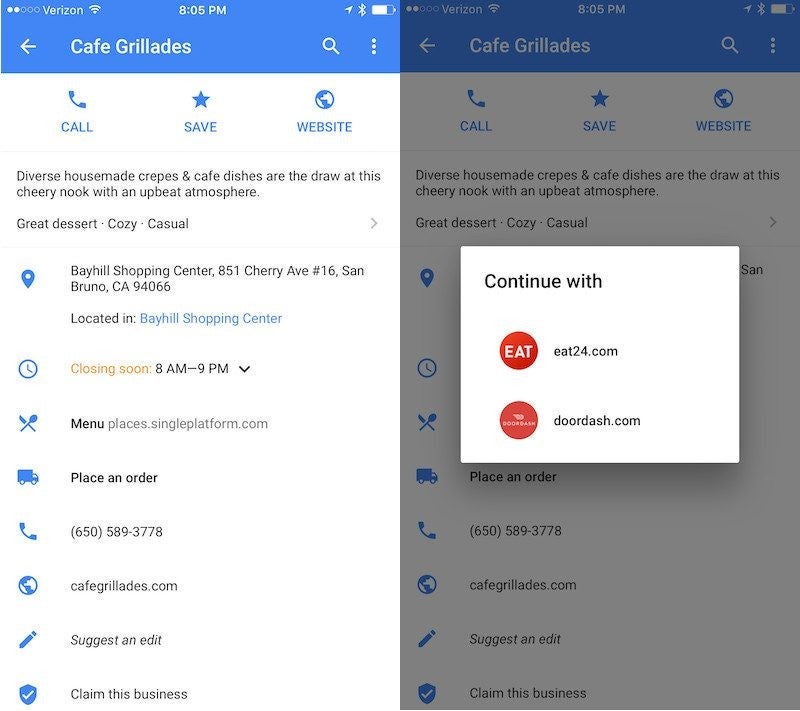
In order to access the food order integration, you will have to head to the Explore menu, tap on a subcategory like “Best lunches” or “Cheap eats” and a list of restaurants will be revealed to you. The restaurants will be shown in the form of cards that contain information like hours, prices and ratings.
Since not all restaurants have been included in the program, those that are will feature a “Place an order” tab on the information card that you can use to order food.
According to Google, the latest version of Maps for iOS features a more streamlined process of taking and adding photos to marked location, something that users have been asking for quite a long time. Google included an “Add a photo” button that shows up under each location's existing photos, so users will now be able to quickly take a picture and upload it.
source: App Store via AppleInsider

Follow us on Google News









Things that are NOT allowed:
To help keep our community safe and free from spam, we apply temporary limits to newly created accounts: