Samsung's Home Up customization module is getting a real upgrade with One UI 9, and a fresh leak shows what's coming: a fully customizable dock background and multi-finger gesture support, letting Galaxy owners wire swipes and pinches to system shortcuts. It's tipped to arrive with the Galaxy Z Fold 8 and Z Flip 8 before reaching the Galaxy S26 Ultra, as part of the broader One UI 9 rollout.
Home Up's dock and gesture overhaul just leaked
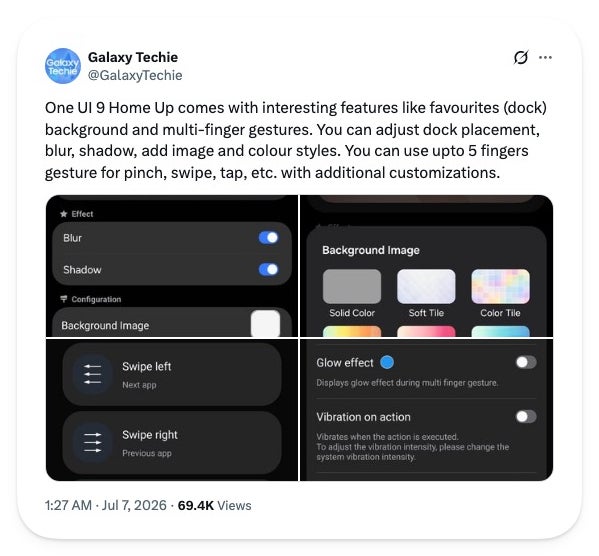
Leaker Galaxy Techie, who has repeatedly surfaced early Good Lock screenshots before they go official, posted a fresh batch on X this week showing what One UI 9 is bringing to Home Up, the module behind home screen customization on Galaxy phones.
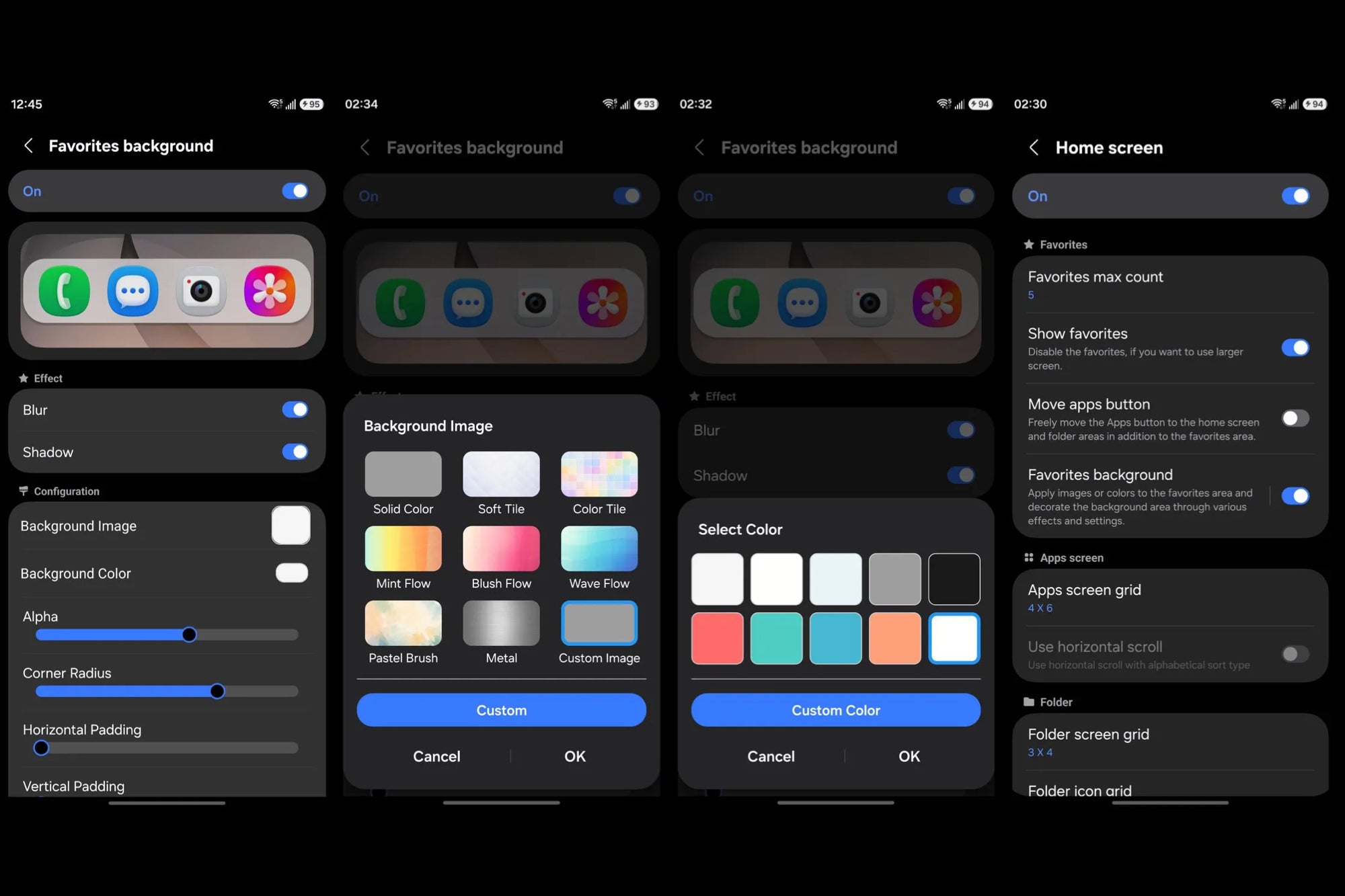
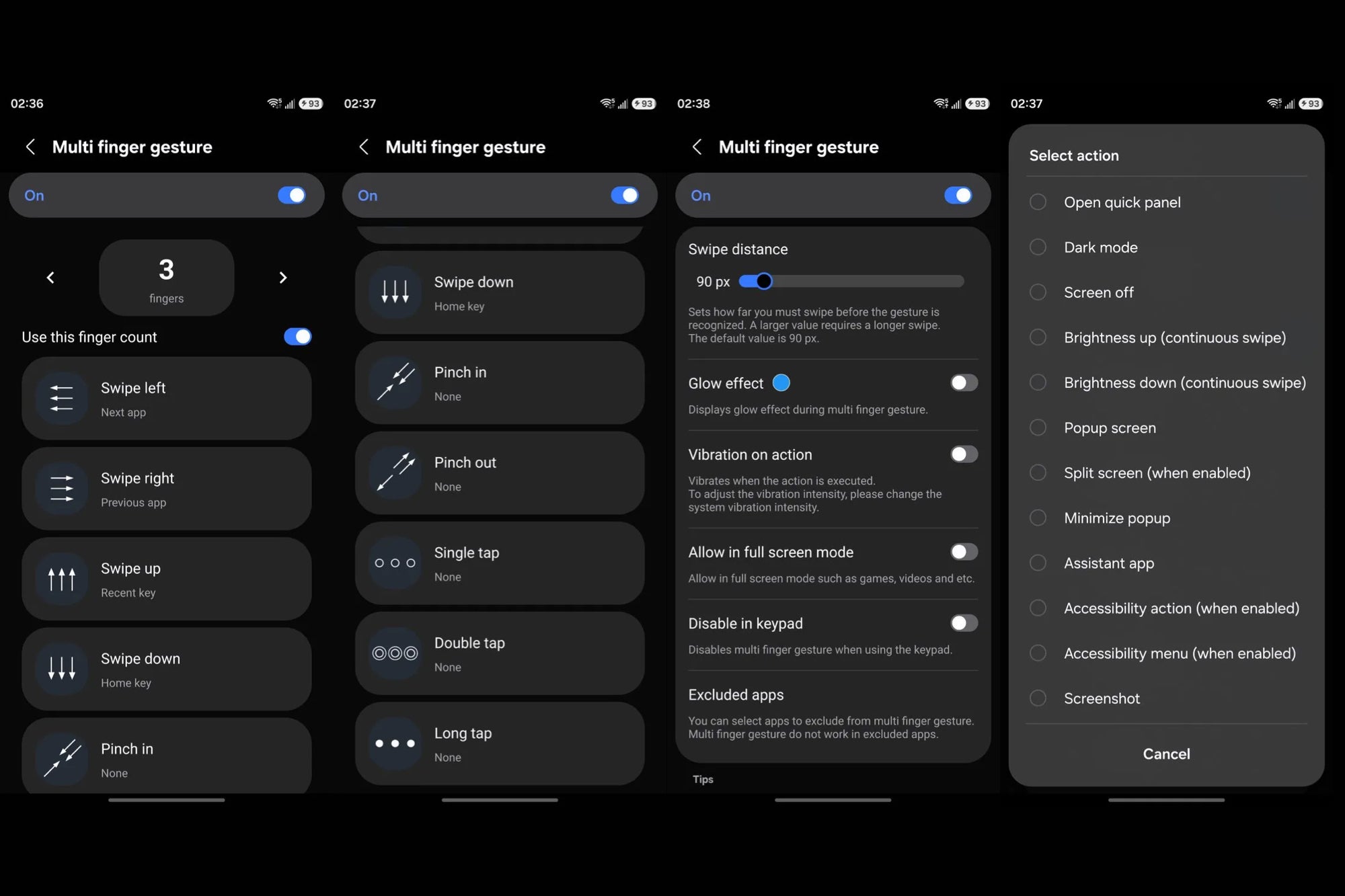
The dock, which Samsung calls Favorites, appears to be getting its own background settings, with a choice of solid colors, tiles, gradients, or a custom image, plus blur and shadow layered on top. The bigger addition looks to be multi-finger gestures, which let you assign actions like opening the quick panel, screen off, brightness control, or taking a screenshot to swipes, pinches, and taps using two to five fingers at once.
Leaker Galaxy Techie shared these One UI 9 Home Up screenshots on X on July 7. | Image by Galaxy Techie via X
How deep would you go with Home Up customization?
79 Votes
I'd customize every screen I can
79.75%
Just the dock, nothing more
2.53%
I don't touch Good Lock at all
11.39%
I'd rather use a third-party launcher
6.33%
Why this matters, even if you're not on Galaxy
If you're an iPhone user comparing notes with a Galaxy-owning friend, this is a gap that has stayed wide for years. iOS 26 lets you tint icons and resize widgets, but there's still no way to touch the dock's background or wire multi-finger gestures to system actions.
Recommended For You
For Galaxy owners who already rely on Good Lock, this fits a pattern from recent Home Up updates: Samsung keeps handing over more of the interface, one piece at a time. One UI 9 runs on Android 17, and the beta is already live on the Galaxy S26 Ultra and the rest of the S26 series.
The bigger event is the Galaxy Z Fold 8 and Z Flip 8 launch on July 22, when One UI 9 goes stable.
The Favorites (dock) background in One UI 9's Home Up module supports blur, shadow, solid colors, or a custom image. | Image by Galaxy Techie via X
What you'll actually be able to do
Here's what the leaked screens point to so far:
A dedicated Favorites background setting for the dock, with solid colors, tiles, gradients, or a custom image, plus adjustable blur and shadow
Multi-finger gestures, using two to five fingers, that can trigger actions like a screenshot, split screen, or the quick panel
Each gesture type, swipe, pinch, or tap, gets its own separate list of assignable actions
None of this is groundbreaking on its own, but it's the kind of quality-of-life layer that adds up if you already use Good Lock daily.
One UI 9's Home Up module lets you assign actions like screenshots or brightness control to gestures using up to five fingers. | Image by Galaxy Techie via X
Is this worth getting excited about?
I like that Samsung keeps treating Good Lock as a real feature pipeline, and Home Up in particular has quietly become one of the more useful modules in the suite.
My only hope is that Samsung irons out the rough edges before One UI 9 goes stable. A previous Home Up update warned that piling on too much dock customization can get messy fast, and that risk only grows with more options on the table.
I'd personally try the dock background first and work my way into the gestures from there.
And if you liked this story, here's more to check out:
Our take on the last major Home Up update in One UI 8.5
What to expect from the Galaxy Z Fold 8 Ultra
Curious how Apple compares? The best iPhones you can buy right now
Follow me, JoJo, on X and Threads for hot takes and behind-the-scenes coverage
Mint Mobile's 6-month plans now cost $10/mo
$10
/mo
$35
$25 off (71%)
Mint Mobile is celebrating its 10-year anniversary with a special offer on its six-month subscription plans. For a limited time, you can get your preferred tier (6GB, 17GB, 23GB or unlimited) for just $10/mo. That saves you between 50% and 71% on the carrier's mobile plans, making it way easier to recommend.
Johanna Romero is a Senior News Writer at PhoneArena, covering mobile technology news across Android, iOS, wearables, and the Google ecosystem she knows best. Drawing on 15 years in IT and tech support from 2007 to 2022, she brings a user-friendly eye for the practical features and lesser-known tricks readers care about. Google named her an official #TeamPixel member in 2022, and she also reviews the latest devices on her YouTube channel, JoJo the Techie.
A discussion is a place, where people can voice their opinion, no matter if it
is positive, neutral or negative. However, when posting, one must stay true to the topic, and not just share some
random thoughts, which are not directly related to the matter.
Things that are NOT allowed:
Off-topic talk - you must stick to the subject of discussion
Offensive, hate speech - if you want to say something, say it politely
Spam/Advertisements - these posts are deleted
Multiple accounts - one person can have only one account
Impersonations and offensive nicknames - these accounts get banned
To help keep our community safe and free from spam, we apply temporary limits to newly created accounts:
New accounts created within the last 24 hours may experience restrictions on how frequently they can
post or comment.
These limits are in place as a precaution and will automatically lift.
Moderation is done by humans. We try to be as objective as possible and moderate with zero bias. If you think a
post should be moderated - please, report it.
Have a question about the rules or why you have been moderated/limited/banned? Please,
contact us.




Things that are NOT allowed:
To help keep our community safe and free from spam, we apply temporary limits to newly created accounts: