Google now allows you to customize what you see and hear on Search, Discover, and the News app
Google is making it easier for users to see and hear preferred content.
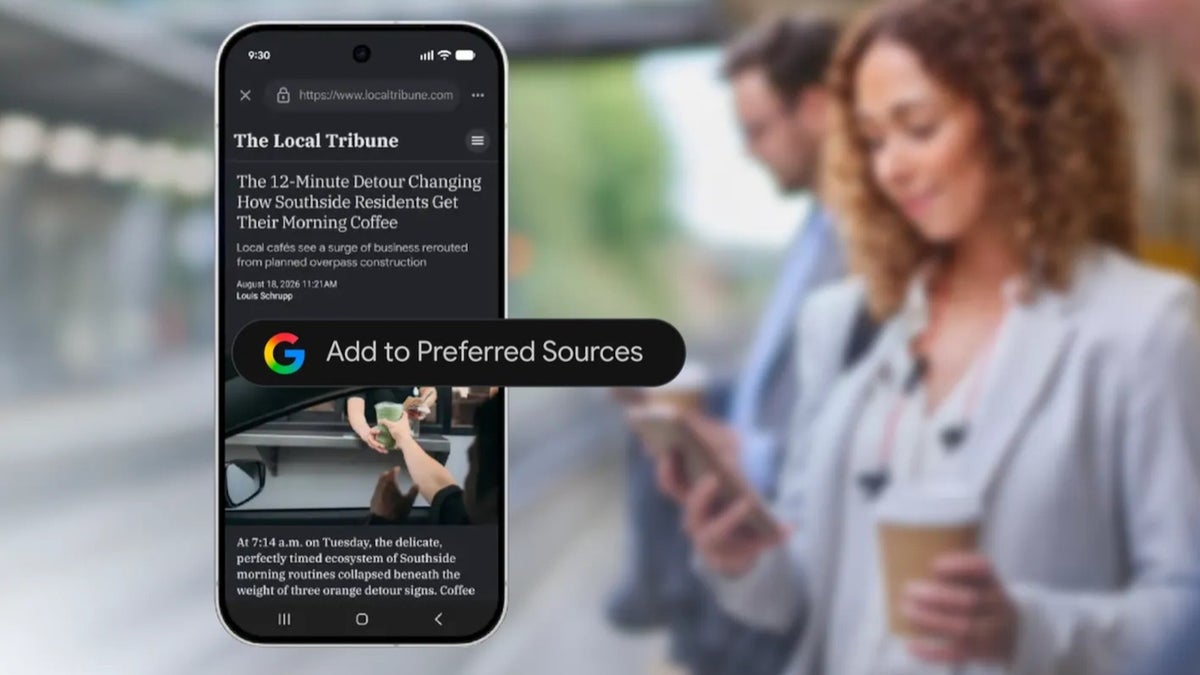
Choose your preferred sources on Discover, Search and the Google News app for Android | Image by Google
This past week Google revealed ways that you can have more control over what you see on the Google Discover page, Google Search, and Google News. Publishers can embed this button on their pages to help strengthen the connection between the reader and the source of the content.
Add a publisher to your "Preferred Sources"
When you tap on this button, which reads "Add to Preferred Sources," the site becomes a preferred source on Google and sends the reader back to where they left off on that publisher's page. In addition, readers will be able to find their favorite publications more easily in Top Stories, AI Overviews, and AI Mode. Google says that over 600,000 unique sources have been chosen as a Preferred Source by users.
Publishers can add the button to their content by getting the code from the Google Search Central documentation page.
Personalize your Discover feed
Do you enjoy reading about Google? Check these articles out:
- What did Google announce at its Made by Google event
- RCS not working on Google Messages with some new Android phones
Google is also making it easy for users to personalize their Discover feed. That is the feed you see when you swipe to the right from your home screen. You get to see news, videos, sports scores, and other content based on Web & App Activity, your location history/timeline, search patterns, and the topics you follow.
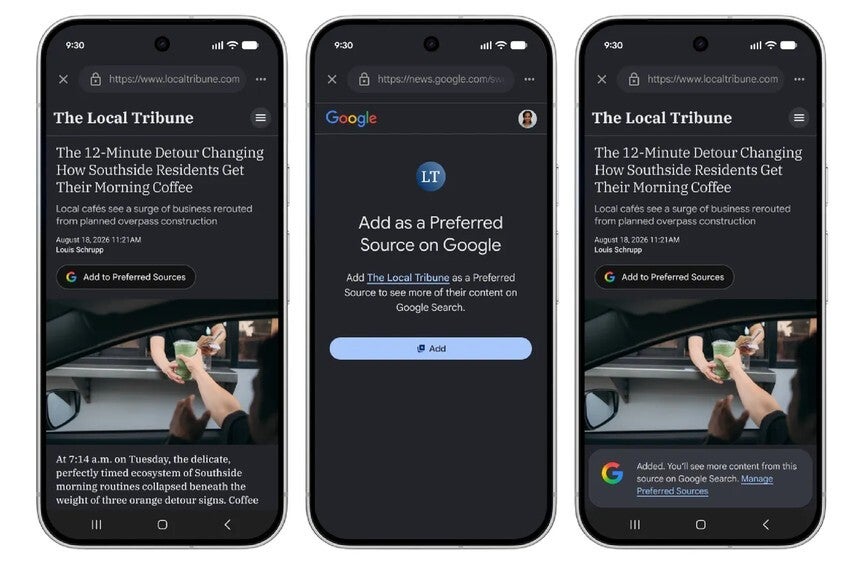
Press the Preferred Sources button to see more of the content you like. | Image by Google
Over the next few days, you'll be able to tap any three-dot menu in your feed in the Google app. From there, you'll be able to type in the topics you want to see more or less of in your Discover feed. You will be able to adjust the topics that you want to see in real time so that your Discover feed can always feature the content you want to see right now.
Customize your Google News for Android daily audio briefing
Some people would prefer to listen to the news. As a result, Google will now allow you to customize your daily audio briefings on the Google News app on Android. You can now choose specific topics with the source listed and you will also receive a link to the complete article.
Which of these Google platforms do you use to get news updates?
10 Votes
Discover
40%
Search
20%
Google News app
40%
Google adds that due to the wide range of publishers that are part of the Alphabet subsidiary's news AI pilot program, you will hear "deeper dives" into the briefing's top stories. To set up your daily audio briefing on the Google News app for Android, open the app (if you don't have the app, tap here to install it from the Play Store) and tap on the Listen tab at the bottom right.
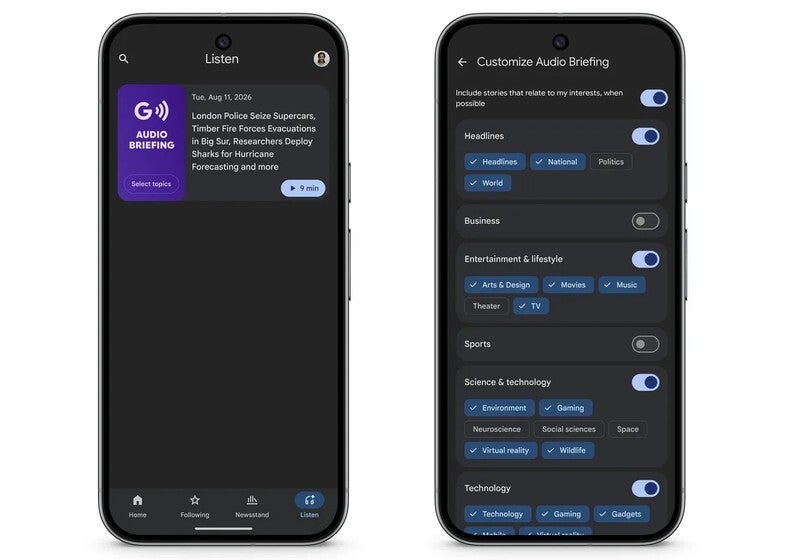
Customize your daily audio briefing on the Google News app for Android. | Image by Google
Select specific categories and sub-categories for an even deeper dive
You'll be able to select specific categories such as Headlines, Business, Entertainment, and Sports. You can go deeper by selecting subcategories like Movies or Music under Entertainment. You can also choose your favorite content creators under the Preferred Source option. Those publishers you select will have their content show up more often.
If you don't see this in your Google News for Android app, it might not have rolled out in your area yet.


Popular stories

Latest News

Things that are NOT allowed:
To help keep our community safe and free from spam, we apply temporary limits to newly created accounts: