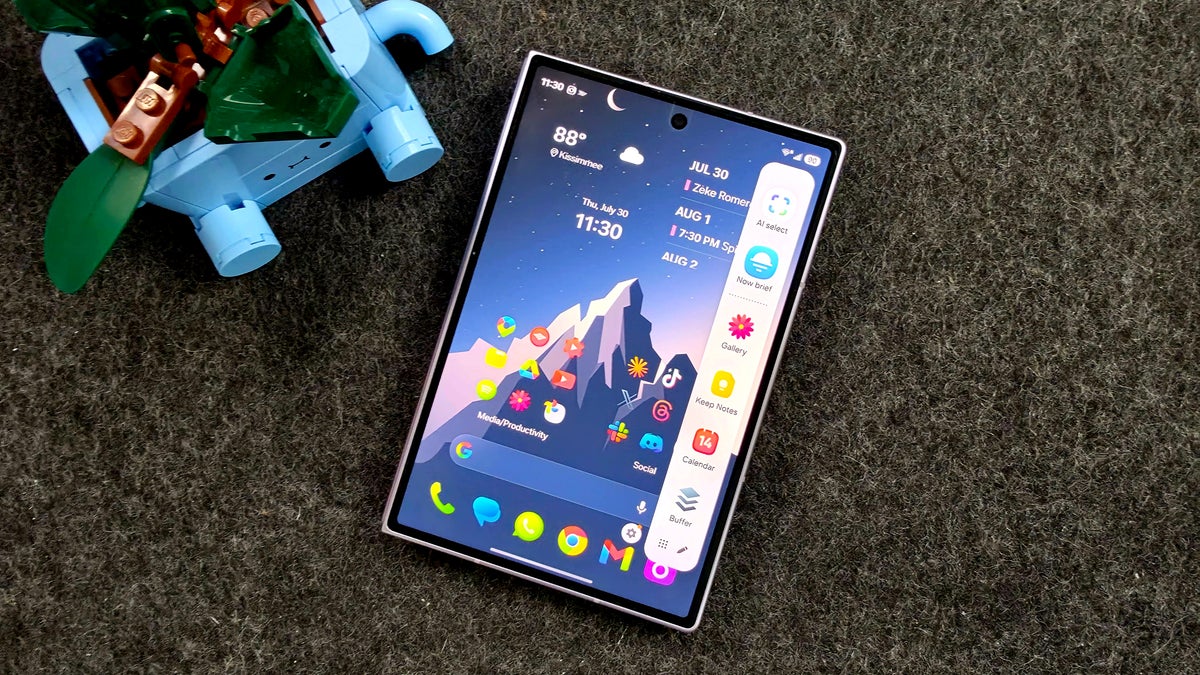
Samsung has confirmed that one of its own Good Lock modules is what keeps breaking the Edge Panel on Galaxy phones, the Galaxy S26 Ultra and Galaxy Z Fold 8 series included. Swiping in from the side of the home screen does nothing, and the culprit is One Hand Operation Plus, a gesture module that sits on that exact same strip of screen.
Samsung's own team owned up to it in a day
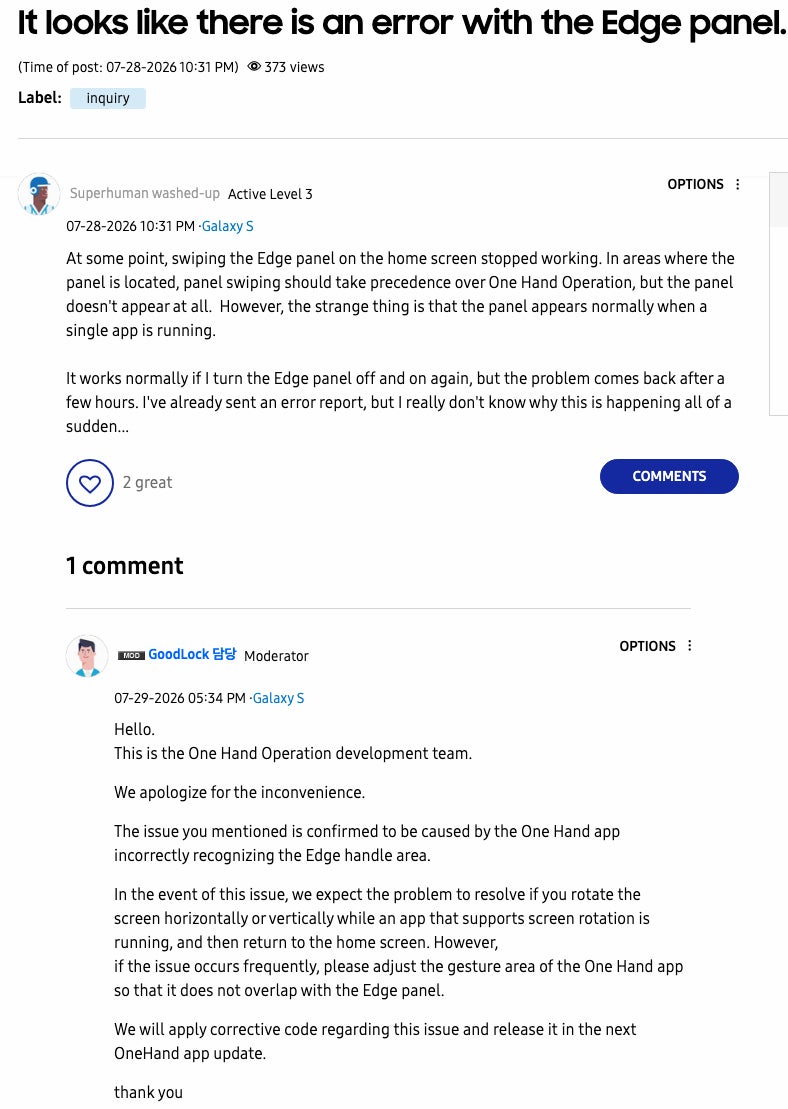
On July 28, 2026, a Galaxy S owner posted on Samsung's community forum (translated source) that swiping the Edge Panel out on the home screen had stopped working. The odd part is that the panel still behaved normally inside a running app, and toggling it off and back on only fixed things for a few hours.
The next day, a moderator answered on behalf of the One Hand Operation development team, apologized, and named the cause outright.
The issue you mentioned is confirmed to be caused by the One Hand app incorrectly recognizing the Edge handle area.
GoodLock moderator, One Hand Operation development team, Samsung Community forum, July 29, 2026
It should be noted that the confirmation came from the team that builds the app, which makes it a fact rather than a claim.
How much do you lean on Good Lock on your Galaxy?
39 Votes
It's the first thing I install on a new Galaxy
30.77%
A couple of modules and nothing more
35.9%
I tried it once and dropped it
10.26%
I have never used Good Lock
23.08%
Two Samsung features, one strip of glass
Good Lock is Samsung's optional customization suite, and One Hand Operation Plus is the module inside it that turns the screen edges into swipe shortcuts, so you can flick up from a corner to open the flashlight or pull down Quick Settings.
Recommended For You
The Edge Panel does something very similar from the very same place, giving you a swipe-in tray of apps, weather or contacts. Both features want the same few millimeters of glass, and Samsung says the module is misreading where the Edge Panel handle actually sits.
Grab the Galaxy Z Fold 8 Ultra at $1,000 off
$1099
99
$2099
99
$1000 off (48%)
Trade in an eligible device and save up to $1,000 on the new foldable phone from Samsung. With its refined design and large cover screen, the Galaxy Z Fold 8 Ultra is a top pick for foldable phone fans. Alternatively, you can get a $200 Samsung credit if you don't trade in a device.
The Galaxy Z Flip 8 is now available at the official store. It features an improved build and offers a fantastic foldable experience. Buy yours and save up to $400 at Samsung with a trade-in. Alternatively, you can get the phone with a $100 Samsung credit, no trade-in required.
The user's own description backs that up neatly, since the panel worked fine inside apps and only failed on the home screen, which is where One Hand Operation Plus is most active.
This is also the second Good Lock module in three weeks we've covered for breaking something in One UI. Back then it was RegiStar quietly removing the Galaxy Buds shortcut from the Settings menu, also confirmed by Samsung only after users reported it.
If you are on an Android phone that is not a Galaxy device, none of this reaches you. Stock Android does not have an Edge Panel equivalent, so there is no second gesture layer to collide with. That is the tradeoff though, less to break and quite a bit less to customize.
What to do if your Edge Panel stopped responding
This only affects Galaxy owners running Good Lock with One Hand Operation Plus turned on. If you have never installed Good Lock, your Edge Panel is fine.
The original Edge Panel complaint and Samsung's reply a day later. | Image by Superhuman washed-up via Samsung Community
Samsung's reply lays out the workarounds directly, and both of them take under a minute to try.
Here's how to get the Edge Panel working again
Open any app that supports screen rotation and turn your phone sideways, then back upright.
Return to the home screen and try swiping the Edge Panel out again.
If the problem keeps coming back, open One Hand Operation Plus and adjust its gesture area so it no longer overlaps the Edge Panel handle.
As a blunt last resort, switch One Hand Operation Plus off until the fix ships.
Samsung really should have caught this one
Samsung assigned two of its own features the same few millimeters of screen and then shipped both of them without checking whether they would fight over it. That is about as predictable a collision as you can get, and it happened because Good Lock lives outside One UI as an optional download instead of being tested against it.
Credit where it is due, the team answered within a day and said plainly what went wrong, which is more than a lot of companies manage. Still, there is no date attached to the fix, so "the next update" is doing a lot of work in that sentence.
I'd personally love to see Good Lock treated as part of One UI rather than a side project, because the modules are the best thing about using a Galaxy and they deserve better than this.
Follow me on X and Threads for hot takes and the behind-the-scenes bits that do not make it into articles
Six-month unlimited plan is now 57% off
$90
$210
$120 off (57%)
Mint Mobile is now allowing you to get whichever plan you like for either three, six, or 12 months for just $15/mo. If you go for the six-month unlimited service, for instance, you'll now have to pay just $90 upfront instead of $210.
Johanna Romero is a Senior News Writer at PhoneArena, covering mobile technology news across Android, iOS, wearables, and the Google ecosystem she knows best. Drawing on 15 years in IT and tech support from 2007 to 2022, she brings a user-friendly eye for the practical features and lesser-known tricks readers care about. Google named her an official #TeamPixel member in 2022, and she also reviews the latest devices on her YouTube channel, JoJo the Techie.
A discussion is a place, where people can voice their opinion, no matter if it
is positive, neutral or negative. However, when posting, one must stay true to the topic, and not just share some
random thoughts, which are not directly related to the matter.
Things that are NOT allowed:
Off-topic talk - you must stick to the subject of discussion
Offensive, hate speech - if you want to say something, say it politely
Spam/Advertisements - these posts are deleted
Multiple accounts - one person can have only one account
Impersonations and offensive nicknames - these accounts get banned
To help keep our community safe and free from spam, we apply temporary limits to newly created accounts:
New accounts created within the last 24 hours may experience restrictions on how frequently they can
post or comment.
These limits are in place as a precaution and will automatically lift.
Moderation is done by humans. We try to be as objective as possible and moderate with zero bias. If you think a
post should be moderated - please, report it.
Have a question about the rules or why you have been moderated/limited/banned? Please,
contact us.




Things that are NOT allowed:
To help keep our community safe and free from spam, we apply temporary limits to newly created accounts: