Pixel phones, the Pixel 10 for instance, are almost perfect in all departments. They have a good camera, long software support, decent battery life, and plenty of AI features. However, you will be able to enjoy all these capabilities only if your device turns on and is operational.
Unfortunately, after downloading the March Feature Drop, many Pixel users reported that their devices got stuck in a bootloop. The good news is that Google finally has a solution for this issue.
What's the exact problem?
In March this year, Google released its regular monthly update for Pixel phones. It was labeled the March Feature Drop and introduced some really cool upgrades like Magic Cue, custom AI icons, and more. However, after installing the update, many users reported that their device wasn't able to turn on at all.
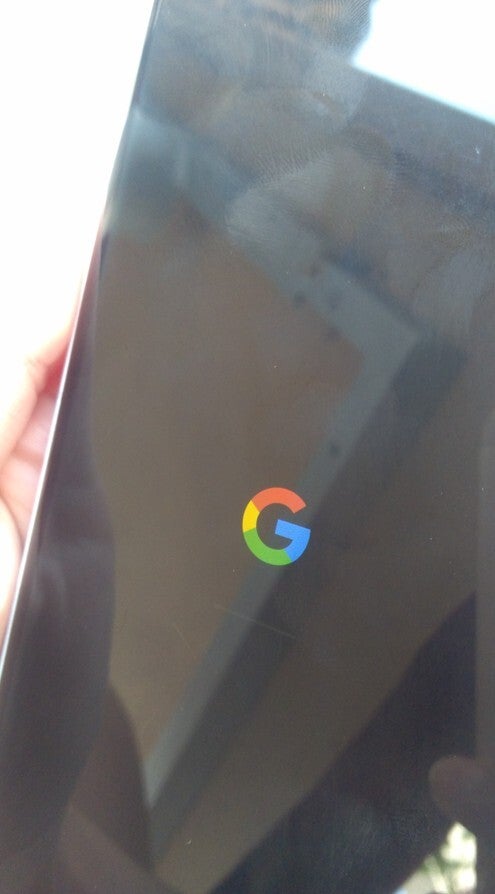
It reportedly reaches only up to the G logo and then restarts the whole process again. This whole process continued endlessly, and users never reached the home screen.
One working solution many suggested online was to factory reset the device. Unfortunately, many affected users reported that their Pixel phone wasn't able to reach even the recovery mode from where they could initiate the reset process.
Recommended For You
It's really a widespread problem, and it is apparently affecting almost all the Pixel phones released to date. On the Google issue tracker, I was able to spot complaints related to this happening on Pixel phones ranging from the latest Pixel 10 series to the multiple-year-old Pixel 6 lineup.
The fix is finally here
Pixel phone stuck on the G logo. | Image by Google Community forum
In April, the tech giant commented on the Google issue tracker that the team was "actively investigating and working on a solution." This statement gave everyone the confidence that we might get a solution very soon, and everyone was hoping that it would come with the May update – but it didn't.
Fortunately, after almost two months since it was first reported, the company apparently has a fix for the bootloop problem. A comment made under the post, which appears to be from one of the Google employees, reads as follows:
Thank you for your continued patience as we’ve been investigating a startup or bootloop issue following the March, April, or May software updates causing devices to freeze on the G-logo or initial boot screen and locking out and rebooting immediately after entering a PIN. We now have updated guidance and next steps available for devices exhibiting these symptoms specifically. Because the best path forward depends on your device's specific state, please contact Pixel Customer Support at https://support.google.com/pixelphone/gethelp directly so an agent can assist you with the resolution process. When reaching out, please mention the issue you're facing (for example "reboot loop issue after recent software update) so our team can quickly route you to the correct guidance.
The statement basically means that you would have to reach out to the Google support team to get your Pixel phone fixed. That's probably because there's no one particular solution that would work on all the affected devices, as it seems that the bug in question isn't affecting the boot process of all the devices the same way.
Plenty of users appear to have already contacted the support team. One user shared their experience by commenting that they were asked to perform a factory data reset from the fastboot screen using the hardware buttons. Another user mentioned that the team concluded that their device can't be fixed, and as a result, a replacement was arranged.
Which problem are you still facing with your Pixel phone?
239 Votes
Battery drain.
43.51%
Bootloop issue.
12.97%
Performance has noticeably degraded since the March update.
8.37%
My Pixel is running absolutely smooth.
35.15%
Factory reset seems to be the only solution
While the comment from what appears to be a Google representative hints that different Pixel phones would have different solutions, most of the users that reached out to the support team mentioned that they have been asked to perform a factory reset. So, it appears that that's the only solution the team has currently.
Honestly, it feels like customers are being punished for a crime that they haven't committed. If a bug introduced by a Google update is responsible, why should Pixel users have to pay the price by wiping their devices? A user experiencing the issue on their Pixel 10 Pro XL expressed the same frustration, saying a "premium device like this should not fail in a way that leaves customers with no option but to lose their data."
The battery drain issue is still haunting Pixel users
While the story of the Pixel bootloop problem might be about to end (definitely not with the most ideal solution), many Google phone users are still suffering from the battery drainage issue. Complaints related to it also started after the March update. Interestingly, the company is apparently aware of what exactly is causing Pixel phones to lose their battery life quickly, yet a solution hasn't been rolled out for it.
I truly hope that a fix is made available for it as well. I, personally, experienced a performance drop on my Pixel 10 after the March update. Fortunately, the problem is fixed now, and my phone is working like new.
Switch flash sale! Limited time offer!
Save $20 on Switch consoles from Back Market. Discount automatically applied at checkout. Offer ends 13 September 2026 at 23:59.
Aman Kumar is a news writer at PhoneArena covering Google Pixel phones, Android features, AI-powered smartphone tools, and mobile tech news. Before joining PhoneArena, he spent over five years writing about consumer technology for publications like MakeUseOf, How-To Geek, and Guiding Tech. His current daily drivers are the Pixel 10 and Samsung Galaxy S26 Plus, while his red iPhone SE (2nd gen) remains a personal favorite. Aman also appreciates bold smartphone experiments and still considers the Nokia N-Gage one of the industry’s most iconic designs.
A discussion is a place, where people can voice their opinion, no matter if it
is positive, neutral or negative. However, when posting, one must stay true to the topic, and not just share some
random thoughts, which are not directly related to the matter.
Things that are NOT allowed:
Off-topic talk - you must stick to the subject of discussion
Offensive, hate speech - if you want to say something, say it politely
Spam/Advertisements - these posts are deleted
Multiple accounts - one person can have only one account
Impersonations and offensive nicknames - these accounts get banned
To help keep our community safe and free from spam, we apply temporary limits to newly created accounts:
New accounts created within the last 24 hours may experience restrictions on how frequently they can
post or comment.
These limits are in place as a precaution and will automatically lift.
Moderation is done by humans. We try to be as objective as possible and moderate with zero bias. If you think a
post should be moderated - please, report it.
Have a question about the rules or why you have been moderated/limited/banned? Please,
contact us.











Things that are NOT allowed:
To help keep our community safe and free from spam, we apply temporary limits to newly created accounts: