Pixel phones may not be the fastest out there, but they’re full of nice features that are not available on other phones, even the ones running Android 17. Google Translate appears to be about to get an update to the Live Translate feature, which will be only available on the Pixel 9, Pixel 10, and Pixel 11 phones.
Google Translate gets a major Live Translate update
The Live Translate feature inside the Google Translate app allows you to get instant translations on your phone, instead of the clunkier basic mode. Until now, the feature could only be used when you were online, putting a barrier in the moments when you may have needed it the most.
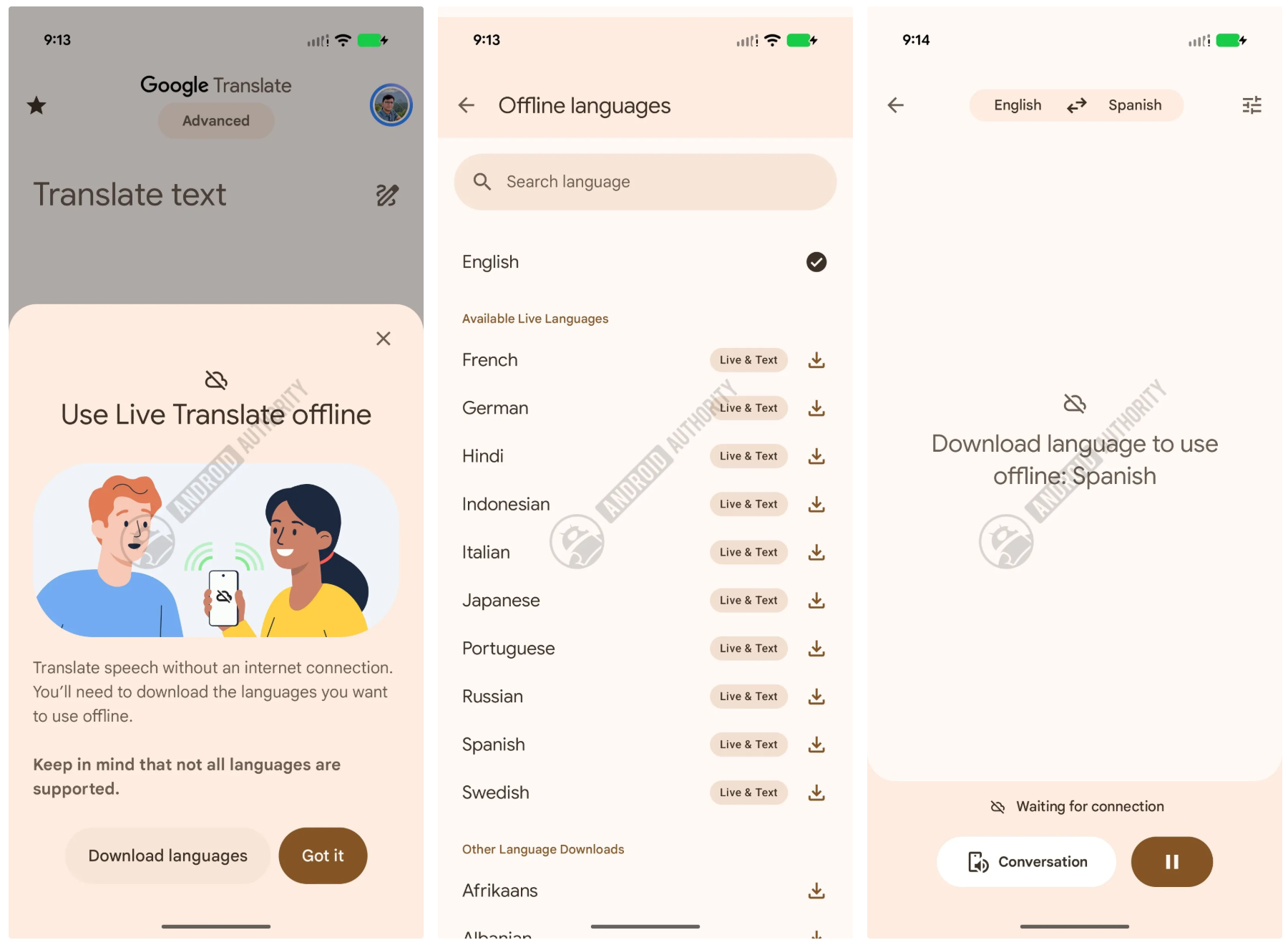
Google appears to have started solving this issue, as Android Authority reports that an offline mode for Live Translate is rolling out with support for 11 languages. According to a support document, this capability will be only available on the Pixel 9, Pixel 10, and Pixel 11 phones, at least for now.
The feature will work with translations from and to English and the following languages:
Italian
Spanish
French
German
Portuguese
Hindi
Russian
Swedish
Japanese
Indonesian (Bahasa)
How often do you use Google Translate or a similar app?
412 Votes
I use it all the time, and this feature sound great
15.78%
I use it quite often, and I'll use this new feature too
22.57%
I use it occasionally
46.84%
I never use translation apps
14.81%
How to download languages to use offline with Live Translate in Google Translate?
You can now download languages to use with Live Translate. | Image by Android Authority
The feature seems to be currently rolling out, but if you have a device that supports it, you can download languages to use it with quite easily. You just need to go in the language picker inside the Google Translate app and tap the Download button.
Recommended For You
To use the Live Translate feature, you just need to tap the Live & Text button inside the language picker. This will allow you to get instant translation regardless of whether you’re using headphones, earbuds, or just the speaker of your phone.
You can also choose real-time voice translations, take turns, or get everything translated into text.
This should extend to more devices
As much as I love learning new languages, it takes so much time and effort that it’s unrealistic to speak every language you may need. That’s why I’d love to see Google offering this feature on more devices as soon as possible. Until then, I’ll pray for a strong connection on all of my travels.
Get a free Galaxy A17 with Straight Talk. To claim this deal, you need to pair the phone with activation on a Silver Unlimited Plan or higher. This tier costs $45 per month. Offer valid through 01/10/27 while supplies last online.
Ilia, a tech journalist at PhoneArena, has been covering the mobile industry since 2011, with experience at outlets like Forbes Bulgaria. Passionate about smartphones, tablets, and consumer tech, he blends deep industry knowledge with a personal fascination that began with his first Nokia and Sony Ericsson devices. Originally from Bulgaria and now based in Lima, Peru, Ilia balances his tech obsessions with walking his dog, training at the gym, and slowly mastering Spanish.
A discussion is a place, where people can voice their opinion, no matter if it
is positive, neutral or negative. However, when posting, one must stay true to the topic, and not just share some
random thoughts, which are not directly related to the matter.
Things that are NOT allowed:
Off-topic talk - you must stick to the subject of discussion
Offensive, hate speech - if you want to say something, say it politely
Spam/Advertisements - these posts are deleted
Multiple accounts - one person can have only one account
Impersonations and offensive nicknames - these accounts get banned
To help keep our community safe and free from spam, we apply temporary limits to newly created accounts:
New accounts created within the last 24 hours may experience restrictions on how frequently they can
post or comment.
These limits are in place as a precaution and will automatically lift.
Moderation is done by humans. We try to be as objective as possible and moderate with zero bias. If you think a
post should be moderated - please, report it.
Have a question about the rules or why you have been moderated/limited/banned? Please,
contact us.












Things that are NOT allowed:
To help keep our community safe and free from spam, we apply temporary limits to newly created accounts: