Pixels go deaf after Android 17 Beta releases as key feature is broken by updates
Pixel users are awaiting a software update from Google that will fix this inconvenient problem.
Important Pixel feature is broken by Android 17 Beta updates. | Image by Google
For the last week I haven't been able to get the Gemini prompt to appear on the screen of my Pixel 6 Pro when I say, "Hey Google." Using that "hotword" is supposed to open whichever digital assistant you choose for your Pixel, either Gemini or Google Assistant. I prefer Gemini because of the quality and depth of the responses. Of course, it occurred to me that the Android 17 Beta releases, 1 and 2, were behind this.
Android 17 Beta 1 and 2 stop the Gemini "hotword" from opening the prompt
As we often remind you, when installing a major Beta update, especially those related to the release of a new OS build, some features that you rely on are just not going to work while the Beta updates are released. Eventually these broken features are repaired, usually before the final version of the software is dropped. A Reddit subscriber with the username Thin_Sun_2612 wrote, "Same issue, Android 17 Beta 1 and 2 had the same issues. Pixel 8 Pro."
There is some good news. The bug has been reported to Google through the Issue Tracker. We could see a fix included in an upcoming Android 17 Beta release. In the meantime, you can manually call for the Gemini prompt with a long-press of the power button, the top button on the right side of a Pixel handset. The prompt should appear on the bottom of the display.
Say "Hey Google, let's chat" to open Gemini Live
By the way, in case you were wondering, Google continues to use "Hey Google" as the hotword instead of "Hey Gemini" to keep things consistent. You might not know this, but if you say "Hey Google, let's chat," you will open Gemini Live allowing you to have a back and forth conversation using Gemini Live.
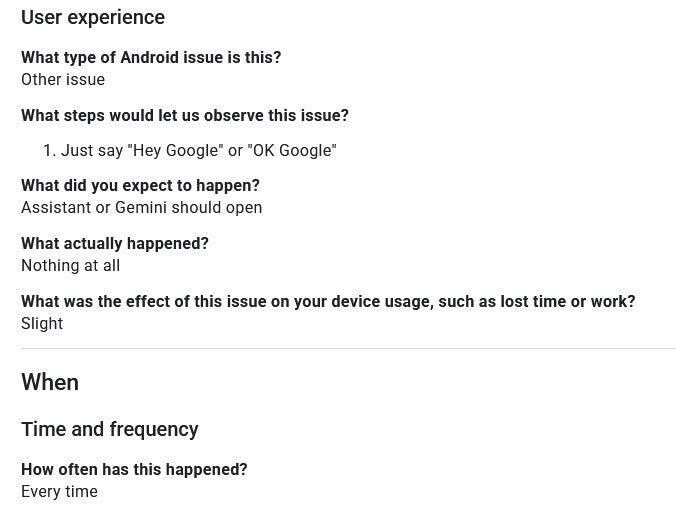
The issue has already been reported to the Issue Tracker. | Image by Google
Now there was one Redditor who said that clearing out the cache and storage for Gemini/Assistant worked for him, but for everyone else who responded to the post, this failed to work. This is more of an inconvenience than any serious problem. They say that you don't know what you've lost until you lose it. That certainly is the case here for Pixel users who have been able to ask a question or set a timer or alarm hands-free ever since they installed Android 17 Beta 1 and then added Beta 2.
Pixel users who stubbornly continue to use Google Assistant will likely see a banner this month whenever they use it that reads, "Switch to Gemini." In the middle to end of March, Google will start rolling out an update that eliminates the option in your Pixel's settings that allows you to "Switch back to Google Assistant." Older Pixel models like the Pixel 3 or Pixel 4a with less than 2GB of RAM running Android 9 or older could end up with a "Legacy Assistant" since those models cannot run Gemini.
Siri 2.0 could be coming to the iPhone with iOS 27 in September
Having a digital assistant that is an AI chatbot is a huge improvement. Since Google started the process of replacing Google Assistant with Gemini, it gave the latter the ability to set alarms and timers, and dictate and send texts on compatible Pixel phones. For those iPhone users who have been stuck with Siri, the upcoming Siri 2.0 update with the integration of a custom Gemini model is going to be a major improvement.
Right now, iPhone users can ask ChatGPT to take a deeper dive on queries originally given to Siri to answer. But the responses from ChatGPT are limited compared to the answers that Pixel users get from Gemini. Starting with iOS 27 in September, Siri will instantly become smarter thanks to the use of a custom 1.2 trillion parameter Gemini model that Apple will pay Google $1 Billion a year to use.
As for those Pixel users who have lost the ability to use "Hey Google" to open the Gemini prompt, all they can do is long-press the power button as we detailed earlier in the story. That is, until Google releases an update that patches the bug. We know that the Alphabet unit already knows about this problem, and on behalf of my fellow Pixel users, it can't come too soon.


Popular stories



Latest News
Things that are NOT allowed:
To help keep our community safe and free from spam, we apply temporary limits to newly created accounts: