Google Wallet is now the first digital wallet to team up with the TSA on PreCheck Touchless ID, letting eligible US flyers clear security with a face scan instead of a physical ID. Apple Wallet on the iPhone can't do this yet, so if you have TSA PreCheck and an Android with Google Wallet, you opt in once and you're covered across 100 participating airlines.
Google Wallet skips the airport ID fumble
Google announced today that Wallet is now the first digital wallet partner for the TSA's PreCheck Touchless ID program. It leans on the TSA's secure facial comparison at the checkpoint, so there's no reaching for a physical ID or a boarding pass.
Touchless ID already runs at 65 airports nationwide, but until now it covered only a limited set of airlines and made you upload your passport details separately for each one. With the Wallet integration rolling out over the coming weeks, a single opt-in carries you across any of the 100 participating airlines.
How do you feel about a face scan replacing your ID at TSA?
23 Votes
Love it, anything that speeds up airport security
47.83%
Not for me, I'd rather not have my face scanned
13.04%
I'll use it but still carry my physical passport
26.09%
I barely fly, so this one passes me by
13.04%
What it changes if you carry an iPhone or Galaxy
For anyone who flies often, the win is simple, you stop re-enrolling airline by airline and just look at the camera. Your passport details stay encrypted on the phone, and nothing reaches the TSA until you unlock the device and approve the share.
Recommended For You
If you're on an iPhone, Apple Wallet holds digital IDs in some states but isn't a TSA Touchless ID partner, so that face-scan shortcut isn't yours for now. Samsung got closer last month with a digital passport feature, though it runs through CLEAR rather than the TSA's own PreCheck Touchless ID.
So if your wallet of choice is Apple's or Samsung's, this particular TSA face-scan line still skips you, even if your phone can hold a digital ID either way. Google moving first here is the kind of head start that tends to push the others to match it.
Who can use it, and how to switch it on
The checklist is short. You need TSA PreCheck, a US passport added to Google Wallet, and a flight on one of the 100 supported airlines, which points squarely at US-based Android travelers.
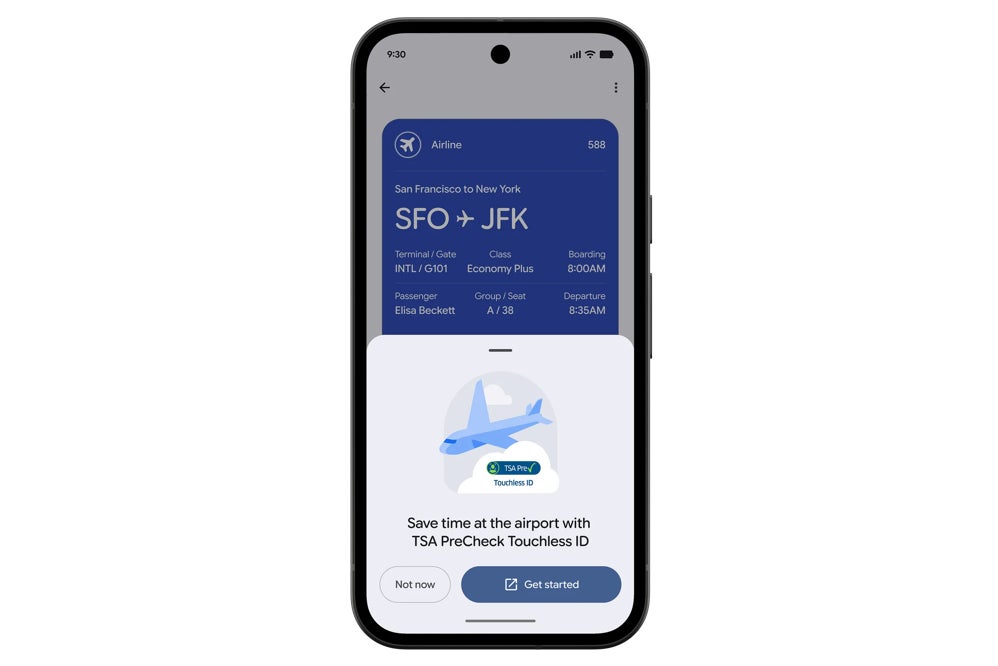
The 'Get started' button shows up on your boarding pass once you're eligible to opt in. | Image by Google
Here's how to set up TSA PreCheck Touchless ID
Add your US passport as an ID pass in Google Wallet.
Check in for your flight and save the boarding pass to Wallet.
Tap the "Get started" button on the boarding pass.
Agree to share your ID pass and that trip's boarding pass with the TSA.
Wait for the Touchless ID badge to show up on your pass, then use the express PreCheck Touchless ID line.
Why I set my passport up the moment I could
I already have TSA PreCheck and my digital ID sitting on my Pixel, so this one is right up my alley. Adding the passport took just a few minutes, and knowing the touchless lane is a single opt-in away makes the next trip feel a bit less stressful. I'm looking forward to trying the face-scan part the next time I fly, and I'll report back on how smooth it really is.
Want more from your Google Wallet before you fly?:
Johanna Romero is a Senior News Writer at PhoneArena, covering mobile technology news across Android, iOS, wearables, and the Google ecosystem she knows best. Drawing on 15 years in IT and tech support from 2007 to 2022, she brings a user-friendly eye for the practical features and lesser-known tricks readers care about. Google named her an official #TeamPixel member in 2022, and she also reviews the latest devices on her YouTube channel, JoJo the Techie.
A discussion is a place, where people can voice their opinion, no matter if it
is positive, neutral or negative. However, when posting, one must stay true to the topic, and not just share some
random thoughts, which are not directly related to the matter.
Things that are NOT allowed:
Off-topic talk - you must stick to the subject of discussion
Offensive, hate speech - if you want to say something, say it politely
Spam/Advertisements - these posts are deleted
Multiple accounts - one person can have only one account
Impersonations and offensive nicknames - these accounts get banned
To help keep our community safe and free from spam, we apply temporary limits to newly created accounts:
New accounts created within the last 24 hours may experience restrictions on how frequently they can
post or comment.
These limits are in place as a precaution and will automatically lift.
Moderation is done by humans. We try to be as objective as possible and moderate with zero bias. If you think a
post should be moderated - please, report it.
Have a question about the rules or why you have been moderated/limited/banned? Please,
contact us.









![Another batch of Galaxy S26 series users in the US are getting a nice surprise today [UPDATED]](https://m-cdn.phonearena.com/images/article/183643-wide-two_350/Another-batch-of-Galaxy-S26-series-users-in-the-US-are-getting-a-nice-surprise-today-UPDATED.webp)
Things that are NOT allowed:
To help keep our community safe and free from spam, we apply temporary limits to newly created accounts: