I have been using Google Messages for several years, and I must say it's great. It offers almost all the features you'd expect in one of the best messaging apps for Android, such as its very own trash folder and the ability to customize chats. However, certain basic capabilities are missing from the Google texting app.
One of these is the ability to copy a particular part of a message. Fortunately, Google has recognized that this is an important feature and has added it to its messaging app.
Copy only what you want
Copy option in Google Messages. | Image by 9to5Google
When you long-press the text in Google Messages and then tap the Copy icon, the entire message is copied instead of giving you the option to select and copy a particular part of it. However, a few months ago, signs that Google was working on addressing this limitation were spotted in the beta build of the app. The good news is that this change has finally been made to the stable build of Google Messages, and now you have the option to copy only a particular part of a message if you want.
Before you rush to check out this capability, I would advise you to open the Play Store and update the Google Messages app to version 20260910_03_RC02. After that, navigate to the message you want to copy. Now, when you press and hold the message and then select the Copy button, a highlighter will appear, allowing you to select the entire message or a particular part of it.
What's the next big change you really like to see in Google Messages?
2 Votes
A new long press menu
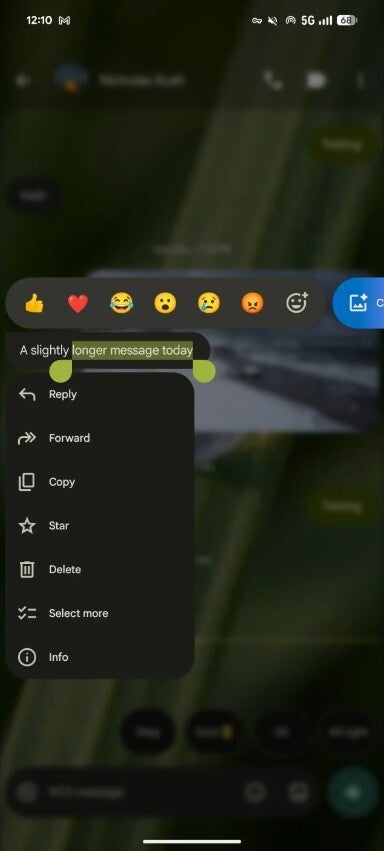
In the updated Google Messages app, you would also notice that the menu that appears upon long-pressing a message has been updated. Unlike before, when a toolbar appeared at the top, a new floating menu pops up upon long-pressing a text or image in Google Messages. It contains all the important options, such as Reply, Forward, Copy, Star, Info, and Select More.
Users were really frustrated by this limitations
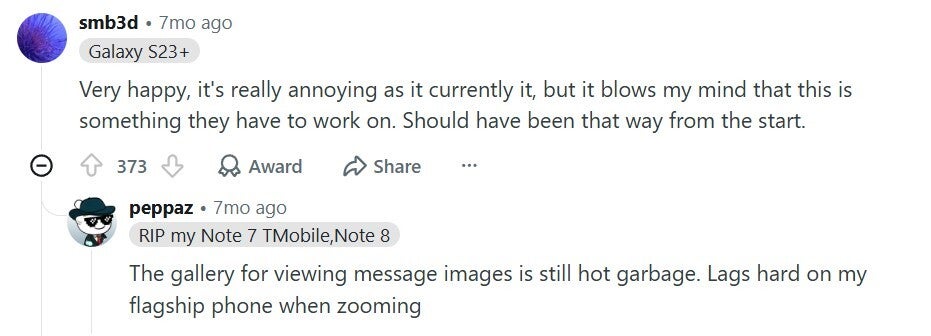
User comment about Google Messages. | Image by Reddit
It's not just me; many users have found this Google Messages limitation very frustrating. I found plenty of comments on the Google Community forum and Reddit with users criticizing Google for not offering such a basic feature in its app. One user commented that they were surprised this capability hadn't been present in the messaging app since day one.
Google Messages isn't the only app to be late in introducing this feature
You would be surprised to know that Google Messages isn't the only texting app that took so long to introduce such a basic capability. This function became available in iMessage with iOS 26, which was released last year. So it seems both Apple and Google have realized very late that users not only want advanced features like RCS and screen effects, but also some basic functions like the option to copy a particular part of a long text.
Want to read more about Google Messages? Check out these stories:
On the Visible+ Pro plan, you get access to 5G Ultra Wideband data on Verizon's fastest network. Along with unlimited roaming across Mexico and Canada, 2 days of Global Pass per month, 3x hotspot speeds, 4K streaming, and Smartwatch service.
Aman Kumar is a news writer at PhoneArena covering Google Pixel phones, Android features, AI-powered smartphone tools, and mobile tech news. Before joining PhoneArena, he spent over five years writing about consumer technology for publications like MakeUseOf, How-To Geek, and Guiding Tech. His current daily drivers are the Pixel 10 and Samsung Galaxy S26 Plus, while his red iPhone SE (2nd gen) remains a personal favorite. Aman also appreciates bold smartphone experiments and still considers the Nokia N-Gage one of the industry’s most iconic designs.
A discussion is a place, where people can voice their opinion, no matter if it
is positive, neutral or negative. However, when posting, one must stay true to the topic, and not just share some
random thoughts, which are not directly related to the matter.
Things that are NOT allowed:
Off-topic talk - you must stick to the subject of discussion
Offensive, hate speech - if you want to say something, say it politely
Spam/Advertisements - these posts are deleted
Multiple accounts - one person can have only one account
Impersonations and offensive nicknames - these accounts get banned
To help keep our community safe and free from spam, we apply temporary limits to newly created accounts:
New accounts created within the last 24 hours may experience restrictions on how frequently they can
post or comment.
These limits are in place as a precaution and will automatically lift.
Moderation is done by humans. We try to be as objective as possible and moderate with zero bias. If you think a
post should be moderated - please, report it.
Have a question about the rules or why you have been moderated/limited/banned? Please,
contact us.









Things that are NOT allowed:
To help keep our community safe and free from spam, we apply temporary limits to newly created accounts: