Google Messages has a camera flash bug that's leaving photos dark, even though the flash does go off. It's the default texting app on phones like the Pixel 11 Pro and Galaxy S26 Ultra, so if you often take pictures from inside a chat, this one is likely to catch you in low light.
The Google Messages camera fires its flash at the wrong moment
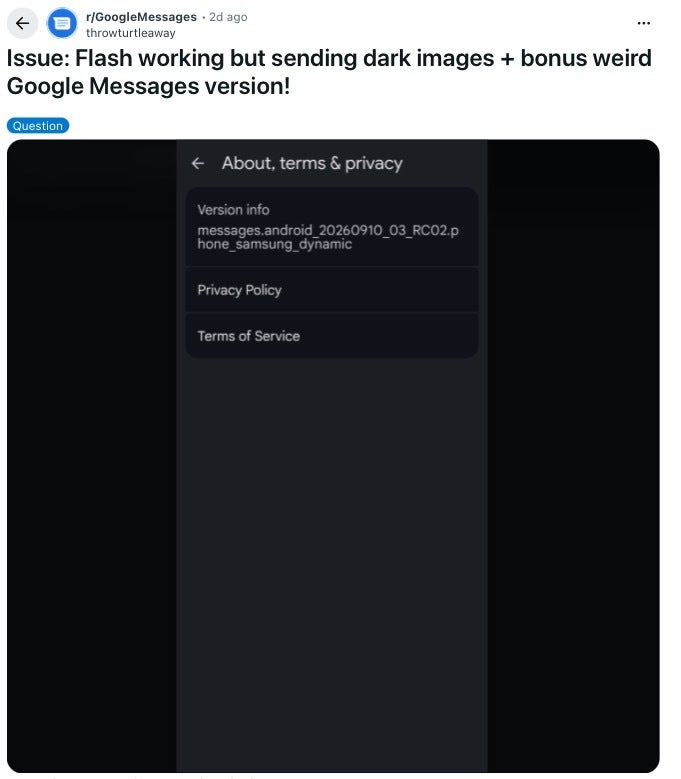
The complaint comes from a post on the r/GoogleMessages subreddit, where a Galaxy S24 Ultra owner on Verizon explained that the flash turns on when they take a picture from a chat, but the camera only captures it after the flash has already turned off. The result is a photo that looks like the flash was never on, while their regular camera app works just fine.
A Galaxy S24 Ultra owner shared the issue along with their Google Messages version. | Image by throwturtleaway via Reddit
A new report was able to reproduce it on the latest Google Messages beta, and on one Pixel the flash wouldn't turn on at all, even when toggled manually.
How do you usually send a photo in a text?
0 Votes
Why the flash works in your camera app but not in Google Messages
For most of us, this is more of an annoyance than a disaster, since you can still send a well-lit photo, it just takes a few extra steps. However, Samsung Messages was discontinued in the US on July 6, so Galaxy owners there now have Google Messages as their main texting app, which puts a lot more people in front of this bug.
Recommended For You
The reason your camera app is fine comes down to how Google Messages takes pictures. Back in 2024, Google gave Messages its own built-in camera instead of opening your phone's camera app, which is why it has a simpler set of controls and its own flash button.
A flash photo only works if the flash is on at the exact moment the camera grabs the picture, and Android's developer tools leave that up to each app, offering simple on, auto and off settings for the flash. In a reply on the thread, the verified Google Help Community account on Reddit mentioned that a bug report helps the team adjust the flash timing for the S24 Ultra, which suggests Google tunes this timing phone by phone.
In practice, it means seeing the flash go off in Messages is no guarantee your photo will come out lit.
What Galaxy and Pixel owners can do in the meantime
Google hasn't officially acknowledged the bug yet, and there's no sign of a fix. So if you often send photos straight from a chat, especially indoors or at night, you're the one most likely to run into it.
Here's how to send a flash photo in Google Messages for now
Open your phone's regular camera app, turn on the flash and take the picture there.
Open the conversation in Google Messages, tap the plus button next to the text field, and choose Gallery.
Select the photo you just took and send it as usual.
A small Google Messages bug, but not one I'd ignore
This isn't the most serious bug Google Messages has had this year, and the workaround only takes a few extra taps. Still, the in-chat camera exists to save us those taps, and having it quietly produce dark photos while the flash clearly goes off defeats the point of having it.
Hopefully, Google looks into this soon, since the complaints now go back a month and span several phones. I'd personally love to see Google spend a little more time on the basics like this before its next big redesign arrives.
Keep reading about Google Messages and Android phones:
On the Visible+ Pro plan, you get access to 5G Ultra Wideband data on Verizon's fastest network. Along with unlimited roaming across Mexico and Canada, 2 days of Global Pass per month, 3x hotspot speeds, 4K streaming, and Smartwatch service.
Johanna Romero is a Senior News Writer at PhoneArena, covering mobile technology news across Android, iOS, wearables, and the Google ecosystem she knows best. Drawing on 15 years in IT and tech support from 2007 to 2022, she brings a user-friendly eye for the practical features and lesser-known tricks readers care about. Google named her an official #TeamPixel member in 2022, and she also reviews the latest devices on her YouTube channel, JoJo the Techie.
A discussion is a place, where people can voice their opinion, no matter if it
is positive, neutral or negative. However, when posting, one must stay true to the topic, and not just share some
random thoughts, which are not directly related to the matter.
Things that are NOT allowed:
Off-topic talk - you must stick to the subject of discussion
Offensive, hate speech - if you want to say something, say it politely
Spam/Advertisements - these posts are deleted
Multiple accounts - one person can have only one account
Impersonations and offensive nicknames - these accounts get banned
To help keep our community safe and free from spam, we apply temporary limits to newly created accounts:
New accounts created within the last 24 hours may experience restrictions on how frequently they can
post or comment.
These limits are in place as a precaution and will automatically lift.
Moderation is done by humans. We try to be as objective as possible and moderate with zero bias. If you think a
post should be moderated - please, report it.
Have a question about the rules or why you have been moderated/limited/banned? Please,
contact us.











Things that are NOT allowed:
To help keep our community safe and free from spam, we apply temporary limits to newly created accounts: