Smart Reply on Google Messages is an AI based feature that delvers contextually based pre-written responses to texts you've received. With one tap, you can send a quick reply to a text that saves you from typing out responses such as "I agree," or "I'm on my way." These are short responses that do make sense in the context of the message you received. Currently, when you tap on a smart reply, the action known as Tap to Send takes over and the Smart Reply you tapped is sent as a new message.
The problem with Tap to Send is that you do not get a chance to fix a typo in the Smart Reply, add more text, or change your mind about your response. The latest Google Messages beta, version 20260113_01_RC00, includes a feature called Tap to Edit. Unlike the current Tap to Send, when you tap on a Smart Reply in Tap to Edit, instead of it being sent as a new message, it is placed in the compose bar, which will allow you to make edits to the Smart Reply before you send it.This will prevent a Smart Reply from being accidentally sent as the response to a text message.
Google Messages will soon allow you to Tap to Send or Tap to Edit a Smart Reply
The new feature has yet to appear in Google Messages. When it does appear, you'll be able to go to Settings > Suggestions and see a menu that gives you the opportunity to choose between two options:
Tap to Send-the current Smart Reply process. Tapping on the Smart Reply bubble immediately sends the text inside the bubble to the recipient.
Tap to Edit-now in the beta version of Google Messages, tapping on a Smart Reply bubble sends the text inside that bubble to the message compose field from where it can be edited as part of a draft message before being sent.
If you choose Tap to Edit when it becomes an option for you on Google Messages, sending a Smart Reply that says something like "Sounds good," when you didn't mean to do so will be something you will no longer have to worry about.
This is a very useful feature for Android users to have if they use Smart Reply on the Google Messages app
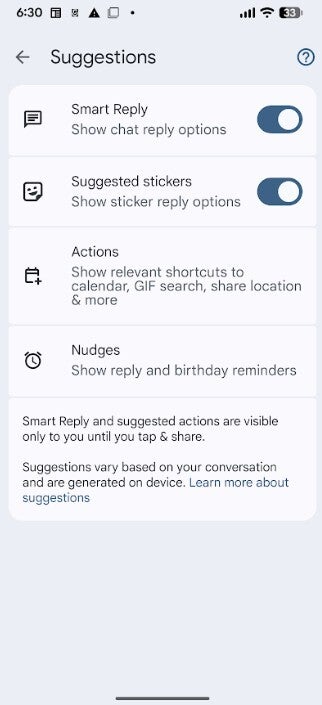
You'll know when Tap to Edit is available on your phone by opening the Google Messages app and tapping the Profile picture on the very right of the search bar at the top of the display. From there, you'll tap on Messages settings > Suggestions. If all you see is a toggle to enable and disable Smart Reply, it means that you haven't received the new version with Tap to Edit. If you can enable/disable Tap to Send and enable/disable Tap to Edit, you'll know that the new feature has arrived.
If you see this menu in Google Messages, it means that you do not have the Tap to Edit feature yet. |Image credt-PhoneArena
Recommended For You
Keep in mind that you cannot have both Tap to Send and Tap to Edit enabled at the same time as they are mutually exclusive of each other. It makes perfect sense, really. Either you want the tap of a Smart Reply to send it as a message to your recipient immediately, or you want that tap to send the Smart Reply text into the compose field from where you can edit it and the words around it before you send it.
What I think about the new feature
Frankly, I love it. It combines the ability to create an immediate, contextual AI-powered response with the more personal opportunity to go over the response and make changes to it as you desire. Google came up with a very good idea for an update and while it's not available yet on my Pixel 6 Pro running Android 16 QPR3 Beta 2, I'll be looking forward to the release of Tap to Edit.
Are you looking forward to Tap to Edit for Smart Reply?
20 Votes
Yes. It will eliminate accidental responses.
90%
No. I'd rather press Smart Reply and send the response.
10%
I don't know.
0%
Of course, your Android phone needs to be running the Google Messages app. If you haven't installed it yet, tap on this link to download it from the Google Play Store.
Mint Mobile's 6-month plans now cost $10/mo
$10
/mo
$35
$25 off (71%)
Mint Mobile is celebrating its 10-year anniversary with a special offer on its six-month subscription plans. For a limited time, you can get your preferred tier (6GB, 17GB, 23GB or unlimited) for just $10/mo. That saves you between 50% and 71% on the carrier's mobile plans, making it way easier to recommend.
Alan, an ardent smartphone enthusiast and a veteran writer at PhoneArena since 2009, has witnessed and chronicled the transformative years of mobile technology. Owning iconic phones from the original iPhone to the iPhone 15 Pro Max, he has seen smartphones evolve into a global phenomenon. Beyond smartphones, Alan has covered the emergence of tablets, smartwatches, and smart speakers.
A discussion is a place, where people can voice their opinion, no matter if it
is positive, neutral or negative. However, when posting, one must stay true to the topic, and not just share some
random thoughts, which are not directly related to the matter.
Things that are NOT allowed:
Off-topic talk - you must stick to the subject of discussion
Offensive, hate speech - if you want to say something, say it politely
Spam/Advertisements - these posts are deleted
Multiple accounts - one person can have only one account
Impersonations and offensive nicknames - these accounts get banned
To help keep our community safe and free from spam, we apply temporary limits to newly created accounts:
New accounts created within the last 24 hours may experience restrictions on how frequently they can
post or comment.
These limits are in place as a precaution and will automatically lift.
Moderation is done by humans. We try to be as objective as possible and moderate with zero bias. If you think a
post should be moderated - please, report it.
Have a question about the rules or why you have been moderated/limited/banned? Please,
contact us.












Things that are NOT allowed:
To help keep our community safe and free from spam, we apply temporary limits to newly created accounts: