Do you find the batteries on your Android phone draining too quickly? Sure, you can stay connected through the use of an accessory such as a power bank. Enabling the Battery Saver will also allow you to stretch out the battery life of your Android phone. But there is one default app that could be responsible for the disappointing battery life you are trying hard to put up with. That app is Chrome, which of course is the Android default browser app.
Chrome's background activities can decimate your Android phone's battery life
As the Android default browser, Chrome might be getting used more than you even know. The Chrome app can decimate your battery even when the app is closed, as the default browser is often used to open articles from the Google app and Discover page. Even if you have another browser selected as your default browser, articles you view from the Google app and Discover page are rendered using a Chrome-based viewer unless you were able to tap on the "Open web pages in the app" setting.
Will you disable these Chrome features to improve your battery life?
754 Votes
Yes. Any improvement in battery life is worth it.
79.31%
No. I'd prefer to have the Chrome features.
18.97%
I don't have an Android phone.
1.72%
Apps like Facebook and Instagram use built-in browsers and on Android devices these browsers employ the Chromium web engine. On iOS, these apps use WebKit. On Android, you might not even realize when you are using the Chrome Browser and there might be no indication that this is the case until you find yourself with only 15% battery remainiing and that old battery anxiety is creeping up on you again.
You might be wondering what it is about the Chrome Browser that makes it consume battery power like a pug eating dog food. The problem is that Chrome is constantly running several background processes and each one has to connect to the web, request new info from a server, and send/receive data. Over the course of a 24-hour day, the Chrome Browser can go through as much as 13% of your battery life.
How to disable Chrome features to improve the battery life on your Android phone
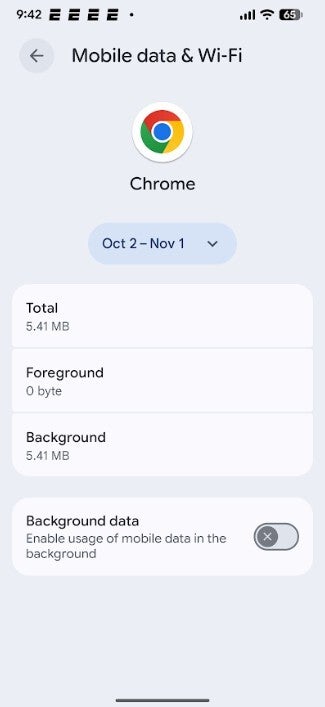
What makes this so interesting is that these background processes allow things to load faster. Some Android phones will allow you to make a trade off by disabling the ability of Chrome to work in the background in exchange for a reduction in the app's battery drain. The fastest way to do this is to long-press the Chrome icon on your home page and that should bring up a few options. Press on App info > Mobile data usage. Toggle off Background data.
Recommended For You
Another way to do this would be to go to Settings > Apps > See all xxx apps. Look for Chrome and tap on it. Press on Mobile data usage and toggle off Background data.
If that doesn't do the trick, open Chrome and press the three-dot icon in the top right corner. Tap on Settings > Privacy and security > Preload pages. Tap on No preloading. This will result in pages taking a longer time to open, but could improve the battery life on your Android phone. Also, you can press the three-dot icon in the top right corner. Tap on Settings > Google services and toggle off Improve search suggestions. When you type something in the Chrome address bar, what you type is sent to your default search engine to get better suggestions. Losing this could improve your battery life at the expense of losing a feature you probably didn't know about.
Toggling off Background data on Chrome can improve the battery life on your Android phone. | Image credit-PhoneArena
Another feature that can be disabled in exchange for additional battery life is one that syncs data from Chrome to other devices. You can disable this feature by going back to Settings and tapping on your name. Toggle off any data that you don't want synced to other devices. You can also save some juice by going to Settings on Chrome once more, tapping on Site Settings > Notifications. Toggle off the very first toggle switch under Notifications to stop receiving any notifications via Chrome. Or you can go through the list of apps individually and disable the ones you don't want to receive notifications from.
It's a trade off. If you can do without these Chrome features, you might enjoy longer battery life
For the next change, which will stop videos from playing automatically on certain websites viewed in Chrome, open the Chrome app and head to www.google.com. Scroll to the bottom of the page and hit Settings. From there, go to Settings > Search Settings. Select the Other Settings tab on the top right and tap on Auto-play reviews. You can choose between keeping Auto-play on, allowing it when on Wi-Fi, or turning off the feature under all situations to save your battery life.
Lastly, below Autoplay video previews is Autocomplete with trending searches, which uses autocomplete to fill out a search request for something that is trending at the moment. Disable the feature if you're willing to lose it in exchange for longer battery life.
It's a tradeoff. If you're willing to give up some of these features for some extra battery life, you might want to disable the above features to see if it worth doing so.
Mint Mobile's 6-month plans now cost $10/mo
$10
/mo
$35
$25 off (71%)
Mint Mobile is celebrating its 10-year anniversary with a special offer on its six-month subscription plans. For a limited time, you can get your preferred tier (6GB, 17GB, 23GB or unlimited) for just $10/mo. That saves you between 50% and 71% on the carrier's mobile plans, making it way easier to recommend.
Alan, an ardent smartphone enthusiast and a veteran writer at PhoneArena since 2009, has witnessed and chronicled the transformative years of mobile technology. Owning iconic phones from the original iPhone to the iPhone 15 Pro Max, he has seen smartphones evolve into a global phenomenon. Beyond smartphones, Alan has covered the emergence of tablets, smartwatches, and smart speakers.
A discussion is a place, where people can voice their opinion, no matter if it
is positive, neutral or negative. However, when posting, one must stay true to the topic, and not just share some
random thoughts, which are not directly related to the matter.
Things that are NOT allowed:
Off-topic talk - you must stick to the subject of discussion
Offensive, hate speech - if you want to say something, say it politely
Spam/Advertisements - these posts are deleted
Multiple accounts - one person can have only one account
Impersonations and offensive nicknames - these accounts get banned
To help keep our community safe and free from spam, we apply temporary limits to newly created accounts:
New accounts created within the last 24 hours may experience restrictions on how frequently they can
post or comment.
These limits are in place as a precaution and will automatically lift.
Moderation is done by humans. We try to be as objective as possible and moderate with zero bias. If you think a
post should be moderated - please, report it.
Have a question about the rules or why you have been moderated/limited/banned? Please,
contact us.













Things that are NOT allowed:
To help keep our community safe and free from spam, we apply temporary limits to newly created accounts: