Google is currently working on the Phone by Google app and it appears that there are several improvements being made to the app which not only includes the dialer but also is where Android Calling Cards are found. These are similar to the Contact Posters used on iOS. While the Contact Posters can be created and edited from the Apple Contacts app for the iPhone, Google allows Android users to manage the Calling Cards from the Phone by Google app, not the Google Contacts app.
It appears that Android users would prefer to copy iPhone users and manage their Calling Cards from the Google Contacts app instead of the Phone by Google app. Google probably doesn't want to simply move the cards from the phone app to the Contacts app. Instead, Google is adding a shortcut to its Contacts app that will allow users to access the Calling Cards from Google Contacts as well as the Phone app.
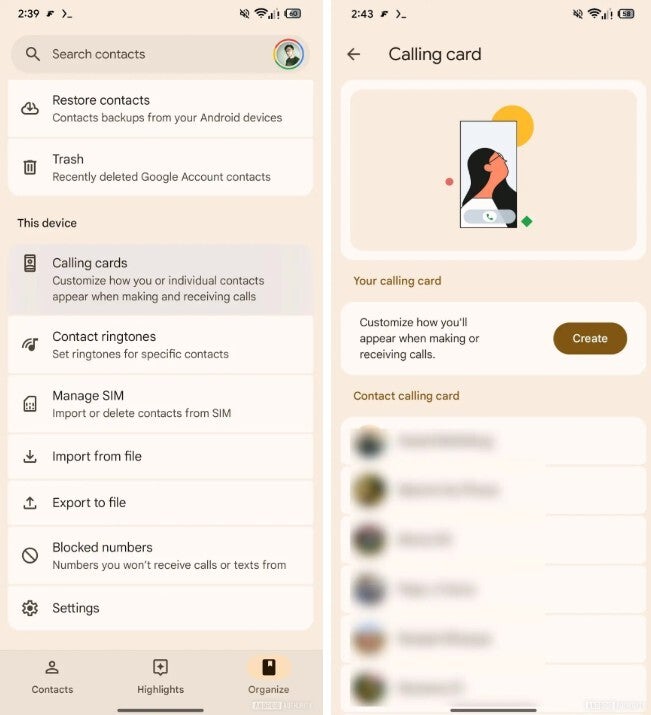
What the new Calling Card shortcut will look like on the Google Contacts app. | Image credit-Android Authority
According to AssembleDebug, writing for Android Authority, in version 4.72.5.862509763 of the Google Contacts app, code was discovered suggesting that Calling Cards will also be available from Google Contacts via a shortcut button that will be added to the app. This button will be found in the Google Contacts' Organize Tab. Tapping the button will open the same Calling Cards management screen that is found in the Phone by Google app.
Recommended For You
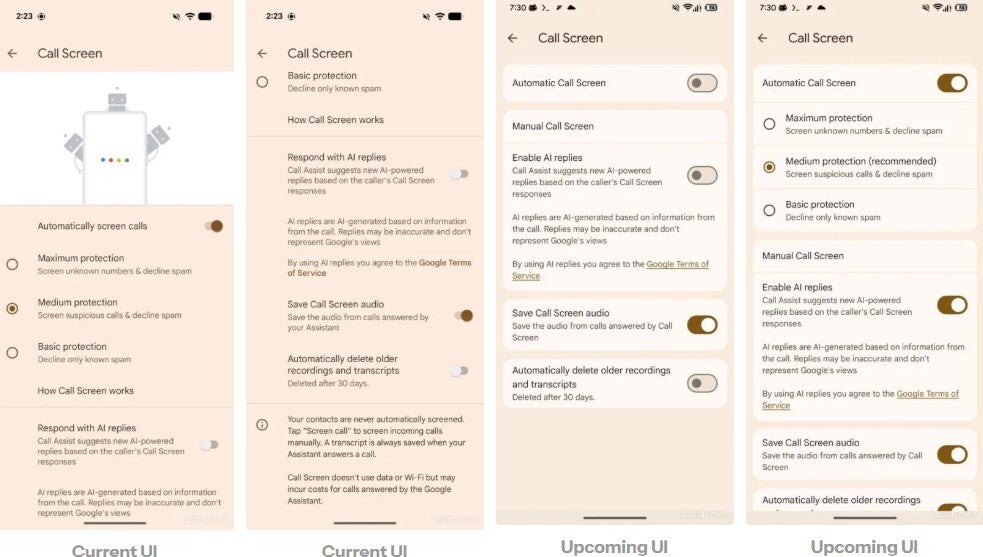
The current and future updated look of the Call Screen menu n the Phones by Google app. | Image credit-Android Authority
Also found in the Phones by Google app in version 208.0.864581421 is a Material 3 Expressive update to the Call Screen menu. Animation at the top of the display has been removed and the new look appears much cleaner and less cluttered. The above changes have yet to be rolled out to Android users in either the Phone by Google app or the Google Contacts app.
If you don't have the Google Contacts app on your Android phone for some reason, tap on this link to install it from the Google Play Store. You can do the same if you don't have the Phone by Google app on your Android phone. Just tap the link here to install that app from the Play Store.
Get iPhone 18 Pro with Visible, get $480 off!
$719
/mo
$1199
$480 off (40%)
On the Visible+ Pro plan, you get access to 5G Ultra Wideband data on Verizon's fastest network. Along with unlimited roaming across Mexico and Canada, 2 days of Global Pass per month, 3x hotspot speeds, 4K streaming, and Smartwatch service.
Alan, an ardent smartphone enthusiast and a veteran writer at PhoneArena since 2009, has witnessed and chronicled the transformative years of mobile technology. Owning iconic phones from the original iPhone to the iPhone 15 Pro Max, he has seen smartphones evolve into a global phenomenon. Beyond smartphones, Alan has covered the emergence of tablets, smartwatches, and smart speakers.
A discussion is a place, where people can voice their opinion, no matter if it
is positive, neutral or negative. However, when posting, one must stay true to the topic, and not just share some
random thoughts, which are not directly related to the matter.
Things that are NOT allowed:
Off-topic talk - you must stick to the subject of discussion
Offensive, hate speech - if you want to say something, say it politely
Spam/Advertisements - these posts are deleted
Multiple accounts - one person can have only one account
Impersonations and offensive nicknames - these accounts get banned
To help keep our community safe and free from spam, we apply temporary limits to newly created accounts:
New accounts created within the last 24 hours may experience restrictions on how frequently they can
post or comment.
These limits are in place as a precaution and will automatically lift.
Moderation is done by humans. We try to be as objective as possible and moderate with zero bias. If you think a
post should be moderated - please, report it.
Have a question about the rules or why you have been moderated/limited/banned? Please,
contact us.













Things that are NOT allowed:
To help keep our community safe and free from spam, we apply temporary limits to newly created accounts: