Apple iOS 27 Beta 3: Siri AI takes one step back
iOS 27 Beta 3 includes some new features for Safari and Siri.
iOS 27 Beta 3 is huge and is now here | Image by PhoneArena
Apple released iOS 27 Developer Beta 3 today, weighing in at a hefty 9.58 GB for the iPhone 15 Pro Max. For Siri AI, it seemed to be one step backward after a strong improvement for the feature in iOS 27 Beta 2. Answers to queries didn't seem as detailed, many more answers were incorrect, and Siri took longer to respond in some cases. This is a work in progress for Apple and I expect to see the same pattern with some improvements for Siri AI in Beta 4.
Siri AI appears to have taken a step backward in iOS 27 Beta 3
Siri AI in iOS 27 Beta 3 also had a propensity for shutting down before I got to finish a verbal prompt. This is an extremely annoying issue that I hope to see Apple take care of by the next Beta release.
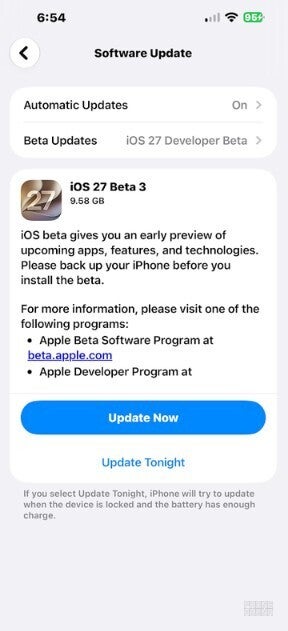
Apple released iOS 27 Beta 3 on Monday. | Image by PhoneArena
Apple did improve the virtual QWERTY when Siri AI is in Search or Ask mode. This mode is enabled when you swipe down from the top center of the screen. The Dynamic Island expands to read "Search or Ask."
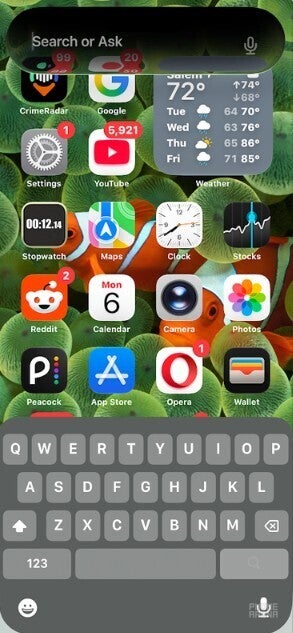
In Search or Ask mode for Siri AI, the QWERTY is easier to read. | Image by PhoneArena
Other changes spotted in iOS 27 Beta 3
In the first two Beta versions of iOS 27, the virtual QWERTY keyboard was very light with little contrast, making it hard to see the letters that you were typing. In iOS 27 Beta 3, the QWERTY now has darker keys with better contrast. And for those with an iPhone sporting 12GB of RAM, which at the moment consists of only the iPhone 17 Pro and iPhone 17 Pro Max, iOS 27 Beta 3 enables a feature that was disabled in the first two iOS 27 Beta releases.
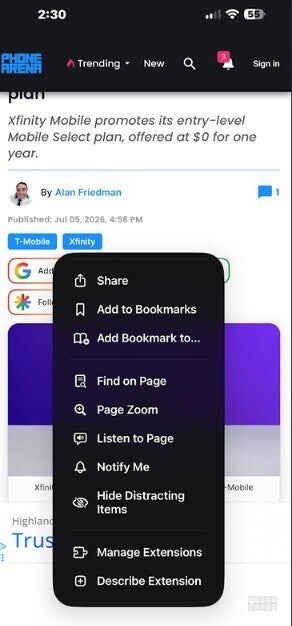
There are four new Safari features in iOS 27 Beta 3. | Image by PhoneArena
I am talking about Siri Voice Customization. On the iPhone 17 Pro and iPhone 17 Pro Max, there are two sliders labeled Pace and Expressivity in Settings. The former controls the speed of Siri's voice, while the latter changes the expressiveness of Siri's voice, from a flat robot sound to a conversational talker. While the sliders were available in the first two iOS 27 Betas, they are live and ready to go with Beta 3.
Four new features are highlighted for Siri
For some users, Apple Intelligence assets were re-downloaded between Beta 2 and Beta 3, resetting access to Siri AI. Additionally, the app icon for Reminders has been slightly changed with the solid, colored bullet points replaced with hollow (but colored) bullet points.
How are you enjoying Siri AI so far?
49 Votes
It's great!!! I Love it!!!
40.82%
It's okay, not as good as other AI assistants
42.86%
It's awful
16.33%
Opening the Safari app for the first time after updating to the latest Beta reveals four new features:
- Organize Tabs automatically.
- Browse bookmarks by topic.
- Use Notify Me to get updates.
- Create custom extensions.
If you're waiting for iOS 27 Public Beta 1, it should be coming out very soon. Those of you on the Developer Beta, you can install iOS 27 Developer Beta 3 right now by going to Settings > General > Software Update and following the directions.
Keep in mind that you do not have to be registered as a developer with Apple in order to install the Developer Beta. Apple used to charge $99 to receive this designation, but no longer does. The Developer Beta is released first to give Apple time to go through feedback and make changes before the public installs the next Beta release.
To subscribe to the Apple Beta Software Program, tap on this link. Press on the iOS 27 link and the blue Sign up button, and follow the directions. It's easy to do.
Once you sign up, go to Settings > General > Software Update and make sure that the Beta Updates bar has iOS 27 Developer Beta listed, if that is the way you want to go. Or you could select the iOS 27 Public Beta if you're the more cautious type.
Siri AI is available for these iPhone models only
The stable version of iOS 27 will be offered to the iPhone 11 and later in September around the time that Apple releases the iPhone 18 Pro and iPhone 18 Pro Max. The foldable iPhone Ultra is not expected to be released until later in the year.
By the way, Siri AI and Apple Intelligence are available only on the following models:
- iPhone 15 Pro
- iPhone 15 Pro Max
- iPhone 16
- iPhone 16 Plus
- iPhone 16e
- iPhone 16 Pro
- iPhone 16 Pro Max
- iPhone 17
- iPhone Air
- iPhone 17 Pro
- iPhone 17 Pro Max
- iPhone 17e


Popular stories



Latest News

Things that are NOT allowed:
To help keep our community safe and free from spam, we apply temporary limits to newly created accounts: