A retention discount is a financial incentive made by a company in an attempt to get you to remain a customer. It usually costs less for a firm to throw you a bone in the form of a discount or credit. The carriers can afford to do this because giving you a deal is still cheaper than acquiring a new customer to take your place
Obtaining a retention discount is easy to do and can save you some money
To obtain a discount or a credit, or some other deal, you first have to do a good job selling the company on the idea that you are leaving. The longer you've been a customer of that company, the more likely this ruse will work.
The first step is to ask for a transfer PIN
Let's focus on the wireless industry. As we've mentioned before, you can improve your chance of receiving a retention discount by asking for a transfer PIN. Most carriers will give you this code when asked, since it allows you to confirm your identity when you seek to port your current number to a new wireless provider.
Because requesting a transfer PIN is a sign that you are looking to leave your current provider, some of the companies will see this as your having one foot out the door and might be willing to throw you some sort of deal to keep you in the fold.
Verizon is more aggressive than the others when it comes to handing out a retention discount
Here's a caveat. I've put in more than two decades as a Verizon customer and when I requested a transfer PIN, I got bupkis from them. To get the My Verizon app, tap on the appropriate link (iOS, Android).
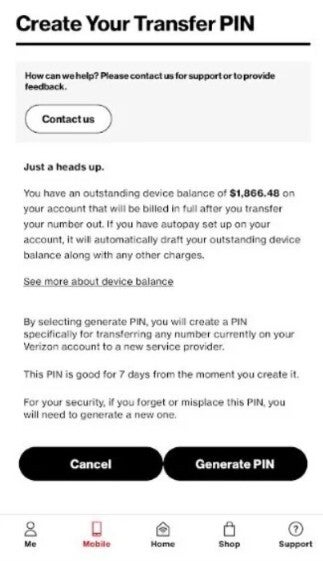
You can request a transfer PIN in the Verizon app. | Image by PhoneArena
When you install the My Verizon app, you can get the transfer PIN by opening the app and tapping the Account tab. Select Edit profile & settings and choose Number Transfer PIN. Tap Generate PIN and follow the prompts to see your PIN on the screen. You could receive a $10 to $20 per month per line discount in "Loyalty Credits" or a "Valued Customer Discount."
T-Mobile subscribers can get their 6-digit Temporary Port Out PIN by going to the T-Life app or website by tapping on Profile > Line Settings > Transfer PIN or by calling 611. T-Mobile could offer you $10-$20 per month in account credits or targeted plan upgrades.
You'll hear from T-Mobile via an app notification, or you'll get a call from a T-Mobile rep.
AT&T subscribers are less likely to get a pop-up discount in the AT&T app, but requesting a PIN will send a warning to its retention department. You could end up with SMS or email promos promising account credits or waived fees if you stay with AT&T.
These offers are made on a targeted basis, which means that if you just opened an account, owe money on a phone installment plan, already on a heavily discounted wireless plan, asking for a PIN might end up getting you a PIN without any deals.
If you do ask for the transfer PIN from Verizon, T-Mobile, or AT&T and receive an offer, you should accept it on the app of the carrier that you're a customer of. If no offer appears, you can cancel or simply ignore`your request for the transfer PIN as most of them expire after four to seven days.
Make sure you disable "Port Out Protection" or "Number Lock" before you generate a transfer PIN
Verizon, T-Mobile, and AT&T also have a toggle in their apps with a name like "Port Out Protection" or a "Number Lock." These must be disabled before you generate a transfer PIN or start the actual transfer.
If you're a Verizon, T-Mobile, or AT&T customer, you might be able to get some deal out of your carrier, and it doesn't hurt to try.
On the Visible+ Pro plan, you get access to 5G Ultra Wideband data on Verizon's fastest network. Along with unlimited roaming across Mexico and Canada, 2 days of Global Pass per month, 3x hotspot speeds, 4K streaming, and Smartwatch service.
Alan, an ardent smartphone enthusiast and a veteran writer at PhoneArena since 2009, has witnessed and chronicled the transformative years of mobile technology. Owning iconic phones from the original iPhone to the iPhone 15 Pro Max, he has seen smartphones evolve into a global phenomenon. Beyond smartphones, Alan has covered the emergence of tablets, smartwatches, and smart speakers.
A discussion is a place, where people can voice their opinion, no matter if it
is positive, neutral or negative. However, when posting, one must stay true to the topic, and not just share some
random thoughts, which are not directly related to the matter.
Things that are NOT allowed:
Off-topic talk - you must stick to the subject of discussion
Offensive, hate speech - if you want to say something, say it politely
Spam/Advertisements - these posts are deleted
Multiple accounts - one person can have only one account
Impersonations and offensive nicknames - these accounts get banned
To help keep our community safe and free from spam, we apply temporary limits to newly created accounts:
New accounts created within the last 24 hours may experience restrictions on how frequently they can
post or comment.
These limits are in place as a precaution and will automatically lift.
Moderation is done by humans. We try to be as objective as possible and moderate with zero bias. If you think a
post should be moderated - please, report it.
Have a question about the rules or why you have been moderated/limited/banned? Please,
contact us.












Things that are NOT allowed:
To help keep our community safe and free from spam, we apply temporary limits to newly created accounts: