Pixel users have been experiencing issues with their phones
New notifications were not appearing on the notification shade, and the Quick Settings tiles, such as the ones for the flashlight, Wi-Fi, and screen rotation, were appearing on the phone but were frozen and were not registering any touches that would enable or disable each setting.
The latest bug prevents Pixel users from employing Google Pay at a point of sale terminal
Once you edited the photograph, the screen becomes unresponsive, making it impossible for you to share the edited photo without going back to the gallery.
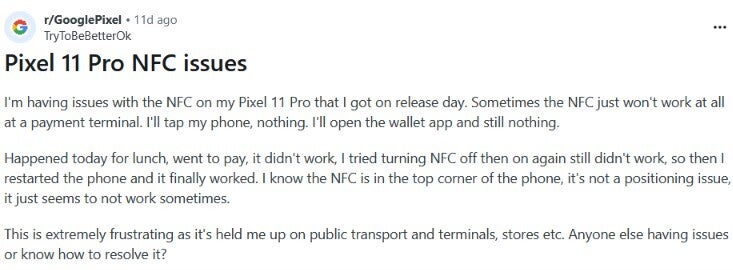
That sounds like plenty of bugs to deal with in a short period of time, and now we have yet another one to report. On Reddit, multiple Pixel users are complaining that they do not have NFC connectivity.
Recommended For You
User writes about the latest Pixel bug on Reddit. | Image by Reddit
NFC, or Near Field Communication, allows devices to exchange data wirelessly over very short distances. It is often used when you use your phone to tap and pay (Apple Pay, Google Pay), and for public transit ticketing.
It seems that the Redditors sharing their complaints on the platform are using newer Pixel models. Phones mentioned by those experiencing the issue include the Pixel 11 Pro, the Pixel 11 Pro XL, and the Pixel 10a.
Some believe that this is the reason for the NFC bug, but it can't be
Actually, there seems to be a reason why the Pixel 11 series might have NFC issues. For the new 2026 line, Google moved the NFC antenna to the top edge above the camera bar. This means that you have to aim the top of your phone at payment terminals.
If you are having issues when you are trying to use Google Pay with a POS (that's point of sale) terminal, try aiming your Pixel as suggested in the paragraph above. However, Pixel 8, Pixel 9, and Pixel 10 users have been complaining about the same issue, which seems to eliminate the new placement of the NFC antenna in the Pixel 11 line as a legit reason for the bug.
This is the only thing you can do if your Pixel won't allow you to make a contactless payment
Some are saying that the only way they can get NFC to work is by restarting their Pixel handset. Can you imagine how annoying it is to be in a long line with many customers behind you, and you are forced to restart your phone to make a contactless payment? You are sure to hear some mean comments directed at you from those behind you in line.
Even though there are some Pixel users who say that they were able to use the tap-to-pay terminal with their phone after restarting it, this cannot be the end of the story. Google does need to disseminate a fix that exterminates this bug.
While coming up with an update that makes this issue go away is the number one wish from Pixel users, some might also want to know what caused this to happen. But first things first, Google, let's get rid of this NFC bug on Pixel handsets.
In fact, ever since the Pixel 2 and Pixel 2 XL were released with several bugs, many of which made strange noises, it has almost become a tradition. When I bought my Pixel 2 XL, I waited a few months until the device seemed free of bugs, and that proved to be a good idea. I did the same when I bought my Pixel 6 Pro, although there were some issues (the modem and the fingerprint sensor) that were beyond the reach of a software update.
If you are thinking about purchasing a Pixel 11 series phone, you might want to wait for a few weeks until Google takes care of the current batch of issues.
On the Visible+ Pro plan, you get access to 5G Ultra Wideband data on Verizon's fastest network. Along with unlimited roaming across Mexico and Canada, 2 days of Global Pass per month, 3x hotspot speeds, 4K streaming, and Smartwatch service.
Alan, an ardent smartphone enthusiast and a veteran writer at PhoneArena since 2009, has witnessed and chronicled the transformative years of mobile technology. Owning iconic phones from the original iPhone to the iPhone 15 Pro Max, he has seen smartphones evolve into a global phenomenon. Beyond smartphones, Alan has covered the emergence of tablets, smartwatches, and smart speakers.
A discussion is a place, where people can voice their opinion, no matter if it
is positive, neutral or negative. However, when posting, one must stay true to the topic, and not just share some
random thoughts, which are not directly related to the matter.
Things that are NOT allowed:
Off-topic talk - you must stick to the subject of discussion
Offensive, hate speech - if you want to say something, say it politely
Spam/Advertisements - these posts are deleted
Multiple accounts - one person can have only one account
Impersonations and offensive nicknames - these accounts get banned
To help keep our community safe and free from spam, we apply temporary limits to newly created accounts:
New accounts created within the last 24 hours may experience restrictions on how frequently they can
post or comment.
These limits are in place as a precaution and will automatically lift.
Moderation is done by humans. We try to be as objective as possible and moderate with zero bias. If you think a
post should be moderated - please, report it.
Have a question about the rules or why you have been moderated/limited/banned? Please,
contact us.





![Another batch of Galaxy S26 series users in the US are getting a nice surprise today [UPDATED]](https://m-cdn.phonearena.com/images/article/183643-wide-two_350/Another-batch-of-Galaxy-S26-series-users-in-the-US-are-getting-a-nice-surprise-today-UPDATED.webp)
Things that are NOT allowed:
To help keep our community safe and free from spam, we apply temporary limits to newly created accounts: