Pixel 10 Pro XL owners are among a small group of users who got locked out of their phones after installing Google's September 2026 update. Some can't finish drawing their pattern, while a Pixel 8a owner saw their PIN rejected after one digit, which is a rough look for what we consider some of the best Google Pixel phones around.
The September Pixel update is rejecting patterns and PINs
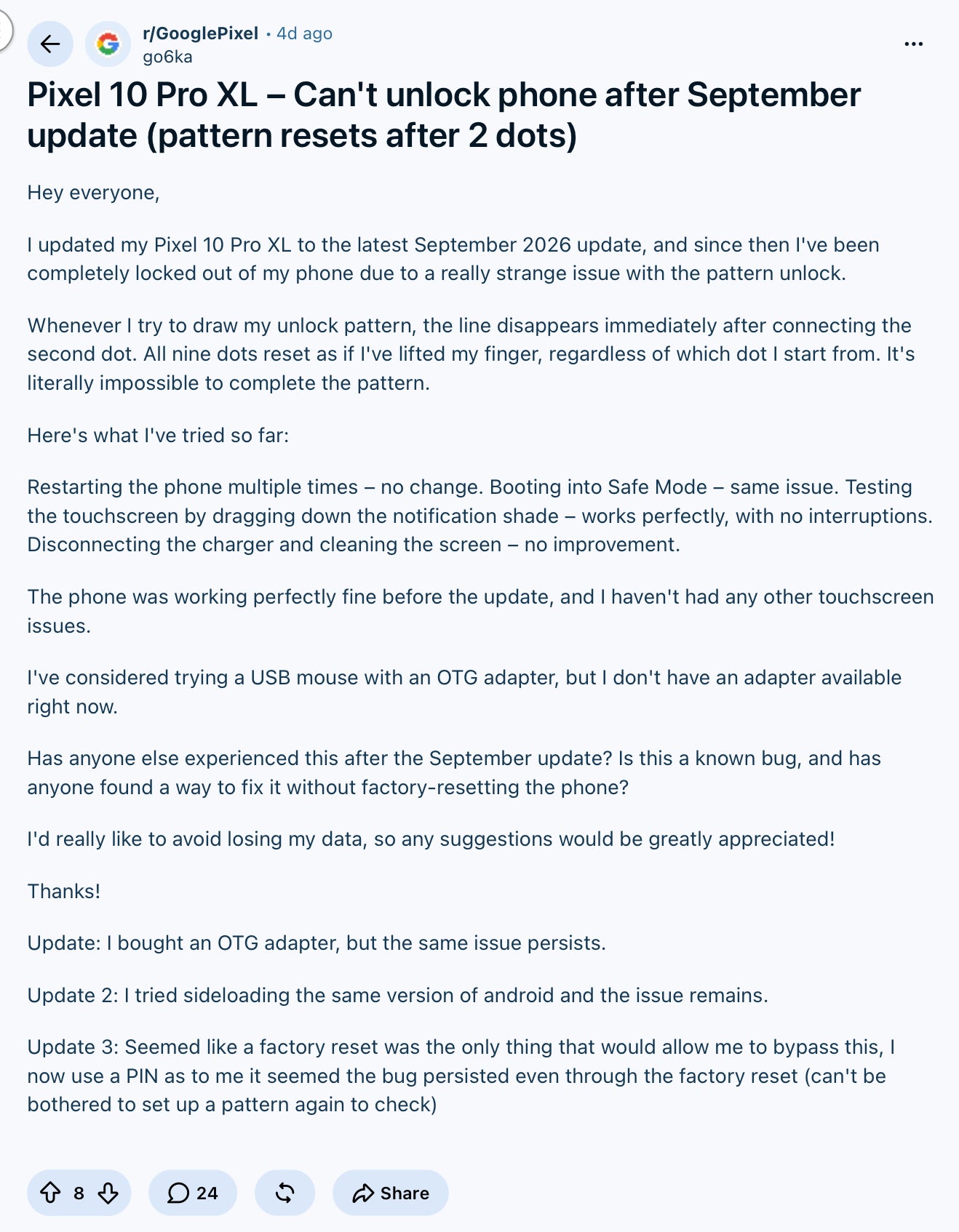
The first report came from a Pixel 10 Pro XL owner on Reddit, who explained that the pattern resets after just two dots, no matter which dot they start from. They tried restarting, Safe Mode, cleaning the screen, a USB mouse through an adapter and even sideloading the same Android build, but nothing worked until a factory reset.
A Pixel 10 Pro XL owner describes getting locked out after the September update. | Image by go6ka via Reddit
However, a PIN isn't a guaranteed escape either, since a Pixel 8a owner reported their phone throwing a wrong PIN error after the very first digit, and a new report points to a Pixel 8 Pro doing the same.
How would you handle a Pixel that locked you out after an update?
1 Votes
Why a locked Pixel usually ends in a factory reset
What makes a lockout worse than most bugs is how Android protects your data. According to Android's own documentation, most of your files live in what Google calls Credential Encrypted storage, and the key to it is derived from your PIN, pattern or password.
Recommended For You
In plain words, your lock screen doubles as part of the key that unlocks your files, so nobody (Google included) can simply skip it to pull your photos out. That's why Google's own support page points locked-out owners toward erasing the phone, with the only silver lining being that anything backed up to your Google Account can be restored afterward.
As for Galaxy and iPhone owners, this one is purely a Pixel firmware problem, so there's nothing to worry about on your end. Our Pixel 10 Pro XL review scored its software an 8 out of 10, just under the 8.2 average for its price class, and a streak of bugs like this one won't help Google close that gap with Samsung and Apple.
Should you hold off on the September Pixel update?
For now, this looks like a rare bug that isn't hitting every Pixel, so I wouldn't panic if your phone already updated and unlocks normally. But if the September update is still waiting for a restart on your phone, make sure your photos and files are backed up to your Google Account before you tap install.
Here's what to do if your Pixel won't unlock
Stop guessing and let the "Too many attempts" timer run out, since that's what got the Pixel 8a owner back in.
As a last resort, turn the phone off, hold Power and Volume Down until Fastboot Mode appears, then choose Recovery Mode.
From there, hold Power and tap Volume Up once, then pick "Wipe data/factory reset" and confirm with the Power button.
The one Pixel feature an update should never break
I understand bugs slip through, especially when the same build rolls out to everything from the Pixel 6 series to the Pixel 10 family. However, the lock screen is the one part of the phone we can't work around, and when the only way past it is wiping everything, the stakes are much higher than a laggy animation.
I'm hoping Google pushes a fix before more owners run into this, and I'd personally love to see it add a safer way to recover from a broken lock screen without losing a year's worth of photos.
On the Visible+ Pro plan, you get access to 5G Ultra Wideband data on Verizon's fastest network. Along with unlimited roaming across Mexico and Canada, 2 days of Global Pass per month, 3x hotspot speeds, 4K streaming, and Smartwatch service.
Johanna Romero is a Senior News Writer at PhoneArena, covering mobile technology news across Android, iOS, wearables, and the Google ecosystem she knows best. Drawing on 15 years in IT and tech support from 2007 to 2022, she brings a user-friendly eye for the practical features and lesser-known tricks readers care about. Google named her an official #TeamPixel member in 2022, and she also reviews the latest devices on her YouTube channel, JoJo the Techie.
A discussion is a place, where people can voice their opinion, no matter if it
is positive, neutral or negative. However, when posting, one must stay true to the topic, and not just share some
random thoughts, which are not directly related to the matter.
Things that are NOT allowed:
Off-topic talk - you must stick to the subject of discussion
Offensive, hate speech - if you want to say something, say it politely
Spam/Advertisements - these posts are deleted
Multiple accounts - one person can have only one account
Impersonations and offensive nicknames - these accounts get banned
To help keep our community safe and free from spam, we apply temporary limits to newly created accounts:
New accounts created within the last 24 hours may experience restrictions on how frequently they can
post or comment.
These limits are in place as a precaution and will automatically lift.
Moderation is done by humans. We try to be as objective as possible and moderate with zero bias. If you think a
post should be moderated - please, report it.
Have a question about the rules or why you have been moderated/limited/banned? Please,
contact us.





Things that are NOT allowed:
To help keep our community safe and free from spam, we apply temporary limits to newly created accounts: