Do your friends and family always tell you to let them know when you arrive at your destination regardless of whether you're driving, walking, flying, skateboarding or sleepwalking? Sometimes that could be a pain in the butt. There are several ways you can check in automatically. One way is through the iPhone's "Check-in" feature, which uses the Messages app to send a message to selected people to let them know when you have arrived safely at a pre-determined location.
Google Maps also can alert friends and family members when you reach your destination. When navigating, swipe up and tap on "Share trip progress." The people you are sharing your journey with will see your estimated time of arrival (ETA). Once you reach the destination. the sharing ends, which is when the other person knows that you have come to the end of the road, literally.
Snapchat introduces "Arrival Notifications"
If you already share your location with someone via Google Maps, they can set an alert from their end that alerts them when you leave or arrive at a specific location like the "home" or "office."
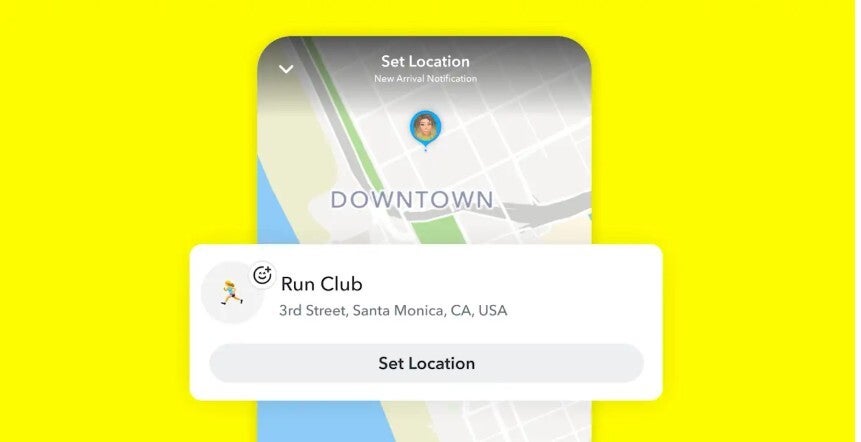
Another way you can alert a friend or family member when you arrive home is through Snapchat's "Home Safe" feature. Today, after more than 1 million people have used "Home Safe" to let those worrying about them know that they are safe at home, Snapchat announced "Arrival Notifications," which automatically alerts someone when you have arrived at a place that is beyond your home. For example, if you take a weekly class, you can arrange to have an alert sent when you arrive at this class either as a one-time notification, or on a recurring basis.
Recommended For You
Snapchat's arrival notification feature lets others know when you have returned from a night out. | Image credit-Snapchat
The announcement of the new feature was not made Monday as a random decision. Tuesday is Safer Internet Day and adding the capabilities of "Arrival Notifications" to "Home Safe" surely makes the internet safer.
"As always, Arrival Notifications are built with safety and privacy in mind. Alerts can only be sent to friends you choose to share your location with, and location sharing on Snap Map is off by default. No one can see your location or receive an alert unless you choose to share it. If you’ve selected a one-time alert, it will expire once it’s sent or after 24 hours."
-Snapchat
If you have Snapchat on your iOS or Android phone, follow these directions to use "Arrival Notifications" on Snapchat:
Share your location with a trusted friend you’d like to have track your comings and goings.
After tapping on your friendship profile. scroll down to "Arrival Notifications.
Select a location on the map and give it a new, personal name. If it's a location where you take singing lessons, name it "Singing Lessons."
Choose to make the alert a one-time or recurring notification, and Snapchat will notify your friend or family member when you arrive.
Snapchat's Snap Map has over 400 million monthly users who use it not just to explore places nearby but also use it to stay in touch with friends and family. With the new expanded "Arrival Notifications," users have another way to stay close with those they trust.
What Snapchat is known for has changed over the years
Snapchat says, "These Arrival Notifications make it simple to let someone know you’ve arrived at your destination safely after being out and about, whether you’re heading back from a first date, a crowded concert, or a weekend getaway." The feature, Snapchat says, is built with safety and privacy in mind. Only friends you've decided to share your location with can receive these alerts, and location sharing on Snap Map is off by default. Your location is a secret and cannot be shared unless you choose to share it. One-time alerts expire after they are sent or once 24-hours has gone by.
Snapchat was once known for its self-destructing messages, which allowed us to compare the app's messaging to Mission Impossible. It also created the Stories format in 2013. Instagram later copied the format three years later and took it to another level. Snapchat is now known for its AR lenses that change users' faces in real time. You can install Snapchat from the App Store for your iPhone by tapping on this link. Android users should tap on this link to install Snapchat on their handset.
Six-month unlimited plan is now 57% off
$90
$210
$120 off (57%)
Mint Mobile is now allowing you to get whichever plan you like for either three, six, or 12 months for just $15/mo. If you go for the six-month unlimited service, for instance, you'll now have to pay just $90 upfront instead of $210.
Alan, an ardent smartphone enthusiast and a veteran writer at PhoneArena since 2009, has witnessed and chronicled the transformative years of mobile technology. Owning iconic phones from the original iPhone to the iPhone 15 Pro Max, he has seen smartphones evolve into a global phenomenon. Beyond smartphones, Alan has covered the emergence of tablets, smartwatches, and smart speakers.
A discussion is a place, where people can voice their opinion, no matter if it
is positive, neutral or negative. However, when posting, one must stay true to the topic, and not just share some
random thoughts, which are not directly related to the matter.
Things that are NOT allowed:
Off-topic talk - you must stick to the subject of discussion
Offensive, hate speech - if you want to say something, say it politely
Spam/Advertisements - these posts are deleted
Multiple accounts - one person can have only one account
Impersonations and offensive nicknames - these accounts get banned
To help keep our community safe and free from spam, we apply temporary limits to newly created accounts:
New accounts created within the last 24 hours may experience restrictions on how frequently they can
post or comment.
These limits are in place as a precaution and will automatically lift.
Moderation is done by humans. We try to be as objective as possible and moderate with zero bias. If you think a
post should be moderated - please, report it.
Have a question about the rules or why you have been moderated/limited/banned? Please,
contact us.











Things that are NOT allowed:
To help keep our community safe and free from spam, we apply temporary limits to newly created accounts: