Every product we review or recommend is thoroughly tested by our in-house experts in real-world conditions, following our
review methodology
and
ethics statement
to ensure honest, independent, and data-driven results.
Our patience has been rewarded. We have just received a final version of one of the most interesting cell phones as of now – the Samsung OMNIA HD, also known as i8910 HD depending on the region it sells. Actually we like the OMNIA HD better, because it sounds far more intriguing than just another name with numbers in it. We are going to take a closer at the phone a bit later. First, let us remind you what is so fancy tickling about the phone. It is all in one device sporting the largest (3.7-inch) AMOLED screen to have ever been integrated on a cell phone in recorded history. It features 16 mln. colors and 360x640 pixel resolution, just like the Nokia 5800 XpressMusic. Moreover, its 8-megapixel camera that allows HD video capture and playback makes it a pioneer among all the cell phones on the market. The device sports DivX and Xvid video support. The OMNIA HD runs on a Symbian OS modified with manufacturer’s TouchWiz 3D interface, so it’s also smart indeed. On top of that it features Wi-Fi with DLNA, 7.2 Mb. capable HSDPA, GPS, HDMI, accelerometer and comes with either 8 or 16GB built-in memory and expansion slot to allow use of an up to 32GB card. Last, but not least the manufacturer have managed to pack all these features in a 12.9 mm. thin body.
What's in the box?
Samsung OMNIA HD i8910
Charger
Stereo headset
microUSB cable
CD with software
Design:
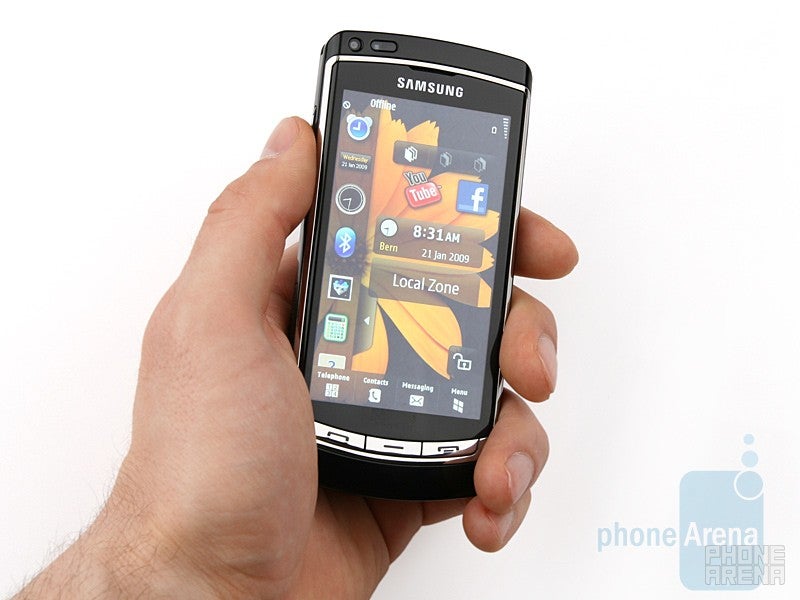
Most people who have seen the phone go on with “Jeez, now that´s one huge screen!”. You hardly need be worried or startled though. Holding it in your hand the phone feels solid, despite it´s almost entirely made of plastic. Its size and weight are balanced really well, it´s thin and the 3.7-inch touch sensitive AMOLED display makes it quite comfy to use. The latter features capacitive technology, meaning you should touch the screen using your fingers. In addition, there is light sensor located next to the video call camera. Just as expected, the screen delivers beautiful, saturated colors albeit in artificial lighting only. Unfortunately, you can hardly see any details on the screen if you take the phone outdoors in bright sunlight, especially if you happen to forget to wipe the fingerprint-smudged surface clean. There are three hardware keys on its front side, the send/end buttons and another one that calls up the main menu. They are fairly large and have good travel, so you feel that quite distinctly.
Recommended For You
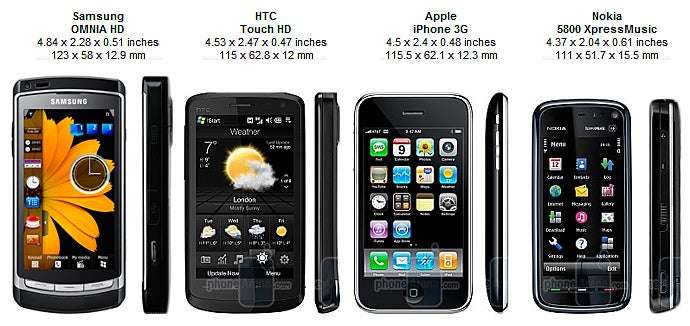
You can compare the Samsung OMNIA HD i8910 with many other phones using our Size Visualization Tool.
The volume rocker, microSD slot, screen lock/unlock button, microUSB port and camera shutter are located on its left and right hand sides, while 3.5 mm. jack and both stereo speakers can be found on its top and bottom.
We need to point out that plastic surface on its back side simply adores fingerprints. Our other negative comment here is the back cover opens way too easily, there is no apparent lock mechanism and we felt as if it was about to come off anytime. It´s possible that the issue affects only the unit we tested. What else is there onto the back panel? One of the most interesting and important features of the i8910 HD – the world´s first 8-megapixel camera that supports HD video capture (720p equal to 1280x720 pixels). You can take a look at the sample pictures and a video in the multimedia section of this review.
The plastic surface on the back of Samsung OMNIA HD i8910 is a fingerprint magnet
Samsung OMNIA HD i8910 Video Review:
Samsung OMNIA HD i8910 360 Degrees View:
Interface:
As we mentioned, the Samsung OMNIA HD i8910 runs the latest Symbian OS version geared to touch screen sensitive phones (v9.4 S60 5th Edition), similarly to the Nokia 5800 XpressMusic and Nokia N97 with the major difference being it has been modified to utilize the Samsung´s TouchWiz 3D interface. In our preview we tipped you off that certain changes in the interface were quite likely and we were right. There are new things indeed, but more of them concern the outer appearance of the software. Just like other TouchWiz cell phones, the interface looks great, shiny and funny and widgets are open from the bar on the left hand side of the screen (you should press the arrow first). A number of them come preloaded onto the phone, plus you can easily download more using a dedicated widget.
Unlike other TouchWiz phones, the OMNIA HD brings along three separate widget screens that are quite easy to switch between through touching an icon at the top of the screen, just the way you do when using a computer with several desktops. We do like that you can lock the position of every widget onto each separate screen as to avoid displacing them. Now, let´s go on with the other airs and graces of the interface.
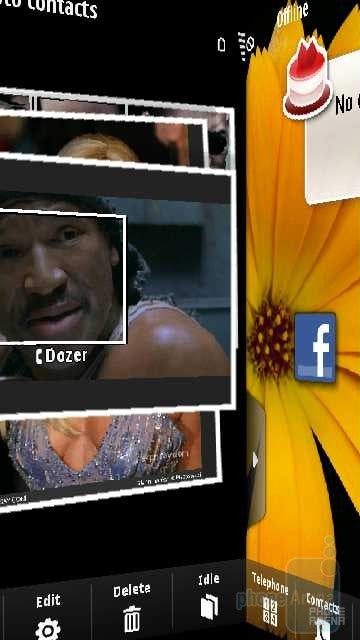
3D navigation is one the eye-candies that can be switched off should you not really like it. Just touch in the home screen and slide it to your right and you´ll switch over to the Photo Contacts screen. As suggested by its name, you can call up contacts by just touching the assigned photos. They are pretty easy to tag in a Facebook-like style which is really cool.
3D navigation
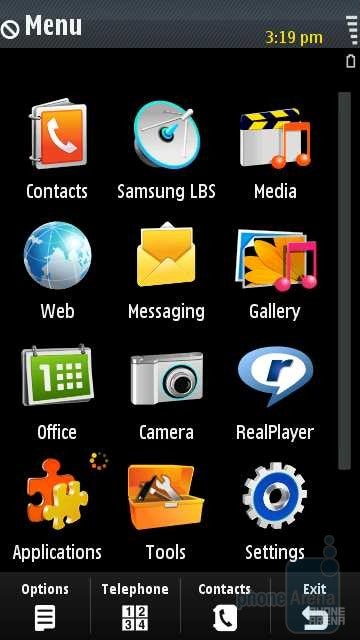
Main menu
Samsung OMNIA HD i8910 - Themes
Now, let´s go back to the widgets, but slide a finger from right to left and get to the main menu. It looks in character with the TouchWiz interface, with all these showy eye-candy icons appearing in a 3x4 grid. Changing over to a vertical item list is pretty easy as well.
Some people would find the widgets likeable a feature, others won´t. If you are one of those who belong to the second group you can easily change the theme over to Finger Use or Basic. There are only wallpaper and the four icons at the bottom of the screen in Basic mode, whereas Finger Use allows customizable quick access to four functions of your own choosing, just like the shortcut bar on the Nokia 5800 XpressMusic. Additional info like upcoming calendar events and song name pops up on screen if the music player is on.
Submenus on the Samsung OMNIA HD i8910 appear as a vertical list of functions and you need to double-click one to select it just like on the 5800 XpressMusic. There is no way you can break away from this, but this method should at least help you make less wrong picks.
Contacts, Messaging and Organizer:
Accessing information in your contacts is also implemented through double clicking. You can save as many contacts as you feel like, all of them with more than a single number. Moreover, they can be assigned unique ringtones, pictures, names, birthdates etc. The only limitation is the memory of the Samsung OMNIA HD i8910. Aside from sliding your finger upward or downward, you can search for a contact with the bar for text input. This sounds as if there is nothing out of the ordinary here, but the latter is implemented through a GPS-like keypad system (A, B, C, D, E, F...) that seems really logical with all initial letters appearing at first until you have selected something when only the necessary letters remain on the screen. It feels as if the phone thinks ahead and tries to guess what you´re looking for. Getting used to the new method takes just a few minutes and we have to admit that finding what you need is fast and easy.
Just like any other contemporary phone, this one provides one of the most popular services these days, messaging. The i8910 HD hasn't got hardware keyboard, but features two virtual ones instead – one is pretty much standard keypad as found on any cell phone and the other is full- fledged QWERTY that thanks to the huge display is way easier to type away on alongside of the Nokia 5800 XpressMusic. Aside from these, you also have handwriting recognition. Using your email box, you are faced with a rather annoying issue – manual entry of all necessary settings. We were caught off balance when the OMNIA HD requested that we manually enter the incoming/outgoing mail server of Gmail. Not all of us know these by heart after all plus most cell phones are capable of finding these automatically.
Calendar
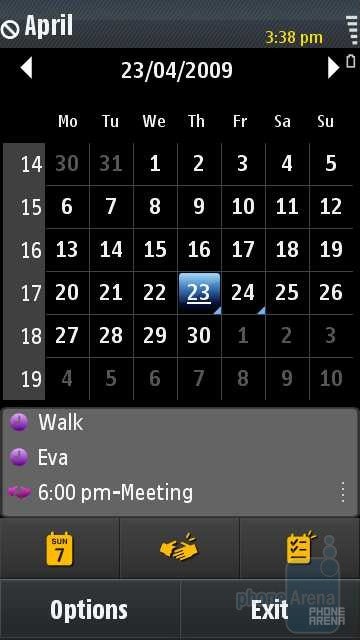
The organizer packs abundant features, but none of them is unique. The calendar looks pretty much the same as the one on the 5800 XpressMusic and can display the whole month, any given week, day or a to-do list. In the first two modes you will be able to see any three adjacent events and this comes in handy.
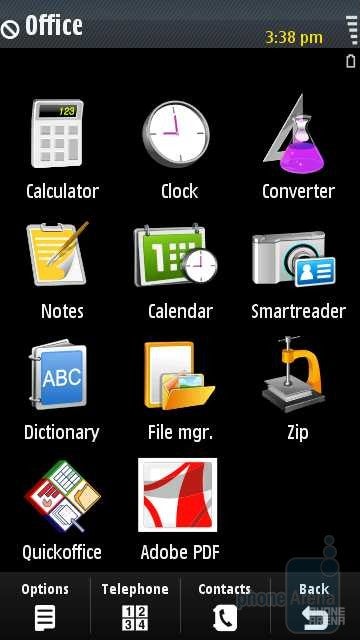
In case you need to convert any value or currency into another, there is a built-in unit converter or you can simply use the provided calculator if you happen to be a bit old-fashioned. Browsing and organizing content on your phone memory is easy through the File Manager that also features a backup option to allow you to you store copies of all the info you have on the phone, including Contacts, Messages and Calendar events.
Similarly to other Symbian S60 phones, you have Quickoffice and Adobe Reader LE to open Office documents and PDF files. We did not encounter any issues even with large office files, but unlike the latest Nokia models you won´t be able to edit them. You need to pay extra for additional software pack if you feel like editing documents or getting Office 2007 support. We had no problems at all using the PDF reader, but again, you would need to pay extra to get the editing option.
Connectivity:
The Samsung OMNIA connects to local devices via Bluetooth, Wi-Fi or USB cable, with the latter offering the fastest transfer speed from and to the handset.
Copying a single file with size of 50 MB in both directions takes about 11 seconds on a USB cable connection, with the average speed peaking at 4.5 to 5 MB/sec., while transferring more files with the same overall size (50 Mb.) proved to take about 14 seconds, with the average speed reaching 3.8 to 4.5 MB/sec. As a whole, decreased transfer speed can be expected when it comes to an increased number of files and we consider the results normal.
Internet:
When it comesto supported functions, the internet browser you get with the SamsungOMNIA HD i8910 is not dissimilar from the one on the Nokia 5800, itjust only sports a more attractive, motley interface. All pages and Flash content, including the YouTube playerload with almost no problems at all plus navigation on such a largescreen feels awesome. Double-clicks or actually double-taps are used tozoom in or out on things, in the first case a small map appears at thetop of the screen that shows your current position on the page. If thepage is too large to fit onto the screen, you can turn on Overview modeto allow faster scrolling. We really like the idea of zooming throughholding and dragging and as a whole, we do not have any complaintsregarding the i8910 HD internet browser.
As a whole, we do not have anycomplaints regarding the internet browser of the Samsung OMNIA HD i8910
GPS:
Naturally, the Samsung OMNIA HD i8910 comes equipped with a GPS to help you navigate easier in the jungle of streets. Without connection to the Internet, the GPS couldn’t locate our position, although we waited for about 10 minutes. Once we started the A-GPS however, everything fell into place and we got our locale info pinned down in a minute. This is certainly a decent result, although we have seen better (the Nokia 6700 classic, Nokia N86 etc.). We didn´t encounter any issues after a software reset and managed to obtain our location co-ordinates in about 4-5 seconds.
The Samsung OMNIA HD i8910 comes preloaded with several navigational and service applications, depending on where you have purchased the cell phone. The most important one when it comes to navigation is Route 66. It features interface that is easy manipulate, fast to get accustomed to and well optimized for use with bare fingers. Unfortunately, a several months free license is not offered with the Samsung OMNIA HD i8910, so you will have to shell out cash if you feel like getting extra features such as additional maps, satellite photos of different regions, voice navigation, traffic updates or speed camera emplacements.
The rest of the applications relate to the GyPSii service and depend on your current location (they make use of the geo-tagging function). PlaceMe allows you to share snapshots, video and audio files with your friends in real time, while SpaceMe shows you where your buddies and other people registered with the service are located at the moment, plus you have the option to give them a ring or send them text messages or emails. ExploreMe lets you see the spots around your current position that other people have shared on the service. As a whole, the apps might come in pretty handy and we, by no means, consider them redundant software.
SpaceMe
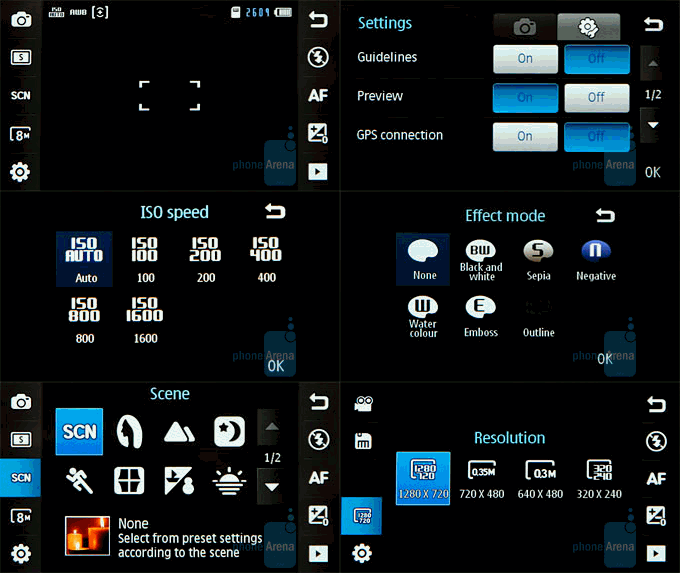
Camera interface of the Samsung OMNIA HD i8910
Camera:
The eye of the monster or its 8-megapixel camera features less pleasing interface that looks pretty much like the one found on Samsung Pixon. Elements are in monotonous, grim colors and out of character with the otherwise motley looking interface. On the other hand it´s really easy to use and that´s more important. There is a number of preloaded photo presets for taking pictures of people, faraway or moving objects and variety of shootings modes - night, sunrise, fireworks, candle light etc. The prototype allowed us to set the ISO up to 3200, but the guys at Samsung must have later decided that such a high setting didn´t make sense, so its maximum value has now been reduced to 1600. The average time to take a snapshot is good alongside of the other 8-megapixel cell phones we have tested this far (take a look at our article here). Starting up takes about 2.5 seconds, focusing objects about the same time and saving pictures another 5 seconds.
Outdoor pictures look great. Their quality is similar to what the Samsung INNOV8 offers with proper exposure, white balance, realistic colors and almost no noise at all and not last, clearly discernible details. We were a bit surprised by the built-in flash in artificial lighting conditions. It managed to provide enough illumination so as to keep as many details as possible. Still, there was noise, but at an acceptable level.
Let´s keep the most important thing in mind, namely HD video capture. Camera, light, action! Do we have the previously promised 24 frames per second? Yes, we do. What about colors? Pretty good, although brightness is a bit excessive. Quality of details? On par, especially for cell phone camera. Camera delivers stellar performance as you can see for yourself by clicking the link below.
You can take a look at all captured videos and snapshots in the Gallery. Moreover, uploading content from there on popular Internet services is but a few screen taps away. You´ve got support for Facebook, Picasa, Flickr, Photobucket, Friendster and MySpace. Starting any of these requires that you enter username and password the first time, but then you are good to go and start sharing.
Aside from the Gallery itself, you also have MediaBrowser that looks very much like the Samsung Pixon´s Photo Browser and shows you all available pictures, snapshots and video files. We really dig that you can use the accelerometer to switch between files without touching the screen at all. Airs and graces are fine art as they say.
Multimedia:
You don´t think we are about to get down to video playback right away, do you? It´s the icing on the cake and is best served last. Let´s talk about the music player. Starting it you find yourself in its main menu that offers a number of filtering options. A nice looking interface that features large buttons pops us whenever you start a song. You can almost immediately notice the 5.1 channel sound option that is only available if you have your headset plugged in. Several equalizer presets and a few sound effects are also available. Now, that was the boring part about the music player. Turning the phone aside gets you to a wonderland. Not literally, of course, but you are taken to an interface that looks a whole lot different. It shows you all covers and art of any album you have and you can navigate through the content by sliding your finger sideways, just like Cover Flow on the iPhone. Once you´ve selected an album, you remain in the same interface and a song list appears on the right to your album cover image. We do like the function and are glad Samsung have decided to lend some color to the music player.
In addition, you have RDS FM radio that sports a simple interface in pleasing colors, all in character with Samsung. What we like most here is you can actually record radio broadcasts while listening. If the radio is playing something you like, why not just record it and have it at hand later?
The sound coming out of the stereo speakers is loud, even if less than what Nokia 5800 offers. The audio quality, however, is great. Our phone didn´t come with a headset, but we are as far from being disturbed as it gets simply because you can always use the 3.5 mm. jack. We plugged in a pair of decent quality headphones and evidenced grand sound quality and medium loudness. We have seen phones with louder sound, say the Sony Ericsson W980 and (again) the Nokia 5800 XpressMusic.
Now, we´ve just made it to the most thrilling part. We suspect most of you left out the previous pages, but we can live with that. Both Samsung Pixon and Samsung INNOV8 are great performers when it comes to watching videos since either features DivX and Xvid support. The Samsung OMNIA i8910 is head and shoulders above them though, since it´s capable of playing content in HD resolution (720p). Watching videos on its 3.7-inch display is breathtaking experience that we can hardly put into words. Colors are vivid and saturated, while artifacts are almost nonexistent. Stuttering, sluggishness or skipping frames? You have to be joking, right? None! Simply perfect. Cheers!
Truth be told, there is no point in converting videos at greater resolutions than the one the screen features (640x360) if you are intent on seeing movies on your phone. HD files come in handy if you connect the phone to a HD TV set through Wi-Fi DLNA module.
Well, there is more. Aside from the standard Symbian OS RealPlayer, you can also watch videos with a preinstalled piece of software going by the name VideoPlayer that also supports subtitles. It scans the memory of the phone on first run; all video files found are then displayed on a vertical scroll list. When you starting a video, a pleasing, simplified interface shows up and we do like it better to RealPlayer.
Performance:
Well, we have almost made it to the grand finale, but there a few more things we need to pay attention to. Say, its speed. The phone is neither sluggish, nor blazing fast. There are slight delays every now and then, but they are well concealed with animated transition effects, so you can hardly notice them. The official battery runtime is impressive – 13.5 hours of talk time, 600 hours in standby, 6.8 hours of continuous HD video playback and 4.1 hours of HD video capture. Unfortunately we are disappointed with the sound quality during talks. Either is able to hear the other one loud and clear, but the voice with the Samsung OMNIA HD i8910 is monotonous and reverberating, as if the other person is in a tunnel or a bathroom. On the other hand, even if you lower the loudness, the effect is still clearly discernible and makes people´s voice sound unpleasantly sharp. Well, at least the loudspeaker is fairly useable…
Conclusion:
Well, here we are at the grand finale of our review on one of the most exciting cell phones as of now. The Samsung´s monster, the OMNIA HD i8910. We took a scrutinizing look at it, we used it to listen to music, talk, take pictures, capture and playback HD video content and it´s about time we passed out verdict. We have to admit that despite its size, it is one hell of an all-in-one, smart device. Aside from being the first cell phone capable of capturing and playback of nice quality HD video content, its 8-megapixel camera takes pictures with very good quality. The OMNIA HD sports an awesome 3.7-inch touch sensitive AMOLED screen and battery that lasts long. Still, the i8910 HD also has a few drawbacks. It simply loves fingerprints and discerning anything on the screen in direct sunlight is an uphill battle. The more annoying problem, however, relates to mediocre sound quality during talks. Anyway, we do believe it´s going to make it on the top 3 list of any high-tech buff and leave a lasting memory, simply because it sets a new standard on the all-in-one phone market.
We are able to recommend the other high-end multimedia phones, such as the LG ARENA, Renoir, Samsung PIXON and INNOV8 as alternatives to the device. Bear in mind the first three are not “smart”, the third doesn´t feature a touch sensitive screen and none of these delivers HD playback or capture capability, so the Samsung OMNIA HD i8910 is pretty much still in a class by itself.
Pros
Huge AMOLED display delivering good image quality
HD video playback and capture and very good snapshot quality
Robust battery that lasts
Quality sound through a headphones and built-in loudspeaker
Slim form factor
Cons
Quality of sound during talk is below par
Image details are hardly discernible in bright light
Back panel flips open way too easily
Surface that loves fingerprints
Email settings are manually entered even when it comes to popular providers
A discussion is a place, where people can voice their opinion, no matter if it
is positive, neutral or negative. However, when posting, one must stay true to the topic, and not just share some
random thoughts, which are not directly related to the matter.
Things that are NOT allowed:
Off-topic talk - you must stick to the subject of discussion
Offensive, hate speech - if you want to say something, say it politely
Spam/Advertisements - these posts are deleted
Multiple accounts - one person can have only one account
Impersonations and offensive nicknames - these accounts get banned
To help keep our community safe and free from spam, we apply temporary limits to newly created accounts:
New accounts created within the last 24 hours may experience restrictions on how frequently they can
post or comment.
These limits are in place as a precaution and will automatically lift.
Moderation is done by humans. We try to be as objective as possible and moderate with zero bias. If you think a
post should be moderated - please, report it.
Have a question about the rules or why you have been moderated/limited/banned? Please,
contact us.






Things that are NOT allowed:
To help keep our community safe and free from spam, we apply temporary limits to newly created accounts: