In April this year, Samsung announced that it was soon going to discontinue the Samsung Messages app. Then, on July 6th, the company officially pulled the plug on its messaging service in the US. Now, another crucial Galaxy app is being sent to the Samsung graveyard (sort of).
Samsung Find will become unusable on your device if…
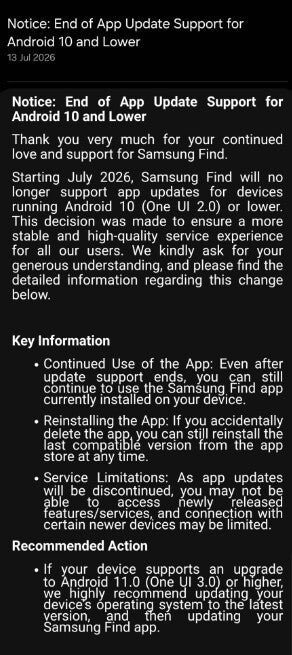
Samsung is reportedly showing a notice in the Find app that basically states that the service will no longer work on devices that are running on Android 10 (One UI 2.0) or lower. The notice further mentions that this decision has been taken to ensure that you enjoy the best experience of the app on your smartphone, which wouldn't be possible if it were running on an extremely old Android and software version.
The important thing to note here is that the app will continue to function on devices that are running on the above-mentioned Android and One UI builds, but the connection with new devices may be limited, and it will not receive the latest features and bug fixes. It was recently updated to version 2.0.00.20, which introduced new capabilities like a location tracking home screen widget, the ability to switch to satellite view from the standard map, and more.
Recommended For You
There are plenty of Galaxy devices whose OS support ended with Android 10. This includes names like the Galaxy S9, S9 Plus, Note 9, Galaxy A6, Galaxy A6 Plus, Galaxy A7, and many more. In case you end up uninstalling the application accidentally or intentionally on any of the unsupported devices, you can still download the compatible version of Samsung Find from the Galaxy Store or the Google Play Store.
What is the Samsung Find app, anyway?
Notice in the Samsung Find app. | Image by SamMobile
Samsung Find, in case you are not aware, is one of the most important Galaxy apps that's been designed to replace the old SmartThings Find tab. You can use this application to track your lost Galaxy devices, which include smartphones, smartwatches, and tablets. I personally like its offline finding feature that ensures that your phone's exact location can be tracked even if it isn't connected to the internet.
It basically relies on the nearby Galaxy devices to find your lost device's location. The application has plenty of other interesting capabilities as well, like remote actions to make your lost device ring or lock it remotely and family location sharing to keep track of your loved ones.
Poll
163 Votes
Which device tracking app do you think is the best?
Samsung Find.
49.69%
Google Find Hub.
37.42%
Apple Find My.
12.88%
Update your Samsung phone
If you want to enjoy the latest features of the Samsung Find app, you must make sure that your Galaxy smartphone is running on Android 11 or above. To check and install the latest Android version on a Samsung smartphone, open the Settings app, choose Software update, and tap Check for updates.
If your phone isn't compatible with Android 11 and you still want to receive the latest features on the Samsung Find app, then the only thing you can do is get a new Galaxy phone. There's no better time than now to get a new smartphone, as the prices of almost each handset are likely to increase in the future because of the RAMageddon. You can get the Galaxy S26 Plus, which is available at a $250 discounted price on Amazon, or if you are looking for something in the budget segment, you can go for the Galaxy A57, whose 128 GB and 256 GB options are available at $425 and $485, respectively, on Amazon.
Samsung isn't doing anything unusual here
The South Korean giant isn't taking any unusual step by ending the support of one of its key applications for older devices. It's a standard practice that manufacturers follow when it becomes difficult for them to keep their services compatible with older devices.
However, it's definitely worth noting that one of the main Samsung Find alternatives, Google Find Hub, is still compatible with Android 6 devices, and its offline device tracking mechanism requires Android 9 or above. So, the Google option definitely has an edge in this department.
Interestingly, that's not the only major decision Samsung has taken recently
The Galaxy S27 Ultra is going to feel like rain after a drought
The Galaxy Z Fold 8's specs all but confirm a huge upgrade for the Galaxy S27 series
Don't forget to follow me on X and Threads to remain updated on what’s happening in the Samsung world.
Free Galaxy A17 5G with Straight Talk
Get a free Galaxy A17 with Straight Talk. To claim this deal, you need to pair the phone with activation on a Silver Unlimited Plan or higher. This tier costs $45 per month. Offer valid through 01/10/27 while supplies last online.
Aman Kumar is a news writer at PhoneArena covering Google Pixel phones, Android features, AI-powered smartphone tools, and mobile tech news. Before joining PhoneArena, he spent over five years writing about consumer technology for publications like MakeUseOf, How-To Geek, and Guiding Tech. His current daily drivers are the Pixel 10 and Samsung Galaxy S26 Plus, while his red iPhone SE (2nd gen) remains a personal favorite. Aman also appreciates bold smartphone experiments and still considers the Nokia N-Gage one of the industry’s most iconic designs.
A discussion is a place, where people can voice their opinion, no matter if it
is positive, neutral or negative. However, when posting, one must stay true to the topic, and not just share some
random thoughts, which are not directly related to the matter.
Things that are NOT allowed:
Off-topic talk - you must stick to the subject of discussion
Offensive, hate speech - if you want to say something, say it politely
Spam/Advertisements - these posts are deleted
Multiple accounts - one person can have only one account
Impersonations and offensive nicknames - these accounts get banned
To help keep our community safe and free from spam, we apply temporary limits to newly created accounts:
New accounts created within the last 24 hours may experience restrictions on how frequently they can
post or comment.
These limits are in place as a precaution and will automatically lift.
Moderation is done by humans. We try to be as objective as possible and moderate with zero bias. If you think a
post should be moderated - please, report it.
Have a question about the rules or why you have been moderated/limited/banned? Please,
contact us.






Things that are NOT allowed:
To help keep our community safe and free from spam, we apply temporary limits to newly created accounts: