Winter has fully settled in, temperatures are dropping fast, and in many areas extreme weather is already causing power outages. When conditions get rough like this, staying connected becomes critical, which is why Verizon is sharing a few practical tips to help your phone survive the cold.
How to keep your phone alive in freezing temperatures
Carriers like Verizon, AT&T, and T-Mobile are on standby to keep their networks running, but there is also a lot you can do on your end. Cold weather is brutal on smartphones, especially when it comes to battery life.
Verizon points out that lithium-ion batteries – which power basically every iPhone, Galaxy phone, and Pixel phone – chemically lose efficiency in low temperatures. That is why phones can suddenly shut down even when they still show 20–30% battery remaining.
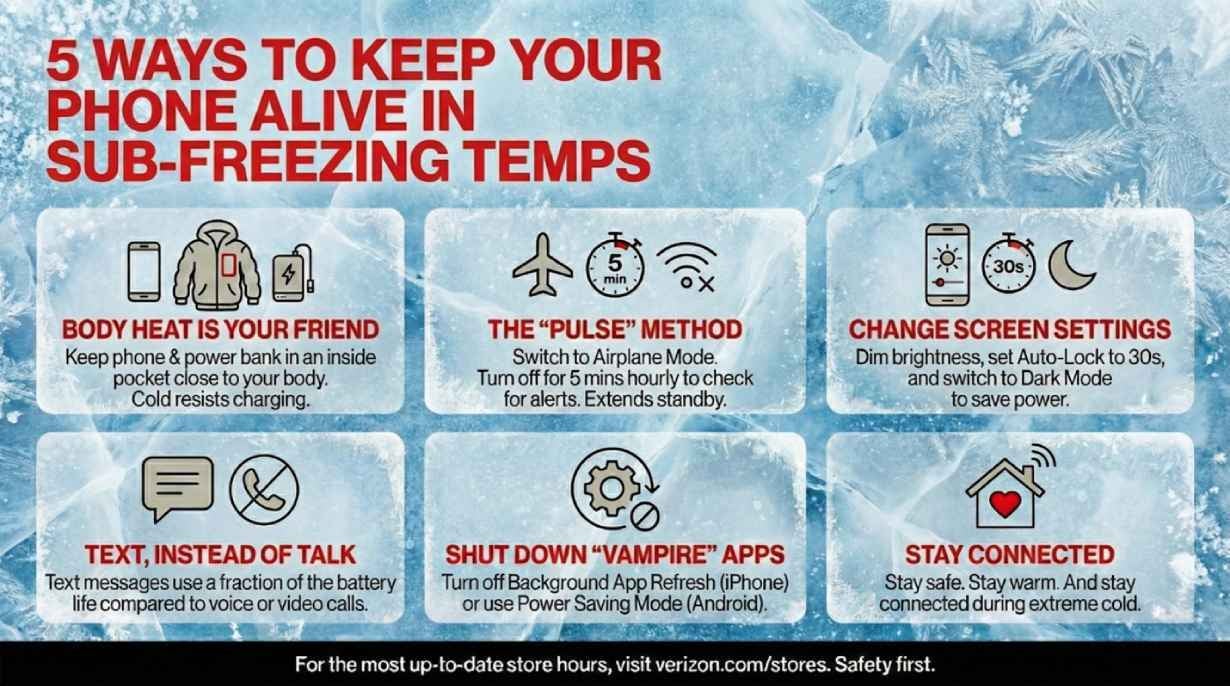
One of the easiest fixes is using your own body heat. If your home is cold, don’t leave your phone sitting on a table or countertop. Keep it in an inside pocket, close to your body. The same goes for power banks – warm them up before plugging them in, because a cold battery can resist charging and waste energy.
Your phone’s display is also a big battery hog. Manually lowering screen brightness to the lowest usable level can significantly extend battery life. And if your phone has an OLED screen, switching to Dark Mode can also help conserve power.
Recommended For You
Another smart move is adjusting your screen timeout. Setting Auto-Lock or Screen Timeout to around 30 seconds ensures your display isn’t staying on longer than needed. And if you are not actively using your phone, don’t leave the screen on “just in case.”
These are the 5 tips Verizon has for us. | Image by Image credit – Verizon
Verizon also recommends using what it calls the “Pulse” method. When your signal is weak – one bar or SOS – your phone works overtime trying to reconnect, draining battery fast.
The workaround is simple: switch to Airplane Mode. Then, once every hour, turn it off for about five minutes to check messages or emergency alerts before switching it back on. This method can stretch standby time from roughly 12 hours to well over 48 hours, which is huge if the power is out.
Voice and video calls require a constant, strong connection, which eats up battery quickly. Text messages, on the other hand, use small data packets that can slip through weak or congested networks much more efficiently.
So, in cold weather or outage situations, texting instead of calling can save a surprising amount of battery. And honestly, most of us already default to texting anyway, but in this case, it’s also the smarter technical choice.
Background activity can also quietly drain your battery, even when you are not actively using your phone. Verizon suggests temporarily shutting down “vampire” apps that keep running behind the scenes.
On iPhone, enabling Low Power Mode does this automatically. On Android, switching on Power Saving Mode achieves the same result. It’s an easy one-tap fix that can buy you extra hours of usage.
Being prepared makes all the difference
None of this is ideal, of course. We are used to charging our phones whenever we want. But storms and power outages happen, and knowing how to stretch your battery can save you a lot of stress in an emergency.
What’s your go-to move when your phone battery starts dropping fast in winter?
19 Votes
Lower screen brightness.
15.79%
Turn on Low Power / Battery Saver mode.
42.11%
Carry a power bank.
21.05%
Panic and hope for the best.
21.05%
Carriers are on standby during extreme winter conditions
As mentioned earlier, carriers are in full standby mode, ready to step in if their networks run into trouble. Teams from Verizon, AT&T, and T-Mobile are actively monitoring their networks and stepping in where needed, using portable generators and backup power solutions to keep critical infrastructure running if local power goes down.
Get a free Galaxy A17 with Straight Talk. To claim this deal, you need to pair the phone with activation on a Silver Unlimited Plan or higher. This tier costs $45 per month. Offer valid through 01/10/27 while supplies last online.
Tsveta, a passionate technology enthusiast and accomplished playwright, combines her love for mobile technologies and writing to explore and reveal the transformative power of tech. From being an early follower of PhoneArena to relying exclusively on her smartphone for photography, she embraces the immense capabilities of compact devices in our daily lives. With a Journalism degree and an explorative spirit, Tsveta not only provides expert insights into the world of gadgets and smartphones but also shares a unique perspective shaped by her diverse interests in travel, culture, and visual storytelling.
A discussion is a place, where people can voice their opinion, no matter if it
is positive, neutral or negative. However, when posting, one must stay true to the topic, and not just share some
random thoughts, which are not directly related to the matter.
Things that are NOT allowed:
Off-topic talk - you must stick to the subject of discussion
Offensive, hate speech - if you want to say something, say it politely
Spam/Advertisements - these posts are deleted
Multiple accounts - one person can have only one account
Impersonations and offensive nicknames - these accounts get banned
To help keep our community safe and free from spam, we apply temporary limits to newly created accounts:
New accounts created within the last 24 hours may experience restrictions on how frequently they can
post or comment.
These limits are in place as a precaution and will automatically lift.
Moderation is done by humans. We try to be as objective as possible and moderate with zero bias. If you think a
post should be moderated - please, report it.
Have a question about the rules or why you have been moderated/limited/banned? Please,
contact us.













Things that are NOT allowed:
To help keep our community safe and free from spam, we apply temporary limits to newly created accounts: