Gemini is now the only voice assistant on Android phones, and plenty of Pixel owners aren't happy about it. With Google Assistant gone for good, users on everything from older Pixels to the new Pixel 11 Pro say simple hands-free jobs like timers and reminders stopped working, and some are ready to give up on Pixel phones altogether.
Google Assistant is gone, and r/GooglePixel is fed up
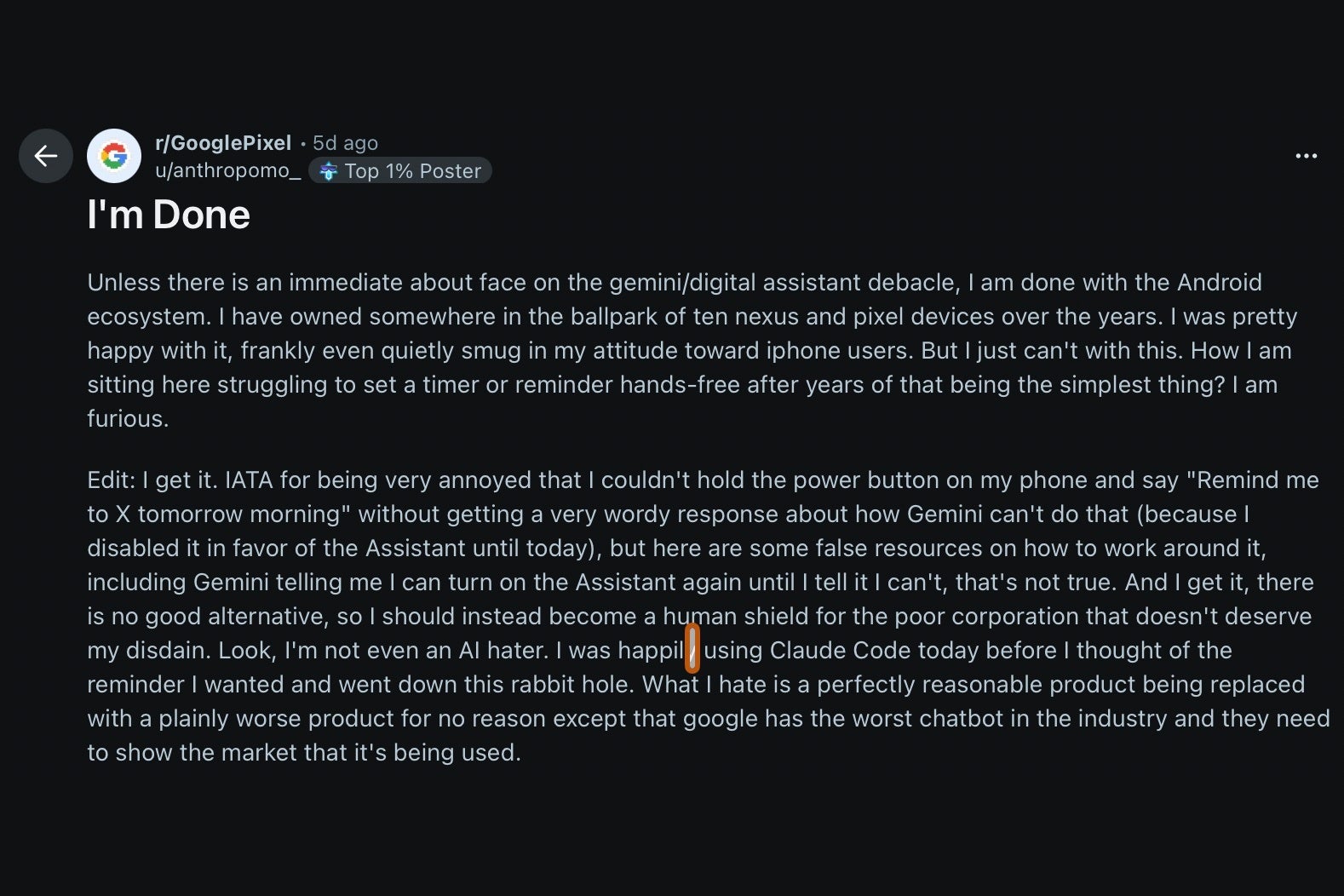
I came across a post on r/GooglePixel from a user who has owned about ten Nexus and Pixel phones and now says they're done with Android. Their breaking point was a simple one: they held the power button to ask for a reminder, and Gemini answered with a long explanation of why it couldn't do that.
The r/GooglePixel post that kicked off the discussion. | Image by anthropomo_ via Reddit
The post picked up close to 680 upvotes and more than 640 comments in five days, so this isn't a lone complaint.
Now that Google Assistant is gone, where do you stand with Gemini?
5 Votes
Why Gemini asks for more than Google Assistant did
Google Assistant worked from a set of fixed commands, so "remind me at 8" did the same thing every time. Gemini treats each request as a conversation and hands the actual job to separate connected apps. Reminders go to Google Tasks, and Google's support page says Gemini can't reach those apps unless Keep Activity is on, which is the setting that saves your Gemini chats to your account.
Recommended For You
Alarms, timers and media go through a connected app called Device Assistance, while working without unlocking the phone is a separate opt-in. That explains a lot of the thread, since the original poster later said they won't give Gemini that kind of access, and without it, Gemini simply can't set the reminder.
Switching phones isn't much of an escape either, as several commenters pointed out. Apple confirmed earlier this year that Google's technology is the foundation for its new Siri, and according to this report, the Siri in iOS 27 runs on Apple Foundation models built with Gemini tech.
Galaxy owners have more choice, since Samsung gave Bixby a bigger role on the Galaxy S26 series as a voice agent that changes settings and navigates the phone, right alongside Gemini and Perplexity.
How to get Gemini working again
If you'd rather keep hands-free timers and reminders, these are the settings Google's own help pages say need to be on in the Gemini app.
Here's how to fix Gemini timers and reminders
Make sure Keep Activity is turned on in Gemini's activity settings, since reminders won't work without it.
Open Connected Apps in Gemini's settings and turn on Device Assistance for alarms, timers and media control.
Ask Gemini for a reminder and accept the prompt to connect Google Tasks if it shows up.
Go to Settings, then Gemini on lock screen, and turn on Use Gemini without unlocking so timers work while the phone sits on the counter.
Google pulled the safety net too early
My issue is the order Google did things in, since Assistant was taken away before Gemini could reliably handle a timer, and a basic reminder now depends on agreeing to save your chats. I'm hoping Google lets those simple commands work with fewer strings attached, because I'd love to see Pixel owners get back the "just do it" reliability they had for years.
On the Visible+ Pro plan, you get access to 5G Ultra Wideband data on Verizon's fastest network. Along with unlimited roaming across Mexico and Canada, 2 days of Global Pass per month, 3x hotspot speeds, 4K streaming, and Smartwatch service.
Johanna Romero is a Senior News Writer at PhoneArena, covering mobile technology news across Android, iOS, wearables, and the Google ecosystem she knows best. Drawing on 15 years in IT and tech support from 2007 to 2022, she brings a user-friendly eye for the practical features and lesser-known tricks readers care about. Google named her an official #TeamPixel member in 2022, and she also reviews the latest devices on her YouTube channel, JoJo the Techie.
A discussion is a place, where people can voice their opinion, no matter if it
is positive, neutral or negative. However, when posting, one must stay true to the topic, and not just share some
random thoughts, which are not directly related to the matter.
Things that are NOT allowed:
Off-topic talk - you must stick to the subject of discussion
Offensive, hate speech - if you want to say something, say it politely
Spam/Advertisements - these posts are deleted
Multiple accounts - one person can have only one account
Impersonations and offensive nicknames - these accounts get banned
To help keep our community safe and free from spam, we apply temporary limits to newly created accounts:
New accounts created within the last 24 hours may experience restrictions on how frequently they can
post or comment.
These limits are in place as a precaution and will automatically lift.
Moderation is done by humans. We try to be as objective as possible and moderate with zero bias. If you think a
post should be moderated - please, report it.
Have a question about the rules or why you have been moderated/limited/banned? Please,
contact us.











Things that are NOT allowed:
To help keep our community safe and free from spam, we apply temporary limits to newly created accounts: