Using One UI 9? Here's another bug you should know about
Thought there would be no more One UI 9 bug reports? Think again.

One UI 9 bug reports keep piling up. | Image by PhoneArena
Samsung has been rapidly rolling out One UI 9 to Galaxy devices, but the process hasn't been entirely bug-free. My colleague Adrian recently reported on the first issues, but that might have been just the tip of the iceberg.
One UI 9 update causes Bluetooth problems
User shows a Bluetooth bug after updating their phone to One UI 9. | Video by Which_Leadership_356
Galaxy phone users who recently updated to One UI 9 noticed a strange bug with Bluetooth on their devices. When playing music through the phones' speakers, they see a Bluetooth icon appear at the bottom of the slider.
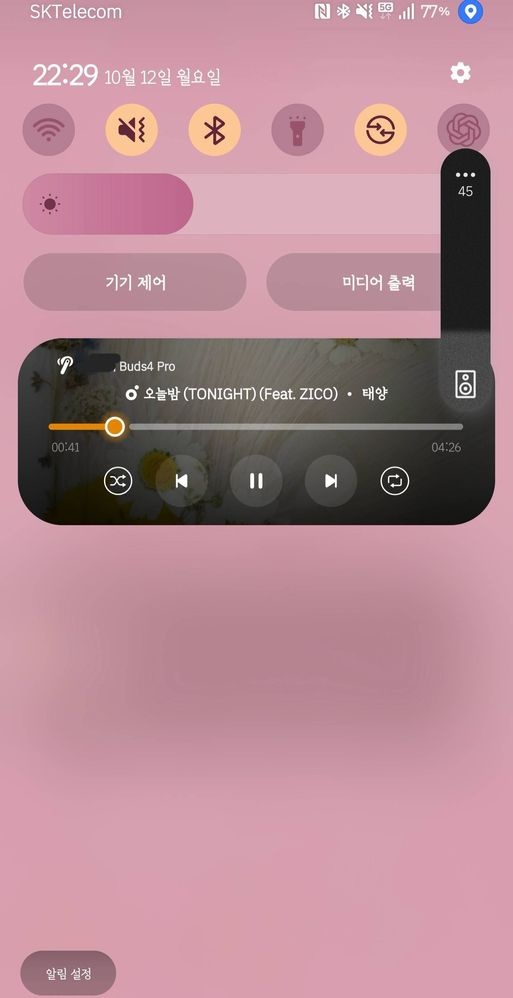
And another annoying issue... | Image by Ddyubapddubab
At this stage, we don't have enough data to determine whether this glitch is limited to specific devices or regions or if it's affecting the stable One UI 9 build more broadly. On the bright side, a potential cause of the problem and a solution may have already been found.
Have you had any problems running One UI 9?
258 Votes
One UI 9: the buggiest one yet?
It's easy to point fingers at Samsung and criticize it for releasing buggy software based on several user complaints. After all, Google hasn't exactly been perfect when it comes to keeping Android glitch-free.
But it seems that One UI 9 may indeed be causing headaches for some. Browsing the Samsung Community forums and Reddit, I noticed multiple bug reports covering everything from system crashes that prevent users from changing earbud settings to the QR scan icon disappearing from the Quick Settings menu.
Although these reports don't automatically prove Samsung's latest software is inherently buggy, you've got to admit the sheer variety of reported issues is concerning.
Although these reports don't automatically prove Samsung's latest software is inherently buggy, you've got to admit the sheer variety of reported issues is concerning.
Try this if you experience the Bluetooth glitch
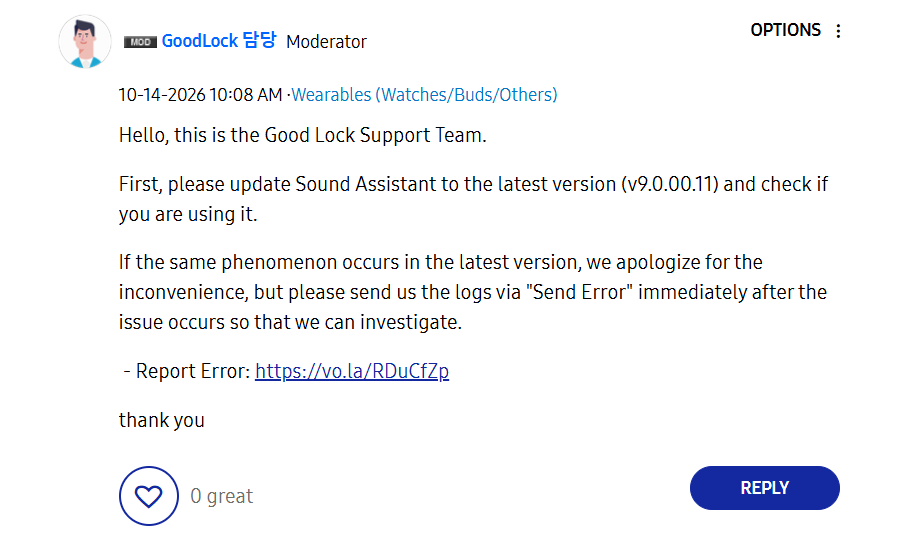
Samsung's support team may already have a solution. | Image by Samsung
Some claim disabling it fixes the Bluetooth glitch, while Good Lock Support Team members advise updating your Sound Assistant to the latest version in order to determine if the glitch is somehow tied to older versions of the app.
Looking ahead
Given that the Samsung Good Lock Support Team has already chimed in under some of the user complaints I've come across, I'm hoping at least some of the glitches are already being investigated.
Looking ahead, I would expect Samsung to release bug fixes as soon as possible and ensure the next updates are at least a bit more reliable.
Looking ahead, I would expect Samsung to release bug fixes as soon as possible and ensure the next updates are at least a bit more reliable.
Check out these Samsung news before you go:


Popular stories



Latest News





Things that are NOT allowed:
To help keep our community safe and free from spam, we apply temporary limits to newly created accounts: