The January 2026 security update for Windows 11 includes a strange bug that prevents users from shutting down their systems or putting them into hibernation.
There's a temporary workaround available
The security updates from Microsoft are important to download, as they help safeguard your device against the latest security threats and patch any issues that originated after the last Windows update. This month's security update (KB5073455) was rolled out with the same intention, but after installing it, some users are reporting that they aren't able to shut down their system or put it into hibernation mode.
On hitting the Shut Down or Hibernate button, the machine restarts instead of performing the expected action. Microsoft has acknowledged the issue and confirmed that it affects only Windows 11 Enterprise and IoT editions, and only on devices with the Secure Launch feature enabled.
Secure Launch, for those who are aware, is a Windows security feature introduced with Windows 10 that safeguards the boot process from firmware-level threats. Until a permanent fix is released, a temporary solution is available that allows you to shut down your Windows PC. Here's what you need to do:
Open the Start menu, type cmd in the search bar, and hit Enter
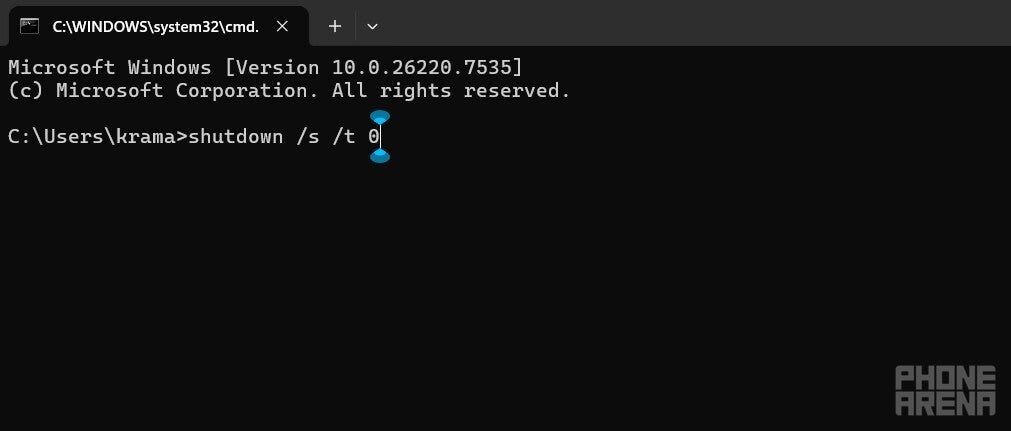
In the Command Prompt window, type shutdown /s /t 0, and press Enter to shut down your machine
The Command Prompt approach is definitely safer than the forced hard shutdown (holding the physical power button until the machine turns off) method that many users prefer. The biggest drawback to the forced shutdown method is that you might end up losing your unsaved data. In the worst-case scenario, the data might even get corrupted.
Recommended For You
That said, there's nothing you can do as of now to put your device into hibernation mode. The command to trigger hibernation mode in Windows 11 is shutdown /h. You can try your luck by running this command in Command Prompt if you're dealing with the issue at hand. Since I'm not experiencing the problem myself, I'm afraid I can't confirm whether this method actually works.
This isn't the only problem
Cmd command to shutdown Windows PC. | Image by PhoneArena
Along with the shutdown and hibernation issues, the January Patch bundle also causes a connection problem that Microsoft has acknowledged. Some users report that after installing the update, they can't connect to or authenticate with Azure Virtual Desktop. This connection issue also prevents users from accessing Windows 365 through the Windows app.
The Redmond Giant has released temporary fixes for both scenarios. If you can't access Azure Virtual Desktop, Microsoft suggests using the Remote Desktop client. And if you're unable to access Windows 365 through the official Windows app, you can rely on the Windows App web client until a permanent solution is available.
Ahh... you're wrong if you think that's all the problems that have appeared with the January patch bundle. In a separate post, the company has acknowledged that after downloading the patch update released this month, some users aren't able to properly exit their Outlook POP account profiles.
For some users, Outlook freezes, while others report that the client fails to restart after closing it. Microsoft states that this is still an emerging issue, and details will be shared once all the symptoms have been identified.
Which operating system do you think is the least affected by regular bugs and glitches?
92 Votes
Windows
11.96%
macOS
17.39%
Linux
51.09%
ChromeOS
19.57%
Missing the old golden days of Windows
Bugs and glitches have become more common than ever before on Windows. I've been a Windows user since the Windows 7 days, but I can't recall hearing about any major bug affecting the operating system back then the way it's affecting it now.
One of the reasons that could be happening, according to theories from many Windows users, is that Microsoft has now started using Copilot for coding. Whether it's just a random fun theory or there's actually some truth to it, most likely no one will ever find out. Nonetheless, Microsoft is investigating all the issues mentioned above, and a permanent solution will be made available through a patch update in the near future.
Mint Mobile's 6-month plans now cost $10/mo
$10
/mo
$35
$25 off (71%)
Mint Mobile is celebrating its 10-year anniversary with a special offer on its six-month subscription plans. For a limited time, you can get your preferred tier (6GB, 17GB, 23GB or unlimited) for just $10/mo. That saves you between 50% and 71% on the carrier's mobile plans, making it way easier to recommend.
Aman Kumar is a news writer at PhoneArena covering Google Pixel phones, Android features, AI-powered smartphone tools, and mobile tech news. Before joining PhoneArena, he spent over five years writing about consumer technology for publications like MakeUseOf, How-To Geek, and Guiding Tech. His current daily drivers are the Pixel 10 and Samsung Galaxy S26 Plus, while his red iPhone SE (2nd gen) remains a personal favorite. Aman also appreciates bold smartphone experiments and still considers the Nokia N-Gage one of the industry’s most iconic designs.
A discussion is a place, where people can voice their opinion, no matter if it
is positive, neutral or negative. However, when posting, one must stay true to the topic, and not just share some
random thoughts, which are not directly related to the matter.
Things that are NOT allowed:
Off-topic talk - you must stick to the subject of discussion
Offensive, hate speech - if you want to say something, say it politely
Spam/Advertisements - these posts are deleted
Multiple accounts - one person can have only one account
Impersonations and offensive nicknames - these accounts get banned
To help keep our community safe and free from spam, we apply temporary limits to newly created accounts:
New accounts created within the last 24 hours may experience restrictions on how frequently they can
post or comment.
These limits are in place as a precaution and will automatically lift.
Moderation is done by humans. We try to be as objective as possible and moderate with zero bias. If you think a
post should be moderated - please, report it.
Have a question about the rules or why you have been moderated/limited/banned? Please,
contact us.














Things that are NOT allowed:
To help keep our community safe and free from spam, we apply temporary limits to newly created accounts: